What should you look for when buying?
First, check that the connection and number of microphone inputs suit your setup. Assess the sound of the room with a test recording, too. Other features matter most when you need them for your recording or stream.
The percentages refer to consumers choosing an interface for spoken intros in untreated rooms. Each row identifies the main buying consideration.
| Buying consideration |
What to check |
Who is it most relevant to? |
| Room sound and vocal clarity |
Test the microphone where you plan to speak and assess the reverb through headphones. |
If I’m recording in an echoey room, I want to hear whether my voice stays clear before changing equipment. Around 31% of consumers put room sound first. |
| Microphone connection and power |
Check the connection type and required phantom power against your microphone’s specifications. |
If you want to connect a particular microphone, you need the right input and, where necessary, the correct power supply. Around 25% of consumers prioritise microphone compatibility. |
| Setting levels and monitoring |
Check the gain controls, level display and headphone monitoring, then listen to a test recording. |
If I want to check levels and background noise before recording, I look for easy-to-use monitoring. For around 19% of consumers, recording checks are the main consideration. |
| Two separate voices |
Count the microphone inputs you can use at the same time, not just the total number of inputs and outputs. |
If you want to record a second voice separately, you’ll need two suitable microphone inputs. Around 13% of consumers put this first. |
| Routing computer audio |
If you need streaming or communications, check loopback and how it routes the signal on the specific model. |
If I want to send my computer audio and voice into a stream, I need to check which signal is routed back. Around 12% of consumers prioritise this routing feature. |
Key brands at a glance
The manufacturer information below helps you understand the inputs and features available. It isn’t an independent comparison of sound quality, nor does it indicate the availability of individual models.
Focusrite
According to Focusrite, the 4th Generation Scarlett Solo is designed for one microphone source, with a separate instrument input.
- Focusrite lists an XLR microphone input, switchable 48 V phantom power and direct monitoring.
- The instrument input isn’t a second microphone input. Loopback is mainly relevant if you’re routing computer audio for recording or streaming.
Audient
According to Audient, the EVO 4 is aimed at users who want two microphone preamps and automatic level assistance.
- Audient lists two microphone preamps, Smartgain and switchable 48 V phantom power.
- Smartgain is no substitute for a test recording or good microphone placement, and it won’t remove room reverb.
RØDE
According to RØDE, the AI-1 is designed for one analogue microphone source and headphone monitoring.
- RØDE lists a microphone preamp, switchable 48 V phantom power and direct monitoring.
- One microphone preamp isn’t enough to record two microphones separately at the same time.
Behringer
According to Behringer, the UMC202HD is an option if you need two microphone inputs and direct monitoring.
- Behringer lists two microphone preamps and switchable 48 V phantom power.
- For use with Windows, the manufacturer points to a downloadable driver. Check which software is right for your computer.
Steinberg
According to Steinberg, the UR22C combines two inputs with a monitor mix and additional features for compatible streaming or DSP applications.
- Steinberg lists two microphone preamps, monitor mix and loopback.
- If you only record occasional intros without computer audio, you don’t need loopback. If you do use it, check how the signal is routed.
Joybuy products for voice recording
The following Joybuy options are podcast and microphone kits with a sound card or audio mixer, supplied with 3.5 mm microphones. Check that these connections suit your recording setup; the product names don’t mention XLR microphones.
 No image available
Yinkaer G10-P17-P17 podcast kit with two 3.5 mm condenser microphones
For voice recording with two included microphones: the product title lists two 3.5 mm condenser microphones, a sound card and an audio mixer.
View at Joybuy
 No image available
Yinkaer G10-P15-XB podcast kit with 3.5 mm microphone and boom arm
For a setup with one included microphone: the product title lists a 3.5 mm condenser microphone, a sound card, an audio mixer and a boom arm stand.
View at Joybuy
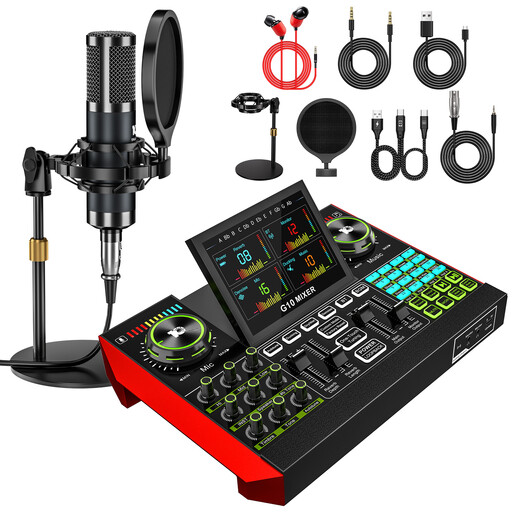 No image available
Yinkaer G10-P15 podcast kit with 3.5 mm condenser microphone
For voice recording with one included microphone: the product title lists a 3.5 mm condenser microphone, an audio mixer and an audio interface.
View at Joybuy
Frequently asked questions
Will a better audio interface get rid of the reverb in my room?
No, not on its own. Shure points out that a microphone cannot improve room acoustics. So first, check your microphone placement and listen to a short test recording.
When should I switch on 48 V phantom power?
Switch it on if your microphone’s specifications say it needs it. RØDE describes phantom power on the AI-1 for a compatible condenser microphone; always follow the requirements of the microphone you’ve connected.
How can I monitor my voice while recording?
Connect headphones, use direct monitoring if needed, and listen to a test recording. RØDE describes direct monitoring for the AI-1; for other models, check the relevant manual.
What are my rights in Germany if a product is faulty or I change my mind after buying online?
Your statutory rights against the seller are separate from a voluntary guarantee. For online purchases by consumers, a 14-day right to cancel generally applies; the Verbraucherzentrale explains that you must notify the seller that you’re cancelling. If a product is faulty, your statutory rights relating to defects are not the same as cancelling simply because you’ve changed your mind.
What should I check to make sure an interface is safe?
Check the specific listing for product identification, manufacturer details, required warnings and conformity information. The Bundesnetzagentur (German Federal Network Agency) includes these points in its market surveillance guidance, while the EU explains the importance of CE marking. This does not tell you anything about the interface’s sound quality.


