For a poetry recording with one voice, an interface with one microphone preamp, a headphone output and direct monitoring is a sensible starting point. For two separate voices, you’ll need two microphone inputs that can be used at the same time. Also check your microphone’s power requirements and the computer connection. More inputs or a higher sample rate won’t fix room echo or an input level that’s too high.
Which setup is right for you?
Solo poets
If you’re recording one voice with an XLR microphone, look for a suitable microphone input and headphone monitoring. Focusrite lists an XLR microphone input for the Scarlett Solo 4th Gen; Audient also describes the iD4 MKII as having a microphone preamp.
Speakers with a wide dynamic range
If your reading moves between very quiet and loud verses, a clear level meter and a test run can help you set the input level. PreSonus lists LED level meters for the Studio 24c, while MOTU lists an LCD showing input and output levels for the M2.
Duos and interviewers
To record two voices at the same time using separate XLR microphones, you’ll need two microphone inputs. Focusrite lists two XLR connections for the Scarlett 2i2 4th Gen; PreSonus and Behringer also describe their respective models as having two microphone preamps.
What should you look for when buying?
| Buying priority |
What to check |
Who is it important to? |
| Clear solo voice |
Check for a microphone input, headphone output and direct monitoring; test the microphone position in the room where you’ll actually record. Shure points out that a microphone can’t improve room acoustics. |
When I’m reading alone, I want to record a clear voice despite the room acoustics, and I don’t automatically need a second microphone preamp. Around 36% of consumers say a clear solo voice is their top priority. |
| Level control when volume changes |
Check that the gain control is easy to use and that there’s an input level meter; test your loudest passage before recording, too. |
When I move between whispers and loud verses, I want to check the input level at the loudest point beforehand. Around 29% of consumers put level control for changes in speaking volume first. |
| Two separate voices |
Check for two microphone inputs that can be used at the same time, not just the total number of connections. |
When we’re reading together, I want to record both voices at the same time using separate microphones. Around 21% of consumers prioritise recording two voices. |
| Compatibility with your existing setup |
Check the connection and power requirements of your specific microphone, as well as the interface’s operating system and driver details. |
When I want to use my existing microphone and computer, I want to check the connections, power supply and system requirements beforehand. Around 14% of consumers put compatibility with their setup first. |
Which buying mistakes can you avoid?
-
Assuming ‘two inputs’ means two microphone inputs
A device can have an instrument input as well as an XLR microphone input. According to Focusrite, the Scarlett Solo 4th Gen’s other input is for line or instrument signals, not a second microphone.
If you want to record two separate voices, check how many microphone preamps can be used at the same time.
You may need a different interface with two microphone preamps to record a second, separate XLR voice.
-
Expecting a new interface to fix room echo
Shure explains that a microphone can’t improve the acoustics of the room it’s in. Additional inputs won’t make any difference to that, either.
Try recording at a quieter time and testing different microphone positions in your room before looking to the interface to solve echo.
-
Taking specifications from a ranking at face value
WELT.de’s comparison, dated 29 October 2026, lists 14 recording and playback channels for the Scarlett 2i2 3rd Gen. This doesn’t match the manufacturer’s documented 2-in/2-out device specification.
Use rankings as an external guide and check the connections and generation against the manufacturer’s documentation for the specific model.
Key brands at a glance
Focusrite
The Scarlett Solo 4th Gen is designed for one XLR voice, while the Scarlett 2i2 4th Gen has two XLR microphone inputs.
- Focusrite lists switchable 48 V phantom power and direct monitoring for the Solo 4th Gen.
- The Solo’s line/instrument input isn’t a second microphone input. These details describe the manufacturer’s features, not an independent assessment of sound quality.
Audient
The iD4 MKII is a compact option for solo recording, with one microphone preamp and two headphone connections.
- Audient lists direct monitoring, 48 V phantom power and audio loopback as features of the iD4 MKII.
- The second input is an instrument input, not a second microphone preamp.
PreSonus
According to the manufacturer, the Studio 24c has two microphone preamps and controls for level and monitoring.
- PreSonus lists LED level meters and a mix control.
- These details describe the model’s features, not the quality of a particular recording or its availability in Germany.
MOTU
The M2 is a two-microphone option for recordings where separate input controls and level displays are useful.
- MOTU lists two XLR/TRS microphone inputs, independently adjustable preamps and an LCD showing input and output levels.
- The manufacturer’s claims about sound quality aren’t an independent comparison with other models.
Behringer
The UMC202HD is another two-microphone option, with direct monitoring and headphone level control.
- Behringer lists two microphone preamps and switchable 48 V phantom power.
- For Windows, the manufacturer refers to a driver download; check the requirements for your operating system.
Joybuy product selection
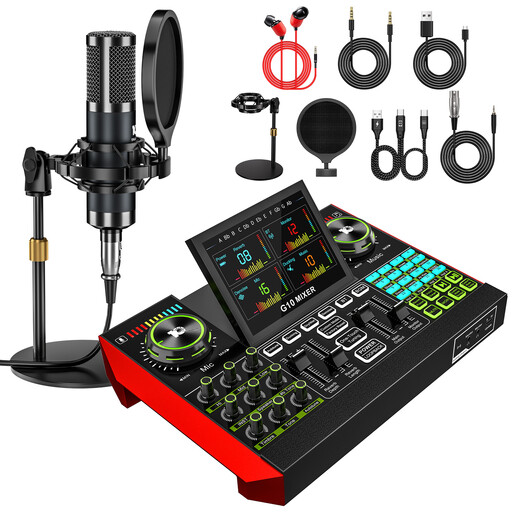
The following Joybuy options are podcast kits with 3.5 mm condenser microphone(s) and a mixer: one includes a microphone and the other includes two. Before buying, check that the connections and recording setup you want will work with your specific computer.
 No image available
Yinkaer G10-P15 podcast microphone kit with audio mixer
For recording one voice using the included microphone and mixer.
The kit includes a 3.5 mm condenser microphone and an audio mixer.
View at Joybuy
 No image available
Yinkaer G10-P17-P17 podcast kit with two microphones
For a setup designed to use two microphones; check beforehand that your chosen recording setup will work with your device.
The kit includes two 3.5 mm condenser microphones and an audio mixer.
View at Joybuy
Frequently asked questions
Do I need two microphone inputs for a solo reading?
No, not if you want to record just one voice using an XLR microphone. Check the number of microphone preamps rather than just the total number of inputs: the Scarlett Solo 4th Gen’s other analogue input is for line or instrument signals.
How do I set the level for whispers and loud verses?
Speak your loudest passage before recording and watch the input level meter. Focusrite warns that setting the input level too high can cause clipping and audible distortion.
Will a new audio interface get rid of echo in the room?
No. Shure explains that a microphone can’t improve room acoustics. So, test the microphone position in the room where you’ll actually be recording.
What should I check about my microphone and computer?
Check that your specific microphone’s connection and power requirements match the interface; switchable 48 V phantom power matters for microphones that need it. Also check the chosen model’s computer connection, operating system and driver requirements.
What rights apply when buying an audio interface in Germany?
When you buy from a business seller, statutory rights generally apply if the goods are faulty. The European Commission explains that goods purchased in the EU are covered by a minimum two-year guarantee. This is separate from a voluntary manufacturer’s warranty. Online purchases usually come with a 14-day right to cancel; the Verbraucherzentrale explains the time limit and applicable conditions. Cancellation rights and rights relating to faulty goods are separate claims.


