Auditioning in a noisy room
If you can’t switch off the fan, clear speech and the right microphone distance are what matter. RØDE recommends positioning the microphone close to the sound source and away from unwanted noise.


The key is to position the microphone as close to your voice as possible and as far from the fan as you can; RØDE recommends this placement to reduce background noise. If you move around during your monologue, a lavalier recorder such as the one described by Zoom may suit you. If you’ll be speaking from a fixed position, a handheld or voice recorder placed nearby may also be suitable. A test recording in the actual room matters more than the recording format or a noise-reduction feature alone.
If you can’t switch off the fan, clear speech and the right microphone distance are what matter. RØDE recommends positioning the microphone close to the sound source and away from unwanted noise.
If you move during your monologue, you can attach a lavalier to your clothing to keep it consistently close to your voice. Zoom describes the F2 as suitable for recording and playing back acting lines.
If you can place the recorder securely near where you’ll be speaking, you can choose between handheld and voice recorders with different recording and playback features. Listen to your take in the room where you plan to record.
With fan noise, getting the microphone position right should come first. Recording formats and extra features are no substitute for listening to a test recording from your speaking position.
| What to consider | What to check before buying | Who it matters most to |
|---|---|---|
| Speech clarity | Can you position the microphone close to your voice and further away from the fan? Is your test take clear with the fan running? | If I can’t switch off the fan, my voice needs to stay clear in the test take. That’s why around 42% of consumers put speech clarity above all else, even with a fan running. |
| Quiet and loud passages | Check the recording format and playback; test both a quiet passage and a particularly loud one. | For a monologue with big changes in volume, I want to be able to record and check both passages. Around 25% of consumers prioritise this ability to handle changes in level. |
| Microphone position when moving | Check what’s included, the connection and how it attaches; listen for any clothing rustle. | If I move around during an audition, I want to keep the microphone as consistently close to my voice as possible. Around 17% of consumers put freedom of movement and microphone position first. |
| A straightforward recording process | Prepare the storage and power supply, test recording and playback, and try importing a file. | Before an appointment, I want to be able to record, listen back to and share takes without unnecessary interruptions. Around 16% of consumers prioritise a simple, easy-to-manage process. |
A noise-processing feature or a particular microphone arrangement doesn’t prove that the fan will be inaudible in your room.
Compare possible microphone positions and listen to a test recording with the fan running.
A recording format alone can’t make up for an unsuitable distance between your voice and the microphone.
If you can’t place the recorder close enough, consider a compatible external microphone or a wearable lavalier setup.
A lavalier, a handheld recorder and a voice recorder may each require different preparation and accessories.
Before your appointment, practise attaching or positioning the equipment, checking the power supply, recording, playing back and transferring a file. A lavalier or external microphone may require extra accessories; also check whether you’ll need a storage device.
Zoom offers the F2, a lavalier setup for recording speech while moving, and the H1essential, a handheld recorder with built-in X/Y microphones.
The DR-05XP is a handheld recorder with built-in microphones and an additional microphone input.
The ICD-UX570 is a compact voice recorder for takes you want to check afterwards.
The LS-P5 is a compact recorder with multiple microphones and features for standalone recording.
This selection includes digital voice recorders and recording earbuds for capturing speech. Make a test recording to check whether your voice is clear from the intended speaking position with the fan running.
 No image available
This may be suitable for individual voice recordings; test speech clarity from your planned speaking position with the fan running.
Four MEMS microphones and USB-C file transfer are listed; the device is described as a digital voice recorder with a built-in microphone.
 No image available
This could be an option for voice recordings; the best way to check whether it’s suitable for an audition with a fan running is to make a test recording.
The description lists 4 GB of storage, Bluetooth and a triple-microphone system.
 No image available
This device is worth considering for voice recordings from a fixed speaking position; test playback with the fan running before recording your actual take.
The description lists three microphones, 64 GB of storage, Wi-Fi and Bluetooth. A speaker mode for external audio sources is also listed.
 No image available
This version is worth considering as a voice recording device; before an audition, test whether recordings are clear at your planned location.
The description lists 32 GB of storage, a dual-microphone array and a stated recording time of five hours.
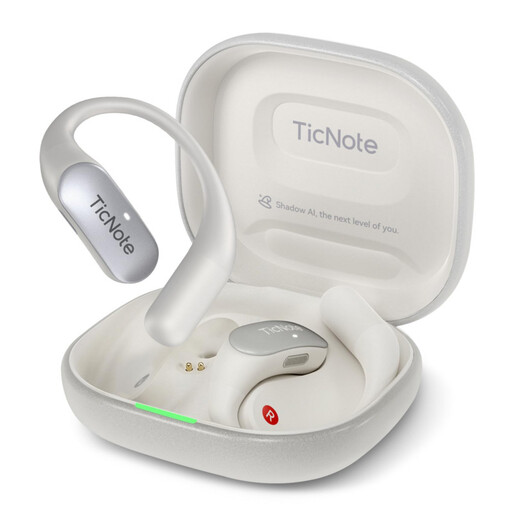
 No image available
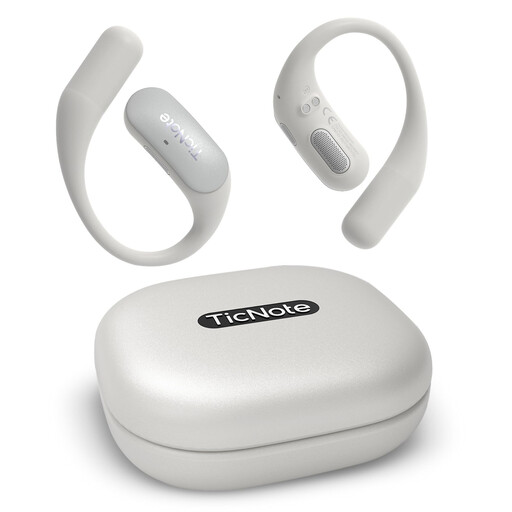
These recording earbuds are a different style of device from a handheld recorder. The described recording of external audio is done through the charging case when the earbuds aren’t in use.
The description lists 32 GB of storage and MP3 and WAV export. Before choosing, check whether the described recording method suits your speaking position.
No, it’s no substitute for positioning the microphone correctly. Zoom and Tascam describe 32-bit float in relation to changing recording levels; RØDE recommends positioning the microphone close to your voice and as far from the noise source as possible.
At your intended location, record a quiet passage and a loud one with the fan running, then listen back to both. Also check how the microphone attaches or where the recorder sits, the power supply, storage, how to start recording and how to import the file onto the device you plan to use.
Check what’s included with the specific model and how you plan to set it up. Zoom says the F2 comes with a lavalier; if you’re using an external microphone with a handheld recorder, the microphone, mounting accessories or a storage device may need to be part of your preparations.
Check with everyone involved beforehand if their voices might be heard on the recording. Section 201 of the German Criminal Code (StGB) covers the unauthorised recording of another person’s non-public spoken words; it does not apply generally to recording your own speech when you’re speaking alone.