What should you look for when buying?
First, check how clearly people can be heard at the planned recording location. Then decide whether the built-in microphones will suit your seating arrangement or whether you’ll need separately positioned microphones.
| Consideration |
What to check when buying |
Who is this important to? |
| Speech clarity with fan noise |
Make a test recording with the fan running and listen to the quietest or most distant speaker. |
If the fan will be running during the discussion, I still want to understand what people are saying. Around 36 % of consumers put this first. |
| Recording several speakers |
Check that the seating arrangement matches the planned setup and the number of external microphone inputs you need. |
If several people are sitting apart, I’ll check whether a table-top recorder is enough or whether the microphones need to be closer to the speakers. Around 29 % of consumers prioritise recording several speakers. |
| Easy start-up and monitoring |
Try starting a recording, monitoring it and playing it back using the settings you plan to use. |
If there’s little time to set up, I want to be able to check quickly that the recording is running. Around 21 % of consumers prioritise ease of use. |
| Recording time and files |
Check available storage, power supply and preferred file format before the session. |
If the discussion runs for longer or I want to use the file afterwards, I’ll plan for storage and file format too. Around 14 % of consumers prioritise recording time and file use. |
Joybuy models for voice recording
The following Joybuy models are portable voice recorders with built-in microphones. Claims about range or noise-reduction features are no substitute for a listening test at your planned table setup with the fan running.
 No image available
PLAUD Note Pro Voice Recorder, 64GB, Black
Worth considering if you’re planning to record at a table and then transcribe or summarise the discussion using an app.
Product information lists 64 GB of storage, four MEMS microphones and up to 30 hours of continuous recording. The PLAUD app is designed for its AI features, and the monthly transcription allowance is listed as 300 minutes.
View at Joybuy
 No image available
Mobvoi TicNote Lite AI Voice Recorder, 4GB, Black
This model could suit you if you’re planning a compact recording followed by text analysis in an app.
Product information lists 4 GB of storage and three microphones, including a vibration microphone. The advertised recording range of up to 33 feet doesn’t tell you whether voices will remain clear with a fan running.
View at Joybuy
 No image available
Mobvoi TicNote Standard AI Voice Recorder, 64GB, Dark Grey
Its recording and export features may suit you if you want to record a discussion and edit the file afterwards.
Product information lists 64 GB of storage, a three-microphone array, up to 20 hours of recording, and Wi-Fi and Bluetooth. Check in advance which app features you plan to use.
View at Joybuy
 No image available
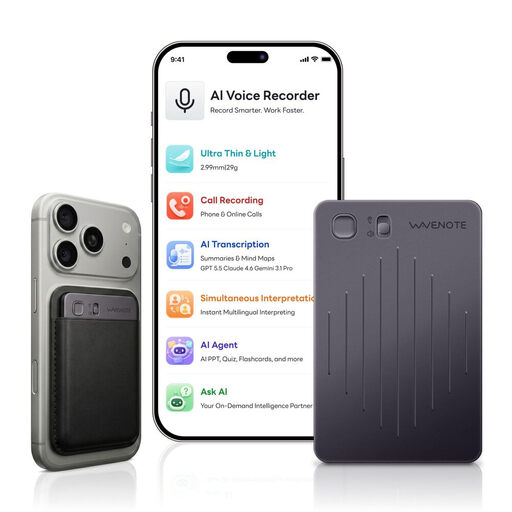
WaveNote AI Voice Recorder, 64GB, Black Grey
This model is an option for longer recordings if you check its storage and file specifications against your planned session.
Product information lists 64 GB of storage, WAV recording and up to 42 hours of continuous recording, as well as a dual-sensor system for vibration and airborne sound recording. The advertised AI noise cancellation doesn’t prove that voices will remain clear with a fan running.
View at Joybuy
 No image available
Rexsun 64GB Portable Digital Voice Recorder, L15
This model could suit a longer discussion if you check the storage and recording time on the device beforehand.
The product description lists two omnidirectional microphones, an included 64-GB TF card and up to 22 hours of recording. The advertised recording range of up to 60 feet doesn’t prove that voices will remain clear with fan noise.
View at Joybuy
Frequently asked questions
Can I record a private book discussion without the participants knowing?
Section 201 of the German Criminal Code (StGB) makes the unauthorised recording of privately spoken words a criminal offence. Check whether recording is permitted before you start; the law doesn’t make a blanket ruling for every public event or subsequent publication. The Federal Ministry of Justice and the Federal Office of Justice publish the text of the law.
Does 32-bit float remove fan noise?
No. 32-bit float isn’t a way to remove fan noise from a recording. Microphone placement and room noise are among the factors that affect speech clarity, so test your setup with the fan running.
How can I test the setup before starting?
Leave the fan running and ask everyone to say a sentence from their actual seat. Listen especially carefully to the most distant or quietest speaker, and adjust the microphone position or room noise if needed.
What should I check in advance for a longer discussion?
Check the power supply, available storage and recording format on your chosen device. Make and play back a short test recording before the discussion begins.
Do data protection rules for recorded phone calls also apply to a group discussion around a table?
The resolution from the German Data Protection Conference referred to in the question deals specifically with phone calls, so it shouldn’t be applied as a blanket rule to a table discussion. Section 201 of the German Criminal Code (StGB), on unauthorised recording, is relevant to private conversations regardless. Any further obligations when processing a recording later depend on the specific circumstances.


