What should you look for when buying?
Make a short recording where you plan to read, then decide whether room noise control, a straightforward connection, direct monitoring or the option to add XLR later matters most to you.
| Buying priority |
What to check |
Who is it important to? |
| Room noise and speaking position |
Can you keep your distance and speaking direction consistent while reading? How do quiet sentences and pauses sound in a test recording? |
When I read in a noticeably noisy room, I want to find a position where my voice remains clear against the background noise. Around 33% of consumers put room noise control first. |
| Simple connection |
Is the connection compatible with your recording device, and are you actually planning to switch to XLR later? |
When I record on my own at a computer, I want to get started without a separate interface and avoid paying for a connection I won’t use. Around 25% of consumers prioritise an easy start. |
| Monitoring and level control |
Is there a headphone output for the connection you want to use? Can you monitor quiet and emphatic passages effectively with your settings? |
When I record several chapters, I want to hear my voice as I record and check that my position and levels work throughout. Around 25% of consumers prioritise monitoring and level control. |
| Upgrading to XLR later |
Does the specific version have both connections, and which features are USB-only? Is the interface compatible with the XLR microphone? |
When I start recording on my computer but plan to add an interface later, I want to check the connection and power requirements in advance. Around 17% of consumers prioritise a planned studio upgrade. |
Microphones for voice recording at Joybuy
The Joybuy options featured here range from dynamic USB/XLR microphones to USB and 3.5 mm kits for recording voice on a computer. Compare the connection, available features and setup with the place where you plan to read.
 No image available
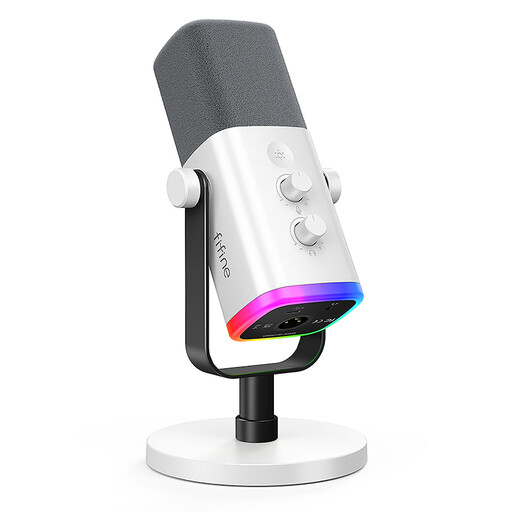
FIFINE AM8 White
A dynamic USB/XLR option for recording voice on a computer, if you want to monitor your voice directly and check the setup at your reading spot.
The product title lists USB-C and XLR. According to the description, the monitoring output and controls are available in USB mode; an XLR cable and microphone arm are not included. A stand is listed as included.
View at Joybuy
 No image available
FIFINE K688CT
This dynamic USB/XLR microphone may suit you if you want a consistent position at your reading spot and headphone monitoring while recording.
The description lists USB-C and an included boom arm. Monitoring and controls are available in USB mode; an XLR cable is not included.
View at Joybuy
 No image available
USB cardioid condenser microphone
A USB model for your computer, if you want to try a directional setup and direct headphone monitoring.
The description lists zero-latency monitoring, a scissor arm, a shock mount and a pop filter.
View at Joybuy
 No image available
Yinkaer G10-P17 microphone kit
This kit may suit computer or mobile recording if you want to include the audio mixer described in your workflow.
The description lists an audio mixer and a 3.5 mm condenser microphone, as well as support for PCs and mobile devices. Check that the connections are compatible with your recording device before buying.
View at Joybuy
 No image available
uRage Stream 410 HD
This USB microphone may be an option if a desktop stand suits your reading spot and you can take its stated pickup pattern into account in your room.
The description lists an omnidirectional pickup pattern, a pop filter and a mute function. It gives a desktop stand and shock mount as setup options.
View at Joybuy
Frequently asked questions about microphones for audiobook recording
Do I need phantom power for an XLR condenser microphone?
Check the power requirements for the specific microphone and the XLR microphone input on your interface. Focusrite explains that condenser microphones need an electrical power supply, and suitably equipped interfaces can provide 48 V through a designated XLR input; this isn’t automatically available on every connection.
How can I check a longer recording without listening to the whole chapter first?
Use direct headphone monitoring if your model has it, and test short passages with normal, quiet and emphatic sentences before recording a chapter. Audio-Technica lists a headphone socket and a control for mixing microphone and computer audio on the AT2020USB-X.
Can I publish audiobook chapters using someone else’s book?
Buying a microphone doesn’t give you the right to use a text. Under copyright law, reproduction and public communication are generally exclusive rights held by the author; whether you can record and publish a particular work depends, among other things, on the rights in place and any applicable exceptions.
What should I look for in terms of product safety in Germany?
When monitoring the market for electronic products, the German Federal Network Agency lists correct CE marking and identifiable manufacturer details among the points to check. The marking isn’t an assessment of audio quality, so check the details for the specific listing.


