Softly spoken reviewers
If you want to record a quietly spoken review, clear, natural-sounding speech and a well-positioned microphone capsule matter more than speaking loudly.


For a softly spoken audiobook review, USB isn’t the only thing that matters. Choose a headset with a microphone you can position to suit your voice, then listen back to a test recording. A USB headset makes connecting to a PC easier; with broadcast models that use XLR, the microphone and headphone connections need to work with your existing equipment. Check room noise, input levels and comfort independently of the connection type.
If you want to record a quietly spoken review, clear, natural-sounding speech and a well-positioned microphone capsule matter more than speaking loudly.
If you’re recording in a room with a fan or other sources of noise, test your recording position and boom microphone placement with a short recording. A directional microphone won’t make a quiet recording space unnecessary.
If you want to record without a separate XLR setup, check whether USB or a jack connection works with your computer, and whether a test recording makes your quiet voice easy to understand.
Start with the sound of your voice and microphone position. Then consider noise at your recording location, the right connection and comfort.
| What matters | What to check before buying | Who will find this especially important? |
|---|---|---|
| Clear, natural-sounding voice | Check the microphone position and directional pattern. Listen to a quiet test recording and check the input level. | When I speak quietly, I want my review to sound clear and natural, rather than simply turning up the level. Around 36% of consumers put sound quality first. |
| Background noise and room acoustics | Test at your intended recording location with the noise sources you’ll find there. Position the microphone and listen to the unedited recording. | In my room, I want to keep background noise to a minimum without assuming that closed-back earcups mean the microphone recording is soundproofed. Around 29% of consumers prioritise controlling background noise. |
| Connections and extra equipment | Check that the headset’s connections match your recording device, and whether you’ll need suitable cables or an audio interface. | I want to connect my headset to my computer without incompatible connections and know in advance whether I’ll need extra equipment. Around 21% of consumers put having the right connection first. |
| Comfort during longer recording sessions | Check the design and padding, and try the headset for a realistic length of time if possible. | If I’m planning longer recording and listening sessions, I want a comfortable headset that stays in place. Around 14% of consumers prioritise comfort. |
A headset promoted for clear conversations won’t necessarily be suitable for softly spoken narration.
Record one quiet passage and one at your normal speaking volume, then listen to both unedited recordings for clarity and naturalness.
These connection types and their cable requirements differ. A headset may work with your recording device, or you may need an additional connection solution.
Before buying, check the complete signal path from the microphone through the recording device to your recording software.
Depending on your existing equipment, you may need a suitable interface or cable.
Closed-back earcups and the microphone do different jobs: the earcups help you monitor your recording, but room noise can still be picked up by the microphone.
Make a short test recording where you’ll actually be recording, with the equipment you’ll have running.
According to the manufacturer, the NTH-100M combines closed-back, over-ear headphones with a microphone and is also designed for podcasting.
Audio-Technica describes the BPHS1 as a broadcast headset with a positionable boom and closed-back headphones.
beyerdynamic describes the MMX 300 PRO as a closed-back, wired headset with a boom microphone, designed for gaming.
According to Logitech, the H390 connects via USB, making it an option for PC users looking for a straightforward connection.
Shure describes the BRH440M-LC as a broadcast headset for professional applications.
The Joybuy products below are headsets with microphones. For a softly spoken audiobook review, check the connection and microphone position before buying, and listen to a test recording. The product features alone don’t prove that speech will sound natural.
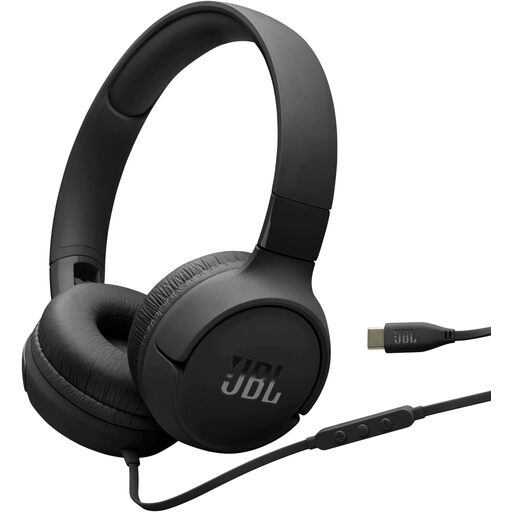 No image available
An option if your recording device supports USB-C and you’re looking for a wired headset with a built-in microphone.
Connection: USB-C. Design: on-ear. Check compatibility with your specific recording device.
 No image available
Could be worth considering if you’re looking for a headset with a detachable, flexible microphone and several connection options. Test the sound separately for quiet recordings.
The product description lists 2.4 GHz, Bluetooth and wired connections.
 No image available
An option if you’re considering over-ear headphones with wireless connectivity. The product details don’t show how naturally it records softly spoken narration.
The description lists Bluetooth and Razer HyperSpeed Wireless, as well as built-in beamforming microphones. Stated battery life: up to 40 hours.
 No image available
Could be a good fit if you’re looking for a wired headset with a swivel microphone and your device has the right audio connection.
According to the description, audio runs through 3.5 mm; USB powers the lighting. The microphone is described as retractable and able to swivel through 360°.
 No image available
An option if you’re looking for a headset with an adjustable microphone boom. A test recording is the only way to judge whether it reproduces your quiet voice naturally.
The description specifies an adjustable omnidirectional boom microphone. Audio runs through 3.5 mm; USB powers the lighting.
Position the microphone boom towards your voice and make a test recording where you plan to record. Audacity recommends lowering the recording level if the meter enters the yellow or red zone between −9 dB and 0 dB during the test. Then listen to the recording through headphones to check how it actually sounds.
Not reliably. Audacity says noise reduction works best for steady background noise; when noise varies or speech is barely louder than the noise, it may not be possible to remove it satisfactorily. So record in as quiet a space as possible and listen to an unedited test recording.
On the version described, the microphone signal is carried by a 3-pin XLR connector, while the headphones have a separate 6.3 mm plug. Before buying, check whether your recording device has these connections or whether you’ll need a suitable adaptor or interface.
You can’t determine that simply by choosing a particular headset. The German Patent and Trade Mark Office describes a quotation as using part of a protected work to discuss it in an independent work. Whether you can use a particular audiobook excerpt in a recording needs to be checked on a case-by-case basis, including the rights required.