
Lieferung heute & morgen

Qualitätsgarantie

Willkommens-Angebote freischalten: KOSTENLOSE Lieferung | Bis zu 80 % RABATT | Kostenlose 30-Tage-JoyPlus-Testphase
App herunterladen
A wireless gaming mouse should respond precisely, feel comfortable and light, and perform reliably when it matters most. The AULA SC620 wireless gaming mouse brings together several sought-after features: Bluetooth 5.0, 2.4 GHz wireless, USB-C, a PixArt sensor, RGB lighting and seven programmable buttons.
But specifications alone won’t tell you whether a mouse suits your playing style. If you focus only on DPI, polling rate or RGB, you could overlook important details. These three common buying mistakes can lead to unnecessary spending:
According to the product information, the AULA SC620 uses a PixArt PAW3311 sensor with a maximum resolution of 12,000 DPI. A 12,000 DPI gaming mouse can suit a range of sensitivity settings, from slow, controlled movements to fast inputs.
In practice, it’s worth:
The sensor name provides an objective point of comparison, but doesn’t by itself prove that the mouse is right for you.
The AULA SC620 is marketed as an 8,000 Hz polling rate mouse. The polling rate describes how often the mouse reports its position to the computer. A higher rate can increase the time resolution of inputs. At the same time, higher settings can affect system load and power consumption.
The three connection options offer different ways to use the mouse:
Before buying, check the available USB ports, your preferred wireless connection and software support for your PC or Mac.
At a stated weight of 67 g, the AULA SC620 falls into the lightweight 67 g gaming mouse category. A low weight can make quick changes of direction easier, but it won’t be ideal for every grip or hand size. Palm grip users may prefer a larger or heavier shape.
The mouse has seven programmable buttons and a Fire button. These can be useful in games with extra commands, macros or frequent inputs. Before buying, check that the buttons are easy to reach and that the software supports the assignments you want.
The built-in 400 mAh battery makes the AULA SC620 a rechargeable gaming mouse. The product information available doesn’t state a specific battery life. So check for a charging indicator and charging time, and consider how you’ll use RGB lighting. Lighting and a high polling rate can increase power consumption.
The AULA SC620 is particularly appealing if you’re looking for a mouse with several connection options, a low weight and extra buttons. If you plan to use Bluetooth only, check that your system supports all the features you need. The 8,000 Hz function may be relevant for competitive gaming, but it’s no substitute for a suitable sensitivity setting, a good mouse mat and stable drivers.
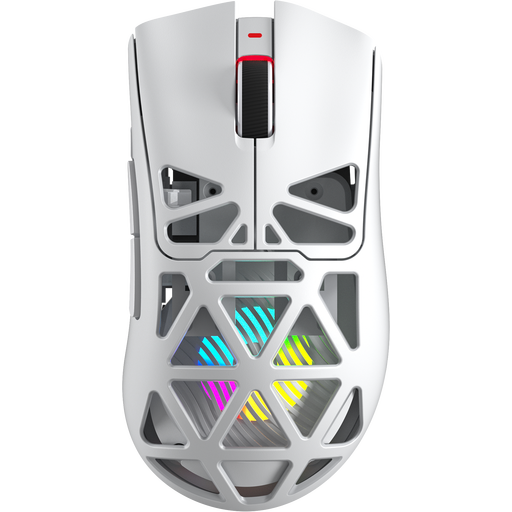
Why this product suits this profile: The combination of 2.4 GHz wireless, Bluetooth 5.0 and USB-C offers flexible use with PC and Mac. At 67 g, with 12,000 DPI and seven programmable buttons, it can suit a range of playing styles.
The key connection options and battery are clearly listed. Check the missing battery life information specifically before buying.
PixArt PAW3311 sensor, 400 mAh battery, RGB lighting, Fire button and up to 8,000 Hz according to the product information.
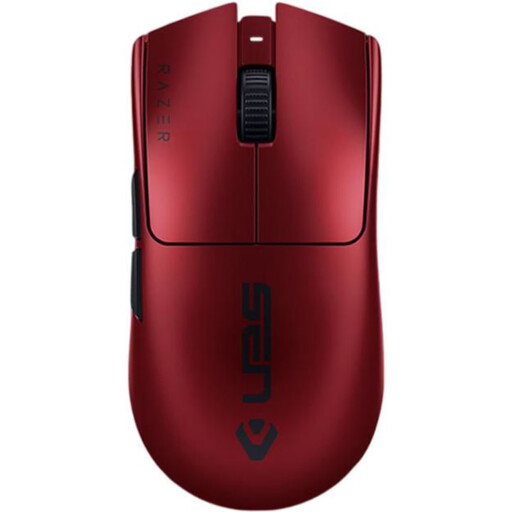
Why this product suits this profile: This model is aimed at users looking for a very lightweight mouse with 2.4 GHz wireless and USB-C, in a design focused squarely on gaming.
The specifications list the weight, sensor, polling rate, connection and battery life separately. This makes it easier to compare the actual features with your needs.
54 g weight, up to 35,000 DPI, up to 8,000 Hz and a stated battery life of up to 95 hours.
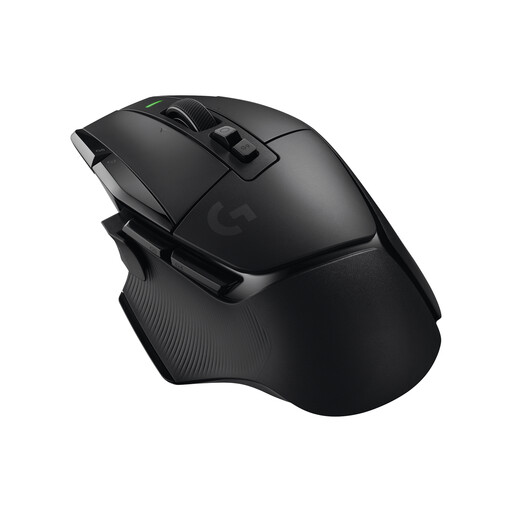
Why this product suits this profile: Its 13 programmable controls and dual-mode scroll wheel are ideal for users who need lots of commands readily available on their mouse for games or applications.
Its higher weight of 102 g and larger shape are clearly stated. This helps buyers decide whether a lightweight mouse or extra function buttons matter more to them.
13 programmable buttons, HERO 25K sensor, USB-C, 2.4 GHz LIGHTSPEED and a stated battery life of up to 140 hours.
We’ve put together a complete, regularly updated list of products that meet these strict selection criteria and fully comply with the safety regulations in force in the EU.
The product description lists PC and Mac as compatible platforms. Even so, check before buying whether all the extra features, such as button mapping, DPI profiles and RGB control, are available on your operating system. Basic mouse functionality may work regardless of these features.
The polling rate indicates how often the mouse transmits position data. At 8,000 Hz, it theoretically reports more often than at 1,000 Hz. The practical difference depends on factors including the game, monitor, system performance, connection and software. A lower setting may make sense if battery life or resource use is more important.
The information available for the AULA SC620 lists a 400 mAh battery, but doesn’t give a specific battery life. Actual usage time may depend on polling rate, RGB lighting, connection type and charge level. If you want to play for long periods without interruption, check for a charging indicator and whether you can use the mouse over USB-C before buying.