
Lieferung heute & morgen

Qualitätsgarantie

Willkommens-Angebote freischalten: KOSTENLOSE Lieferung | Bis zu 80 % RABATT | Kostenlose 30-Tage-JoyPlus-Testphase
App herunterladen
The AULA SC620 wireless gaming mouse combines several features that will appeal to PC and Mac gamers: up to 12,000 DPI, a polling rate of up to 8 kHz, three connection methods, seven programmable buttons and a weight of 67 g. Its technical specification may seem extensive. However, the right buying decision is not about choosing the longest feature list. What matters is whether the sensor, connection, ergonomics and software suit the way you play.
A gaming mouse with 12,000 DPI allows you to adjust pointer sensitivity very precisely. However, that does not automatically mean it will work more accurately at every setting. Many players use considerably lower values in shooters and combine them with the sensitivity settings in the game.
More important than the maximum DPI figure are:
The AULA SC620 is specified with a PixArt PAW3311 sensor. According to the product details, its maximum resolution is 12,000 DPI. In practice, the mouse should be set up so that you can move the cursor or crosshair in a controlled manner.
A gaming mouse with 8 kHz theoretically transmits movement data more frequently than a model with a lower polling rate. This can provide more frequent updates during fast movements. At the same time, a high polling rate requires more system resources and is only worthwhile if your computer, game and monitor can process the data accordingly.
Before buying, check the following:
According to the product name, 8 kHz is one of the AULA SC620’s technical features. How it can be used in practice depends on the firmware, connection method and compatible software.
A Bluetooth gaming mouse is practical for laptops and changing workspaces. However, depending on the device, operating system and surroundings, Bluetooth may have different latency or power-saving characteristics from a dedicated 2.4 GHz receiver.
A 2.4 GHz gaming mouse with a USB receiver is typically used for responsive gaming. USB-C can also enable wired use or charging. According to the product details, the AULA SC620 offers Bluetooth 5.0, 2.4 GHz and USB-C. This makes it flexible to use with PCs, Macs and compatible mobile devices. Nevertheless, before buying, check whether a USB receiver is included and which features are available with each connection method.
With a stated weight of 67 g, the AULA SC620 falls into the lightweight gaming mouse category. A low weight can feel comfortable when making broad movements at low sensitivity. However, it cannot compensate for an unsuitable shape. Hand size, preferred grip style and the position of the side buttons are what really matter.
With seven programmable buttons, buyers should also check whether the buttons can be reached with the thumb without changing their hand position. An additional Fire button may be useful for certain games, but it is not necessary for every application.
The AULA SC620 is specified with a 400-mAh battery. Battery capacity alone does not provide a reliable indication of actual battery life. Lighting, polling rate, connection technology and software settings all affect power consumption.
Practical questions to ask before buying:
An RGB gaming mouse can complement the look of your desk. It is not essential to how the mouse functions, however. Buyers should check whether colours, brightness, profiles and button assignments can be configured using a compatible application. For Mac users, it is also important to find out whether the configuration software supports macOS or whether the mouse can only be used with its standard functions.

Why this product suits this profile: This mouse combines several connection methods, a low stated weight and extensive adjustment options in one model for PC and Mac.
The choice is not based on DPI alone: the sensor, 2.4 GHz wireless connection, Bluetooth 5.0 and USB-C are considered as separate features.
Stated weight of 67 g, PixArt PAW3311 sensor, up to 12,000 DPI and seven programmable buttons.
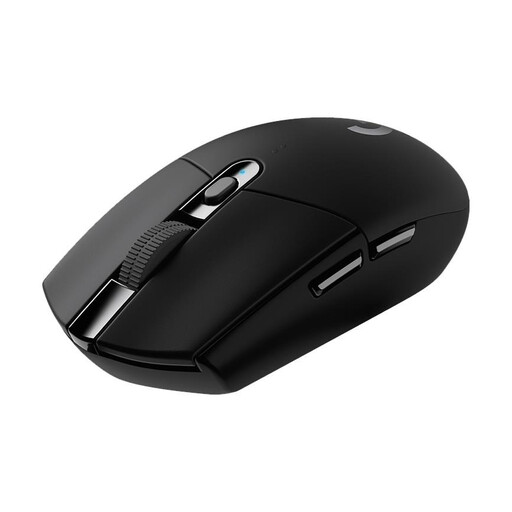
Why this product suits this profile: Users who prefer a clearly defined wireless solution without an integrated battery get a model with a HERO sensor and LIGHTSPEED connection.
Battery life is stated as up to 250 hours in performance mode. It is also clear that the mouse uses an AA battery rather than a 400-mAh rechargeable battery.
HERO sensor with up to 12,000 DPI, LIGHTSPEED wireless connection with a stated 1-ms response time and six programmable buttons.
Why this product suits this profile: If you switch between several devices and want to use additional buttons and RGB lighting, this mouse offers a versatile feature set.
The lighting and Fire button are treated as additional features. Connection, weight, sensor and number of buttons remain the decisive factors when choosing.
Bluetooth 5.0, 2.4 GHz and USB-C, seven programmable buttons, Fire button, RGB lighting and 400-mAh battery according to the product details.
For a stable connection, place the 2.4 GHz receiver as close to the mouse as possible, ideally directly in the computer or connected via a short USB extension cable. Metal surfaces, heavily congested wireless environments and long distances can affect the connection.
After setting up the mouse, we recommend making adjustments step by step:
When switching between PC and Mac, check whether all programmable functions are available on both operating systems. Basic pointer control generally works regardless of the operating system, but additional features may depend on the software.
We have put together a complete, regularly updated list of products that fully meet these strict selection criteria and the safety regulations applicable in the EU.
The product name lists PC and Mac as supported platforms. For basic mouse operation, Bluetooth, 2.4 GHz or USB-C are relevant. For programmable buttons, RGB profiles and 8 kHz settings, check the specific software support available for the operating system in question.
The mouse is specified with a 400-mAh battery. Its actual battery life cannot be determined from this alone. Among other things, it depends on the lighting, connection, polling rate and usage. Buyers should therefore look for an actual battery-life figure in the product details and consider whether the mouse can be charged via USB-C.
8 kHz is not essential for casual gamers. The setting may appeal to users who want to process fast movements at a high refresh rate and have a suitably powerful system. For many applications, a lower polling rate with reduced resource and power consumption is sufficient.