
Lieferung heute & morgen

Qualitätsgarantie

Willkommens-Angebote freischalten: KOSTENLOSE Lieferung | Bis zu 80 % RABATT | Kostenlose 30-Tage-JoyPlus-Testphase
App herunterladen
The search for the right gaming mouse can quickly become overwhelming. The market is flooded with technical jargon like DPI, polling rate, and latency, while manufacturers advertise ever-increasing superlatives. However, not every advertised feature is relevant in practice or worth the extra cost. Many buyers invest in technology they never use, or discover after a short time that the mouse is uncomfortable or doesn't deliver the expected performance.
This guide, created by the Joybuy Product Recommendation Officer, helps you distinguish marketing hype from genuine performance features. We'll highlight the most common pitfalls and show you which criteria truly matter when making your choice.
Before you make a decision, you should be aware of these common misconceptions that often lead to poor purchases:
ergonomic mouse can make long gaming sessions uncomfortable.wireless gaming mouse offers more freedom of movement, budget models can suffer from latency issues or short battery life. In contrast, a wired PC mouse provides a consistently stable connection and never needs charging, making it reliable for long, uninterrupted sessions.Focus on the following three core aspects in your selection process to find a mouse that meets your needs.
The sensor is the heart of any gaming mouse. A high-quality optical sensor delivers precise tracking without unwanted acceleration or smoothing. Instead of focusing on a maximum DPI number, you should opt for a proven sensor that offers stable performance across a wide range. An adjustable sensitivity between 200 and 8,000 DPI is more than sufficient for most use cases and games.
Weight plays a crucial role, especially in fast-paced games like first-person shooters. A lightweight gaming mouse (often under 80 grams) allows for faster and less fatiguing movements. For strategy games or an MMO mouse, a slightly higher weight can provide more stability. Ensure the mouse's shape fits your hand size and preferred grip style to guarantee long-term comfort.
The polling rate, measured in Hertz (Hz), indicates how often the mouse reports its position to the computer. A standard value for gaming mice is 1000 Hz (1-millisecond response time). Modern wireless technologies like Logitech LIGHTSPEED or Razer HyperSpeed now offer performance comparable to wired models. For a wireless gaming mouse, battery life and connection stability are critical factors.
Here are some recommendations tailored to different requirements and budgets.
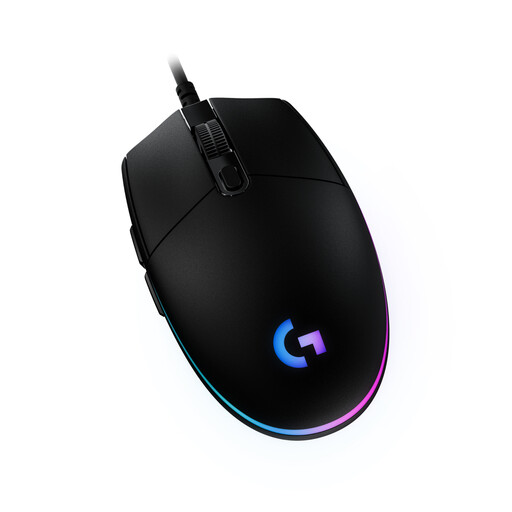
Why This Fits Their Persona: Ideal for gamers seeking a reliable and affordable mouse without unnecessary frills. It provides a solid foundation for all game genres and daily use.
With a practical 8,000 DPI sensor, it sidesteps the DPI trap and focuses on reliable tracking. Its classic, proven design minimises the risk of ergonomic issues.
Offers 6 programmable buttons and customisable LIGHTSYNC RGB lighting. The wired connection ensures consistently low latency.
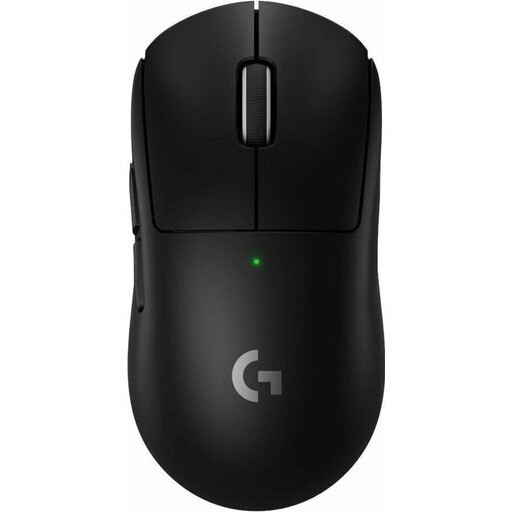
Why This Fits Their Persona: Designed for players where every millisecond counts. Its extremely low weight and professional-grade wireless technology are engineered for maximum performance in competitive games.
It debunks the myth of wireless inferiority by delivering extremely low latency with LIGHTSPEED technology and an 8 kHz polling rate. The shape, developed in collaboration with pros, prevents ergonomic issues.
Weighing only 60 grams, it's an extremely lightweight gaming mouse. The HERO 2 sensor and LIGHTFORCE hybrid switches provide professional-level precision.
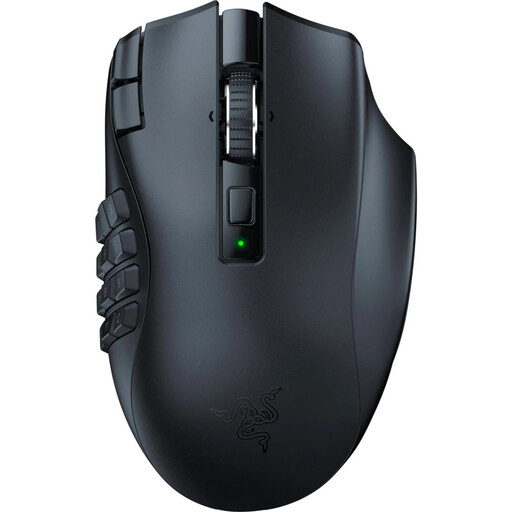
Why This Fits Their Persona: Perfect for players of MMOs and MOBAs who need quick access to a wide array of abilities and macros. The high number of buttons and ergonomic shape are optimised for complex and long gaming sessions.
This MMO mouse is designed for a specific use case where numerous buttons are a necessity, not a gimmick. Its shape is explicitly designed as an ergonomic mouse for long sessions to prevent fatigue.
Features 19 programmable buttons for maximum control. Offers dual connectivity (Razer HyperSpeed Wireless and Bluetooth) with a long battery life of up to 250 hours (HyperSpeed).
We've compiled a complete, up-to-date list of products that fully meet these strict selection criteria and German safety regulations.
Yes, a high-quality gaming mouse pad is a worthwhile addition. The surface of a mouse pad is optimised for the optical sensors in gaming mice, ensuring smooth and precise tracking. Models like the NZXT Zone Elite Mousepad XL offer a low-friction surface for fast movements and a non-slip base that provides stability even during intense gaming moments.
A gaming mouse differs from a standard office mouse in several ways. It features a more precise sensor, a higher polling rate for faster response times, more durable switches, and often additional programmable buttons. Furthermore, its ergonomics and weight are specifically tailored to the demands of gamers.
Battery life varies greatly depending on the model and usage. Efficient mice like the Logitech G305 Lightspeed can last up to 250 hours on a single AA battery. High-end models like the Logitech G PRO X SUPERLIGHT 2 offer up to 95 hours of playtime with their integrated battery. Models with intense RGB mouse lighting tend to have a shorter battery life.