
Lieferung heute & morgen

Qualitätsgarantie

Willkommens-Angebote freischalten: KOSTENLOSE Lieferung | Bis zu 80 % RABATT | Kostenlose 30-Tage-JoyPlus-Testphase
App herunterladen
A white PC setup embodies a clean, modern aesthetic and is the goal for many who want to build a custom gaming PC. However, the path to a flawless all-white system is paved with potential pitfalls. Incorrectly chosen components can not only ruin the look but also compromise the performance and longevity of the entire system. As your Joybuy Product Recommendation Officer, I'll help you navigate the common marketing traps and make an informed decision.
Before you invest, you should be aware of three common issues that often lead to disappointment:
To avoid the problems mentioned above, focus on objective, technical features rather than pure marketing promises.
The foundation of any build is the case. Look for models specifically designed for a clean look and good cooling. A high-airflow case with a mesh front or strategically placed air intakes is crucial to prevent heat buildup. A tempered glass case, ideally with a panoramic view, showcases your components but demands excellent cable management. Look for cases with a dual-chamber design, where the power supply and cables are hidden in a separate compartment. A newer standard is cases that support back-connect motherboards like the MSI Project Zero. Here, the connectors are moved to the back of the motherboard, resulting in a nearly cable-free appearance in the main chamber.
The cooling solution must be both powerful and visually appropriate. For a white AIO liquid cooler, you should match the radiator size (e.g., 240mm or 360mm) to your case's compatibility. Check that the tubes and radiator are also finished in a high-quality white. For a white CPU air cooler, it's not just the colour of the heatsink and fan that matters, but also its height, to ensure it fits in your case. Regardless of your choice, 120mm ARGB fans with PWM fan control are a smart addition. PWM (Pulse Width Modulation) allows for temperature-controlled, quiet regulation of fan speed, while ARGB (Addressable RGB) enables individual control of each LED for perfectly synchronised lighting effects.
Here are some recommendations tailored to specific user needs that meet the criteria discussed.
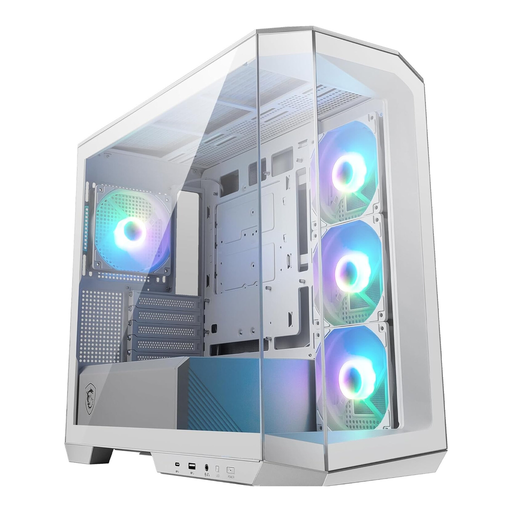
Why This Fits Their Persona: Ideal for users aiming for a visually stunning yet straightforward build. The panoramic glass window offers maximum visibility of the components, while the compact Micro-ATX format saves desk space.
Solves the cable management problem with 33mm of space behind the motherboard and pre-installed Velcro straps. The four included ARGB fans ensure a uniform look without extra purchases.
Four pre-installed 120mm ARGB PWM fans and an integrated hub simplify the build. The GPU bracket prevents heavy graphics cards from sagging.
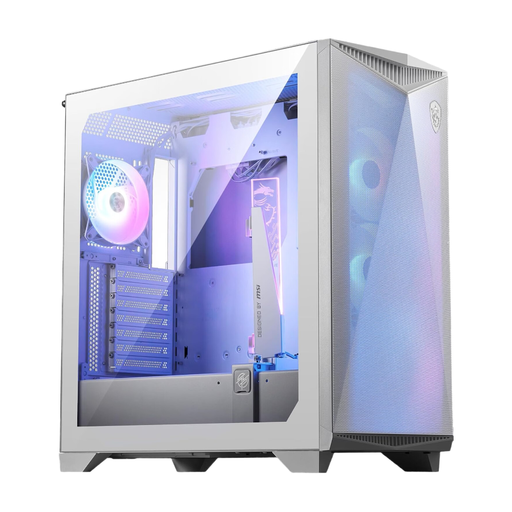
Why This Fits Their Persona: For users who need maximum cooling performance for high-end components. This case prioritises airflow and offers space for large E-ATX motherboards and long graphics cards.
The high-airflow front panel prevents heat buildup, a common issue with closed-off glass fronts. The high-quality white finish is designed for durability and is resistant to yellowing.
Supports up to ten 120mm fans for extreme cooling configurations. A versatile, omnidirectional graphics card support bracket is already integrated.
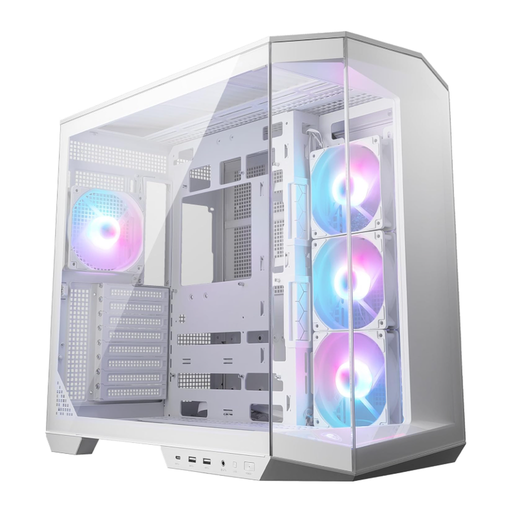
Why This Fits Their Persona: Perfect for enthusiasts who want the cleanest aesthetic with the latest technology. This case is specifically designed for back-connect motherboards (e.g., MSI Project Zero).
Completely eliminates the cable management nightmare by routing the main cables behind the motherboard. The dual-chamber design also separates the PSU and hard drives thermally and visually.
Support for both back-connect and standard ATX motherboards offers flexibility. Four pre-installed ARGB fans and a vertical GPU bracket are included.
Compatibility is crucial, especially when choosing fans. We've compiled an up-to-date list of products that meet these strict selection criteria.
The tendency to yellow depends heavily on material quality. High-quality components from established brands use UV-resistant plastics and powder coatings that retain their colour for years. Cheaper products, however, can start to yellow after a short time under heat and light exposure. Pay attention to manufacturer specifications and material composition.
The easiest method is to use components from a single ecosystem (e.g., fans, AIO, and case from MSI, controlled via Mystic Light). Alternatively, ensure that all ARGB components use the standard 3-pin 5V ARGB connector. This allows them to be connected directly to the motherboard and controlled centrally via its software (e.g., ASUS Aura Sync, Gigabyte RGB Fusion, MSI Mystic Light).
Back-connect systems like MSI Project Zero move the power, fan, and USB headers to the back of the motherboard. In a compatible case, this makes the cables almost completely invisible. For a white PC setup, where a flawless appearance is paramount, this is a significant advantage as no visible cable clutter disrupts the aesthetic.