
Lieferung heute & morgen

Qualitätsgarantie

Willkommens-Angebote freischalten: KOSTENLOSE Lieferung | Bis zu 80 % RABATT | Kostenlose 30-Tage-JoyPlus-Testphase
App herunterladen
A B850 motherboard provides the foundation for a PC with an AMD AM5 processor. It is aimed at buyers who want to combine Ryzen 7000, Ryzen 8000 or Ryzen 9000 CPUs with DDR5 memory, fast M.2 SSDs and the latest networking technology. However, the wide choice makes comparisons difficult: high memory frequencies, Wi-Fi 7 and numerous PCIe specifications may sound impressive, but they are not equally relevant to every system.
As a Joybuy Product Recommendation Officer, I filter the specifications according to clear, practical criteria. It is not the longest feature list that matters, but the right combination of socket, form factor, expandability, cooling and connectivity.
Specifications such as DDR5-8200 or DDR5-8000 often refer to overclocking profiles such as AMD EXPO or XMP. The achievable speed depends on factors including the processor, memory kit, BIOS version and how the DIMM slots are populated. If you are buying a DDR5 motherboard, you should therefore also check the manufacturer's compatibility list.
For many systems, a suitable DDR5 kit with a moderate clock speed is more sensible than memory with a higher stated speed that cannot run reliably.
With a PCIe 5.0 motherboard, PCIe 5.0 may apply to the graphics card slot, an M.2 slot or both. Lanes may also be shared as soon as multiple expansion cards or SSDs are installed. Before buying, it is worth checking the manual. This will show which slots operate at which speed and when connections are disabled or reduced.
A motherboard with Wi-Fi 7 requires a compatible router and an operating system with the appropriate drivers. Some Wi-Fi 7 modules require a current version of Windows 11 for full functionality; Windows 10 may not be supported, depending on the module. Use of the 6 GHz band may also be subject to regional regulations.
An AMD B850 motherboard uses the AM5 socket and is designed for Ryzen processors from the ranges mentioned above. Nevertheless, you should check the specific CPU support on the manufacturer's website. A BIOS update may be required for newly released processors.
Practical features such as Q-Flash Plus or a BIOS update button can, in some cases, enable updating without a fully installed operating system. This can make initial setup easier, but does not remove the need to check that you have the correct BIOS file.
Power delivery is often described in terms of the number of phases and MOSFETs. These figures indicate how the system is designed, but do not provide a complete assessment of performance on their own. For a Ryzen 9 processor, lengthy rendering tasks or frequent full-load operation, a suitably specified VRM area and large heatsinks are advisable.
You should also check:
An ATX motherboard usually offers more slots and connections, but requires a suitably large case. A Micro-ATX motherboard is suitable for more compact systems, but may have fewer DIMM, PCIe or M.2 slots. For particularly small builds, a Mini-ITX model such as the Colorful CVN B850I is an interesting option, although it only has two RAM slots and limited room for expansion.
The networking specifications should also suit your intended use. A 2.5 Gbit LAN motherboard can only be used to its full potential if your router, switch and cabling support this speed. Some models offer 5 Gbit LAN; this is a technical capability, but does not automatically mean a faster internet connection.
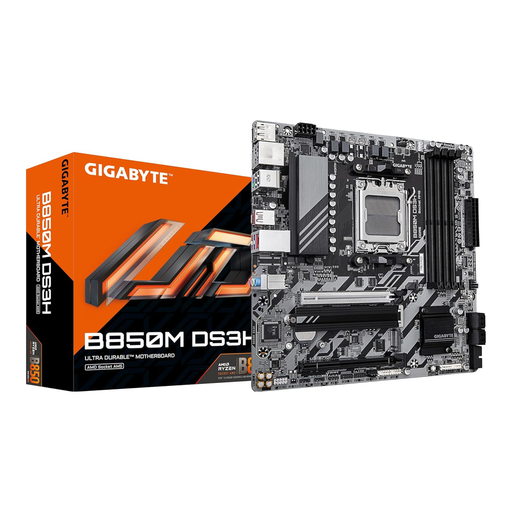
Why this product suits this profile: This Micro-ATX board combines AM5, DDR5 and PCIe 5.0 in a compact design. According to the product specifications, it supports up to 128 GB of DDR5 and features 2.5 Gbit LAN.
The key specifications for the socket, memory type, M.2 and LAN connections are clearly stated. The maximum RAM speed should be understood as an overclocking value.
Micro-ATX format, one PCIe 5.0 M.2 slot and 2.5 Gbit LAN.

Why this product suits this profile: This ATX board offers four DDR5 slots, three M.2 interfaces, Wi-Fi 7 and 5 Gbit LAN for more extensive PC configurations.
The split between one M.2 Gen5 slot and two Gen4 slots makes storage planning clearer than a generalised PCIe specification.
ATX layout, three M.2 slots, Wi-Fi 7, Bluetooth 5.4 and 5 Gbit networking.
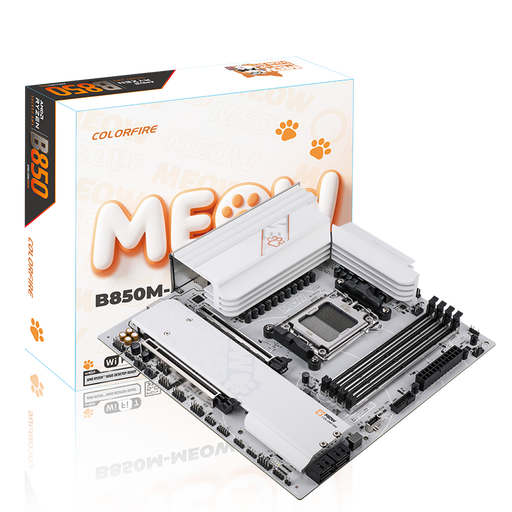
Why this product suits this profile: This Micro-ATX board combines four DDR5 slots with Wi-Fi 7, 5 Gbit LAN and two M.2 connections.
The product specifications include operating system and driver notes for Wi-Fi 7. This allows you to check before buying whether your existing software environment is compatible.
Four DIMM slots, PCIe 5.0 x16, Wi-Fi 7 and 5 Gbit LAN.
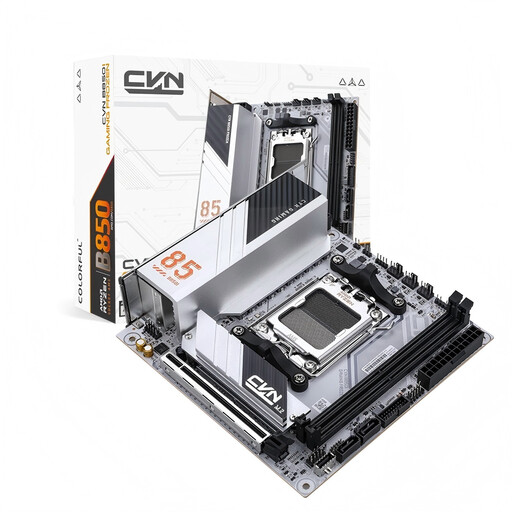
Why this product suits this profile: The ITX format measuring 170 × 170 mm is suitable for small cases and supports AM5 processors, DDR5 and two M.2 slots.
The compact design comes with clearly defined limitations on RAM and SATA slots, rather than assuming ATX-level expandability.
Mini-ITX format, PCIe 5.0 x16, 2.5 Gbit LAN and Wi-Fi 6E.
We have put together a complete, regularly updated list of products that fully meet these strict selection criteria and the safety regulations applicable in the EU.
B850 models are designed for AM5 processors and are offered with Ryzen 9000 compatibility. Before installation, however, you should check the manufacturer's official CPU support list and update the BIOS if necessary.
Its service life depends on BIOS support, workload, cooling and the components used. A board with multiple M.2 slots, DDR5 support and PCIe 5.0 offers more expansion options. However, this does not provide a fixed service life.
The wireless module requires additional energy compared with a model without integrated Wi-Fi. Its share of a desktop PC's total power consumption is normally lower than that of the processor and graphics card. For an accurate assessment, the specifications of the individual module and your usage profile are the key factors.