
Lieferung heute & morgen

Qualitätsgarantie

Willkommens-Angebote freischalten: KOSTENLOSE Lieferung | Bis zu 80 % RABATT | Kostenlose 30-Tage-JoyPlus-Testphase
App herunterladen
Choosing the right motherboard isn’t just about processor compatibility. Memory, SSDs, Wi-Fi, case dimensions and future upgrades all need to work together. The COLORFUL BATTLE-AX B850M-T WIFI V14 Motherboard is aimed at PC enthusiasts, gaming PC builders and home users who want a compact M-ATX motherboard for AMD Ryzen processors.
Many purchasing decisions, however, stumble on technical details that are easily overlooked in product headlines. Three common pitfalls are particularly relevant:
This AMD B850 motherboard uses the AM5 socket and, according to the product specifications, supports AMD Ryzen processors from the 7000, 8000 and 9000 series. For your specific CPU, you should check the manufacturer’s latest compatibility list before installation. This is especially important if a processor requires a particular BIOS version.
A motherboard for Ryzen 9000 can therefore also be interesting for future upgrades. At the same time, support doesn’t mean a blanket guarantee for every model variant. What matters are the processor series, BIOS version and the manufacturer’s published support list.
This DDR5 motherboard has two memory slots and, according to the product description, supports up to 96 GB of RAM, with each slot able to take up to 48 GB. It supports DDR5-4800 through DDR5-7200 (OC) as well as XMP and EXPO.
For a new gaming PC, a matched two-module kit is usually easier to configure than individual, differently specified modules. You should also check the memory compatibility list. The maximum clock speed is a technical support value, not a guarantee that every memory module will run at that speed.
This PCIe 5.0 motherboard features:
The first M.2 slot is designed for PCIe 5.0/4.0 x4 and uses CPU lanes. The second operates at PCIe 4.0 x4 via the chipset. Both M.2 slots support the 2242, 2260 and 2280 form factors. RAID configurations are also supported; the available variants differ according to the Ryzen series, as per the product data.
For a compact build, this feature set is practical, provided you don’t need multiple additional expansion cards. You should check the graphics card length, the space for M.2 heatsinks and the position of the SATA ports against your planned case.
As a Wi-Fi 6E motherboard, the BATTLE-AX B850M-T WIFI V14 uses a MediaTek MT7902D Wi-Fi card and supports Bluetooth 5.3. For wired networking, there’s a 2.5 Gbit LAN port with a Realtek RTL8125BG network chip. The actual data rate on your home network will also depend on your router, cables, connected devices and network configuration.
The rear I/O includes:
Internally, you can connect additional USB ports, three 5 V ARGB headers, one CPU fan, one system fan and a water pump header. This is relevant for a gaming PC with lighting and an AiO cooler. The board measures 230 × 220 mm, placing it in the M-ATX class. Your case must explicitly support M-ATX.
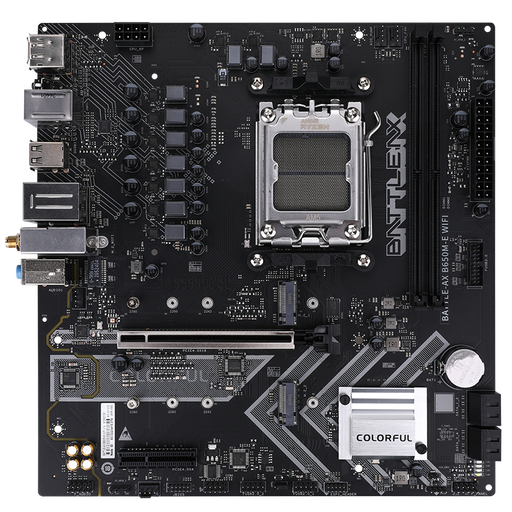
Why this product fits the profile: A compact AM5 platform with DDR5 support, two M.2 slots and Wi-Fi 6 is ideal for a modest gaming or everyday PC.
The product data lists specific slots, memory limits and network standards rather than just vague gaming terms.
Two DDR5 slots, two M.2 interfaces, Wi-Fi 6 and an M-ATX form factor.
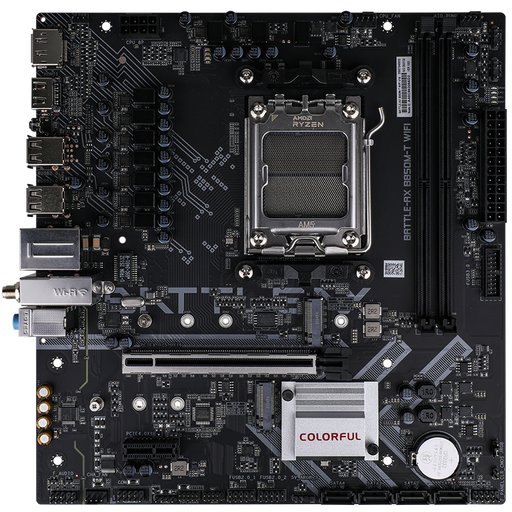
Why this product fits the profile: The B850 model combines AM5 support with PCIe 5.0, 2.5 Gbit LAN, Wi-Fi 6E and two M.2 slots in a 230 × 220 mm case format.
The connection of the two M.2 slots and the CPU dependency of the PCIe 5.0 feature are clearly stated.
PCIe 5.0 x16 slot, Wi-Fi 6E, Bluetooth 5.3 and Realtek 2.5 Gbit LAN.
Why this product fits the profile: For users with multiple drives, fast network connectivity and addressable RGB lighting, the right ports and expansion options are available.
Four SATA ports and two M.2 interfaces make drive planning straightforward; the fan and ARGB headers are also listed.
Up to 96 GB DDR5, RAID support depending on platform configuration and three 5 V ARGB headers.
We’ve put together a complete, regularly updated list of products that fully meet these strict selection criteria and the safety regulations in force across the EU.
Before installation, you should check the following points:
According to the product specifications, the motherboard supports AMD Ryzen processors from the 7000, 8000 and 9000 series with the AM5 socket. You should check the manufacturer’s current CPU support list before purchasing and before installation.
No. DDR5-7200 (OC) is a supported overclocking value. The usable speed depends on factors including the specific memory kit, processor, BIOS and system settings. The memory manufacturer’s specifications and the motherboard’s compatibility list are what you should rely on.
Yes. The board has two M.2 slots for 2242, 2260 and 2280 SSDs, plus four SATA 6 Gbit/s ports. The first M.2 slot supports PCIe 5.0/4.0 x4, while the second operates at PCIe 4.0 x4. For specific RAID configurations, different specifications apply depending on the Ryzen series.