
Lieferung heute & morgen

Qualitätsgarantie

Willkommens-Angebote freischalten: KOSTENLOSE Lieferung | Bis zu 80 % RABATT | Kostenlose 30-Tage-JoyPlus-Testphase
App herunterladen
A baby monitor with camera is designed to make daily life easier for parents: during afternoon naps, while doing housework, or when your child is already sleeping in their own room. However, not every device suits every living situation. What really matters is not a long list of features, but intuitive operation, a stable connection, and safe installation.
The term baby monitor with 1080p HD describes the image resolution, but on its own it tells you little about how usable it actually is. A large room, backlighting, or an awkward camera position can affect the image far more than the difference between Full HD and higher resolutions. So be sure to check:
Many Wi-Fi cameras require a smartphone, an app, and a stable internet or home network connection. If the Wi-Fi goes down, remote access may be limited. If you want a straightforward solution for the nursery, consider a baby monitor without Wi-Fi that comes with its own parent unit. A baby monitor with display can be used directly in the home without needing your smartphone every time you check in.
Lullabies, two-way talk, temperature display, and motion detection can be handy. However, they are no substitute for direct supervision or a safe sleeping environment. A baby monitor is an electrical aid for observation, not a medical monitoring device. The camera and cables must be installed out of your child's reach.
A camera with 1080p HD delivers a detailed image in suitable lighting. For night-time use, a clear specification for infrared night vision is more relevant than a generic marketing claim. Pay attention to the stated night vision range and whether the LEDs could be distracting in the sleeping area.
A wide pan range reduces blind spots. For fixed cameras, a baby monitor wall mount is useful, provided it can be securely attached. Movable PTZ cameras, on the other hand, can often be adjusted via an app. The camera should be positioned so that it is not blocked by bedding, curtains, or furniture.
A separate display works differently from an app-based camera. With a Wi-Fi model, the router quality, frequency band, and location are crucial. With a non-Wi-Fi device, treat the range stated by the manufacturer as a guideline: walls, ceilings, and reinforced concrete can significantly reduce the connection.
For families with multiple floors, stable audio and video transmission is more important than a theoretically very large range figure. It is advisable to do a quick test at the intended location before final wall mounting.
A baby monitor with long battery life should be assessed based on the stated operating time and charging behaviour. The actual runtime depends on factors such as display brightness, video transmission, and VOX mode. With sound-activated mode enabled, the screen only turns on when noise is detected, depending on the model.
A baby monitor two-way talk function allows direct voice transmission via microphone and speaker. A temperature sensor can give you an indication of the room temperature, but it does not replace a calibrated measuring device. Built-in lullabies should also be seen as an extra feature, not a guarantee of getting your baby to sleep.
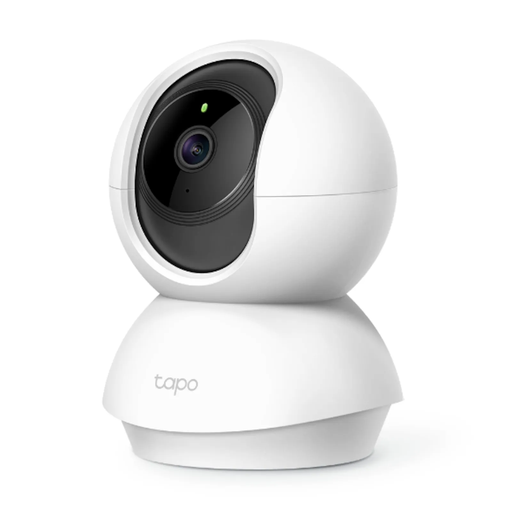
Why this product fits the profile: This camera is aimed at users looking for a compact Wi-Fi solution with basic features for room monitoring.
The product specifications mention 1080p resolution, infrared night vision up to 10 m, motion alerts, and local microSD storage. A paid cloud service is not essential for local recordings.
Pan-tilt function, two-way audio, and microSD support up to 256 GB according to the product description.
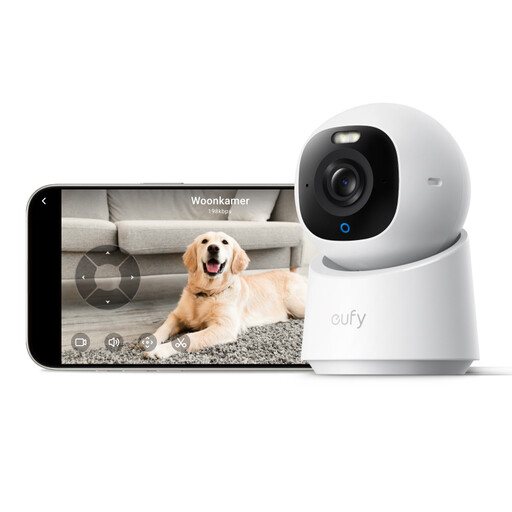
Why this product fits the profile: Suitable for households that value high image resolution, flexible viewing angles, and local storage.
The specifications explicitly highlight the need for Wi-Fi stability for 4K streaming. This makes it easier to check before buying whether the planned location is suitable.
4K UHD resolution, 360° pan and tilt function, two-way audio, and local storage via SD card according to the manufacturer's information.
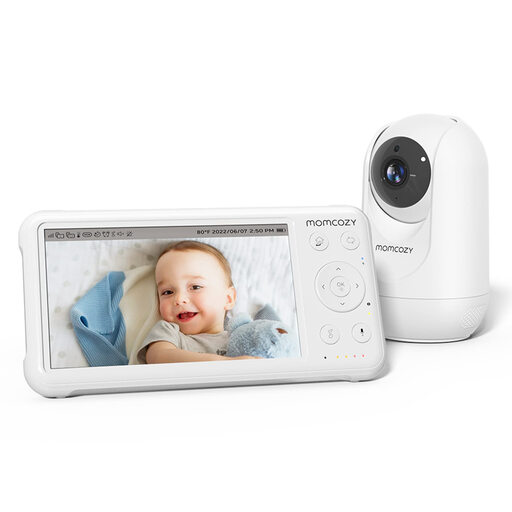
Why this product fits the profile: This model suits parents who prefer a dedicated display without complicated pairing, along with several classic baby monitor features.
The described plug-and-play setup requires no complicated pairing. This reduces the number of setup steps, although the camera still needs to be correctly positioned within the intended range.
5-inch display, 1080p camera, infrared night vision, two-way talk, temperature sensor, and built-in lullabies. The 5000 mAh battery is stated to provide up to 11.5 hours of runtime.
We have put together a complete, regularly updated list of products that fully meet these strict selection criteria and the safety regulations in force in the EU.
Yes, if you prefer a dedicated display unit and the simplest possible setup. Such a system is not dependent on an internet connection. For remote access outside the home, however, a Wi-Fi or app-based camera is usually required.
The runtime depends on the model, display brightness, transmission mode, and activated features. Manufacturer claims such as "up to 11.5 hours" should be understood as a maximum or guideline. For everyday use, parents should charge the battery regularly and check the display before longer sleep periods.
In addition to the purchase price, you may incur electricity costs, memory card costs, or optional cloud service fees. For local recordings on a microSD card, a monthly subscription is usually not required. Check before buying whether the memory card, power supply, and wall mount are already included in the package.