Who this selection is for

Photographers shooting into the light

If you want to capture both a bright sky and dark headframes or façades, RAW files can give you more flexibility when editing. Nikon describes exposure bracketing as taking several shots at different exposure levels; Canon Academy Deutschland explains the editing flexibility RAW files offer.

Visitors exploring colliery sites

If you’ll be changing location frequently, the weight of your complete kit matters, as does choosing a lens that suits the wide views or details you want to capture. Canon Deutschland lists the EOS R10 body at around 382 g without a battery or memory card; this is not the weight of a complete camera kit.

Photographers planning large prints

If you’re planning large prints or heavy cropping, it’s worth weighing up the resolution you need alongside your lens and shooting technique. The nominal pixel count alone doesn’t tell you how well a camera will capture a particular subject when shooting into the light.

What to consider when buying

Portable APS-C system

A good fit if: you often change location on walks and flexible framing matters more to you than particularly high nominal resolution.

The trade-off: The body weight doesn’t tell you the total weight with a lens attached. Canon says the EOS R10 doesn’t have in-body image stabilisation; according to the manufacturer, the FUJIFILM X-T5 has built-in image stabilisation.

High-resolution full-frame camera

A good fit if: you regularly make large prints or want to crop colliery structures heavily, and can accommodate the body and suitable lenses in your plans.

The trade-off: More pixels won’t automatically prevent blown highlights; your choice of lens and exposure still matter.

Medium format for planned detail shots

A good fit if: you’re planning particularly detailed shots for large prints and have factored in the extra outlay for lenses and high-resolution files.

The trade-off: DPReview notes the additional budget required for medium-format lenses with the FUJIFILM GFX100S II. High resolution isn’t automatically the most important advantage for every walk.

Buying priority What to look for Who is it most important to?
Detail in the sky and shadows Check RAW format and exposure compensation; if you plan to bracket exposures, check the specific model’s shooting functions. If you want to show bright skies and dark colliery structures together, the right file format and a suitable editing workflow matter. Around 36% of consumers prioritise how the camera handles backlighting.
Getting the right framing Think about the views you can capture from accessible viewpoints; check the lens mount and which lens is actually included. If you want to switch between whole buildings and architectural details, choose a lens to suit the framing you’re after. Around 29% of consumers prioritise framing.
Portability on walks Compare body weights on a like-for-like basis, and remember to factor in your chosen lens. If you’re walking between several locations, what matters is the kit you actually plan to carry. Around 21% of consumers prioritise portability.
Resolution for large prints Decide what you plan to use the images for, and consider the lens mount and cost of lenses alongside the pixel count. For large prints or substantial crops, nominal resolution can matter, provided the lens and shooting technique are up to the task. Around 14% of consumers prioritise large prints.

Avoiding common buying mistakes

  • Choosing based on megapixels alone

    High resolution won’t automatically compensate for the difference in brightness between the sky and a building. When shooting into the light, your shooting technique and subsequent editing also matter.

    First, check that RAW and your planned exposure-bracketing workflow suit your needs. Then compare the resolution with your intended framing and print size.

    You may need to buy additional suitable lenses; combining and editing multiple shots also takes time.

  • Assuming the body weight and body-only offer represent a complete system

    Mounts differ, and the body weight doesn’t include a lens or the full range of accessories. DPReview notes the additional lens requirements of the medium-format option.

    For a specific offer, check the lens mount and exactly what’s included. Factor the lens into your assessment of weight and how you’ll use the camera.

    If a suitable lens isn’t included, you’ll need to budget for the extra kit and plan how to carry it.

  • Confusing site rules with general permission to take photographs

    Stiftung Zollverein distinguishes between private, editorial and commercial photography, and has specific rules for drones. Other colliery sites may have their own conditions.

    Check the rules for the specific site before your visit, and make sure your intended use is covered.

Key camera brands at a glance

Canon

The EOS R system includes the APS-C and full-frame models covered here; the right choice depends on your subject and the kit you need.

  • Canon Deutschland lists the EOS R10 as having 24.2 effective MP and supporting RF and RF-S lenses. Canon lists the EOS R5 Mark II as having a 45 MP sensor.
  • According to Canon, the EOS R10 doesn’t have in-body image stabilisation. These specifications don’t demonstrate how all Canon cameras perform when shooting into the light.

Nikon

The Z system includes the Z 7II, a high-resolution full-frame option covered here; Nikon also explains exposure bracketing for subjects with varying brightness.

  • Nikon lists the Z 7II as having 45.7 MP. Exposure bracketing can produce several source images at different exposure levels.
  • The explanation of HDR isn’t comparative evidence of the Z 7II’s performance when shooting into the light.

Sony

The E-mount system includes both APS-C and high-resolution full-frame models, offering different starting points.

  • Sony lists the α6700 as having an APS-C sensor and approximately 26.0 effective MP for stills; the manufacturer lists the α7R VI as having 66.8 MP.
  • These pixel counts alone don’t show which model is better suited to a particular colliery subject.

FUJIFILM

The X-T5 belongs to the X system, while the GFX100S II belongs to the separate G-mount system; their lens systems aren’t interchangeable.

  • FUJIFILM lists the X-T5 as having 40.2 effective MP, RAW and built-in image stabilisation. The manufacturer lists the GFX100S II as having 102 MP and a G mount.
  • A higher pixel count is no substitute for correct exposure. DPReview notes the additional lens requirements of the medium-format option.

OM SYSTEM

The OM-5 Mark II is another system camera you can compare if you’re looking for a portable set-up.

  • OM SYSTEM positions the model as a compact, lightweight camera for outdoor use.
  • This manufacturer description doesn’t confirm the weight of a specific kit or superior performance when shooting into the light.

Related products on Joybuy

Joybuy product options related to this topic.
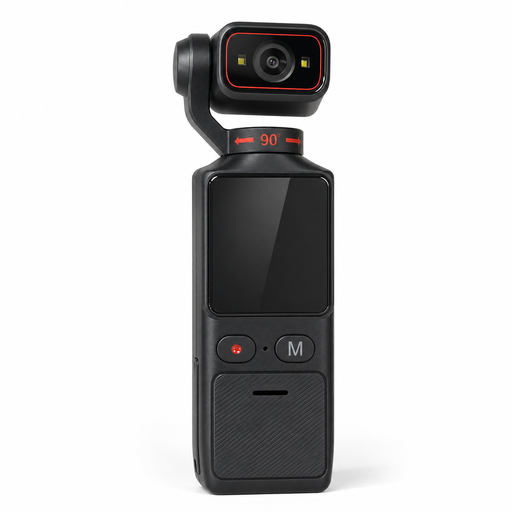
4K pocket camera with electronic image stabilisation and 180° swivel lens

4K pocket camera with electronic image stabilisation and 180° swivel lens

Could be worth considering for walks if you’re looking for a compact camera for stills and video; the product name specifies outdoor use.

The product name also mentions Wi-Fi and a 1.69-inch touchscreen. Check whether the lens and features suit the framing you want for colliery buildings.

View on Joybuy

Frequently asked questions

Is RAW enough for every colliery scene with strong backlighting?

No. RAW gives you more flexibility when editing highlights and shadows, but it doesn’t guarantee that a single shot will capture every difference in brightness. For a mostly static subject, you can also take an exposure-bracketed series and combine the images; Nikon describes this technique for different exposure levels.

Do I need a specific lens for exposure bracketing?

No. Exposure bracketing involves shots taken at different exposure levels; you choose the lens separately to get the framing you want and to match the mount. Check that the camera body has an exposure-bracketing function, and check which lens is actually included with the offer.

What rules apply to photography at the Zollverein site?

Stiftung Zollverein generally allows private photography and filming on the site without permission or a fee, but lists some exceptions. It asks you to register for editorial photography in the freely accessible outdoor areas, and requires permission for photography intended for commercial publication. These conditions apply to Zollverein and not automatically to other colliery sites.

Can I photograph colliery buildings from a public road?

Under certain conditions, § 59 UrhG allows you to photograph works that are permanently located on public paths, roads or squares; for buildings, this only covers their exterior. This doesn’t give you the right to enter a site or exempt you from its rules.

Can I simply use a drone for the same purpose?

Not without checking the rules for the specific location. Stiftung Zollverein prohibits private drone photography on its site and requires you to register and obtain permission for drone photography there. Deutsche Flugsicherung also points out that restrictions may apply in geographical zones, including around industrial facilities; this doesn’t mean you’re automatically allowed to fly at another colliery site.