Which switch is right for you?

For users who regularly make large backups

If you’re checking whether your server and the computers that access it can use a faster wired connection, compare the Ethernet ports on every device in the connection. TP-Link Deutschland and D-Link Deutschland describe their 2.5-gigabit models as suitable for devices with compatible ports.

For users with several devices on their desk

If you want to connect devices in addition to your backup server, remember that the connection to the rest of your network also takes up a port. Work out how many ports you need in total before choosing between a five- and eight-port switch.

For users planning to separate their networks

If you want to assign devices or ports to different networks, you’ll need the right management features and compatible configuration on your other network devices. Manufacturers list VLAN features on certain models, including the TP-Link TL-SG108E and NETGEAR GS305E.

What should you look for when buying?

Priority What to check before buying Who is this important to?
Backup speed Check the ports on the server, connected devices and the link between them; don’t assume that the port’s rated speed is the same as the backup speed you’ll actually get. If I want to transfer large backups over a fast wired connection, the devices involved need to support it too. Around 36% of consumers say usable speed is their top priority.
Ports, including the uplink Count the server, computers, connection to your existing network and any other devices you plan to connect. If I want to connect several devices as well as the server, I don’t want to forget that the uplink takes up a port. Around 29% of consumers say the number of connections they need is their top priority.
VLANs and network assignments Check whether you really need VLAN management and whether your other network devices can be configured to work with it. If I want to assign devices to different networks, I’ll also plan how to configure the other network devices. Around 21% of consumers say planned network separation is their top priority.
Space and noise Check the dimensions of the casing and allow room for plugs and the power supply; check whether the specific model has a fan. If the switch is going on a small desk, I’ll check how much space is available and whether the model has a fan. Around 14% of consumers say space and fan design are their top priority.

Avoid common buying mistakes

  • Comparing only the fastest port speed

    A 2.5-gigabit port won’t automatically make your connection faster if your server or the device it connects to doesn’t support that speed.

    Before you buy, check the Ethernet ports on your backup server and the devices it connects to most often.

  • Forgetting to include the uplink when counting ports

    You’ll also need a switch port to connect to your existing network.

    List all the connections you plan to make, including the uplink, then choose a switch with enough ports.

  • Confusing VLAN support with a complete backup plan

    A VLAN-capable switch gives you configuration options, but it doesn’t create or restore backups for you. Germany’s Federal Office for Information Security lists both as part of a data backup plan.

    Plan network separation and data backup separately, and consider how you’ll restore your backups.

An overview of relevant brands

TP-Link

For a desk setup, the relevant options here are a compact 2.5-gigabit switch and a managed gigabit switch. These differences apply to the models mentioned, not the entire range.

  • According to TP-Link Deutschland, the TL-SG105-M2 is a fanless model with five 2.5-gigabit ports.
  • The TL-SG108E offers VLAN features, according to the manufacturer, but its ports are gigabit.

D-Link

The product lines mentioned include compact 2.5-gigabit models and managed gigabit options.

  • D-Link Deutschland specifies that the DMS-105 has five 2.5-gigabit ports and a fanless design.
  • VLAN management is listed for the DGS-1100 series; check whether it’s available on the specific model you’re considering.

NETGEAR

The models mentioned are compact gigabit options, with and without management features.

  • NETGEAR describes the GS305v3 as unmanaged and fanless, while the GS305E is a managed option.
  • Both models mentioned have gigabit rather than 2.5-gigabit ports. NETGEAR lists VLAN features for the GS305E.

Joybuy products for your desk

This selection features gigabit switches that give you extra wired connections at your desk, including basic and managed models to suit different connection and configuration needs.

D-Link DGS-1005P/E 5-port Gigabit desktop switch with 4 PoE+ ports

D-Link DGS-1005P/E 5-port Gigabit desktop switch with 4 PoE+ ports

An option if you’re looking for a gigabit switch for wired devices on your desk.

The product name lists five gigabit ports, including four PoE+ ports, a 60 W PoE budget and a fanless metal casing.

View at Joybuy

D-Link DGS-1210-10/E 10-port Gigabit Smart Managed switch

D-Link DGS-1210-10/E 10-port Gigabit Smart Managed switch

A managed gigabit option if you want to connect several wired devices at your desk.

The product name lists eight gigabit RJ45 ports and two SFP slots.

View at Joybuy

TP-Link TL-SG1005D 5-port Gigabit desktop switch

TP-Link TL-SG1005D 5-port Gigabit desktop switch

A straightforward gigabit option if you need extra wired connections at your desk.

The product name lists five 10/100/1000 Mbps RJ45 ports, as well as automatic speed adjustment and Auto-MDI/MDIX.

View at Joybuy

TP-Link TL-SG105PE 5-port Gigabit Easy Smart switch with 4 PoE+ ports

TP-Link TL-SG105PE 5-port Gigabit Easy Smart switch with 4 PoE+ ports

A managed gigabit option if you want extra connections as well as configurable network assignments.

The product name lists five gigabit ports, four PoE+ ports with 65 W, and VLAN, QoS and IGMP.

View at Joybuy
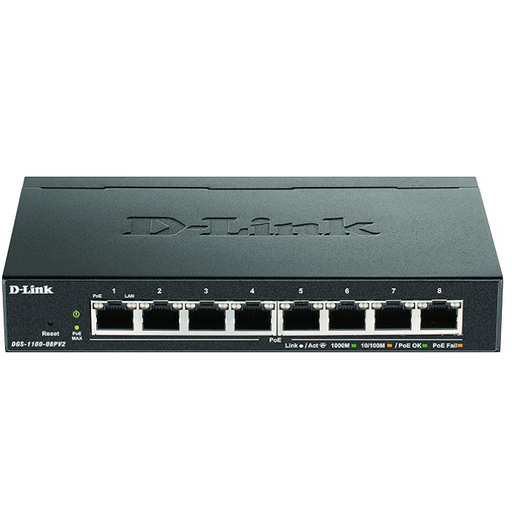
D-Link DGS-1100-08PV2 Managed L2/L3 Gigabit Ethernet switch with PoE

D-Link DGS-1100-08PV2 Managed L2/L3 Gigabit Ethernet switch with PoE

A managed gigabit option if you want to connect extra wired devices and plan to configure VLANs.

The product name lists Gigabit Ethernet with 10/100/1000 and PoE. Features include VLAN, trunking, IGMP snooping and storm control.

View at Joybuy

Frequently asked questions

Will a 2.5-gigabit switch make every backup faster?

No, not on its own. Check the ports on your backup server and the device it connects to at each end of the connection. Manufacturers describe their 2.5-gigabit models as suitable for devices with compatible ports. You can’t use this information alone to determine a specific backup speed.

How do you set up VLANs for a backup server?

Choose a model with VLAN features only if you actually plan to configure network assignments. Make sure you plan which ports will be assigned to each network, as well as how to configure your other network devices. VLAN support alone doesn’t guarantee effective network separation across your whole network.

Can a switch replace a backup plan or a restore test?

No. A switch provides a network connection; Germany’s Federal Office for Information Security includes both creating and restoring backups as part of a complete data backup plan.

What should you consider when buying and disposing of a switch in Germany?

For a specific device, check its labelling, product identification and manufacturer information; Germany’s Federal Network Agency lists these points in connection with its market surveillance. According to the German Environment Agency, a switch that has reached the end of its life shouldn’t go in household waste. Take it to a separate collection point for waste electrical equipment, such as a recycling centre.