First, check whether your camera’s self-timer or a compatible app will do the job for a fixed table set-up. A suitable cable release may be enough if your camera and tripod stay in place. If you’ll be moving the baskets around, a wireless remote or app specifically confirmed as compatible gives you more freedom to move. If you want to check the framing or focus from beside your subject, an app with supported Live View is a better choice than a simple shutter button.
Who can benefit from a remote shutter release?
Photographers with a fixed table set-up
If your camera and basket stay in place for several shots, a suitable cable release or the self-timer you already have may be all you need. Canon Germany describes the self-timer as a way to avoid camera shake caused by pressing the shutter button.
Photographers who change their arrangements
If you move baskets or props between shots, you may want to trigger the shutter from beside the table. A wireless control could be a good option, provided it’s compatible with your specific camera; Canon Germany and Sony list solutions for selected models.
Photographers who want control over focus and framing
If you want to check the framing or focus on your subject after arranging it, look for a compatible camera app with Live View. Canon Germany and Nikon Germany describe remote shooting features for selected compatible cameras.
What to look for when choosing
Before buying anything extra, check whether the self-timer or an app you already use will do the job. If you need a separate shutter release, the right choice will mainly depend on whether your camera stays in one place or you want to move freely while rearranging the baskets.
| What you need |
What to check before buying |
Who it matters most to |
| Compatibility |
Check the full camera model against the approved accessories; for cable models, check the connection and whether you’ll need an adapter. |
If I want to avoid buying the wrong accessory, I’ll check the camera and accessory details carefully. This is the top priority for around 36% of consumers. |
| Taking photos without touching the camera |
Check whether the self-timer is enough; if you’re using a cable release, make sure the cable is long enough for your table set-up. |
With a fixed tripod set-up, I don’t want to touch the camera when taking a shot. Around 29% of consumers say minimising camera shake when taking a photo is their top priority. |
| Freedom to move |
Check that the camera model and connection are supported; don’t assume the manufacturer’s stated range applies to other models. |
If I move the baskets between shots, I want to be able to take a photo from beside the table. Around 21% of consumers say freedom to move is their top priority. |
| Control over framing and focus |
Before buying, check whether the app supports remote shooting, Live View and the focus controls you need with your camera. |
For close-up shots, I want to check the framing or focus point on my subject. Around 14% of consumers say this kind of control over the image is their top priority. |
Avoid common buying mistakes
-
Choosing by camera brand or plug shape alone
Connections and approved accessories can vary even within the same brand. Fujifilm also specifies a 2.5 mm to 3.5 mm adapter for certain combinations with the RR-100.
Before ordering, check your camera’s full model name against the approved accessories. For cable releases, check the connection and whether you might need an adapter.
-
Assuming a shutter button gives you full remote control
A simple shutter button won’t necessarily show you the framing or focus. Canon distinguishes between basic Bluetooth shutter release without Live View and remote shooting with Live View in Camera Connect.
Check which features you need and try a compatible app before buying an additional device.
-
Assuming wireless is automatically the best option
With a fixed set-up, the self-timer or a suitable cable can also let you take a photo without touching the camera. A cable will, however, limit how far you can move.
Consider the actual distance between your tripod and table, then choose between the self-timer, a cable release and wireless control.
Brands and compatible product ranges
Canon
Depending on the camera model, Canon lists cable releases, Bluetooth remotes and the Camera Connect app as possible ways to shoot remotely.
- Canon specifies an E3 remote socket with a 2.5 mm connection and an 80 cm cable for the RS-80E3. For the BR-E1, Canon states a Bluetooth range of up to 5 m.
- These details refer to different products. Check that the accessory is approved for your camera model; according to Canon Academy, basic Bluetooth shutter release through Camera Connect does not offer Live View.
Sony
Sony offers the RM-VPR1 as a cable option and the RMT-P1BT as a Bluetooth option for compatible cameras.
- Sony gives the RM-VPR1 a cable length of 800 mm. According to Sony, the RMT-P1BT uses the camera’s built-in Bluetooth receiver.
- The connection and approved models vary by camera. The details above don’t show that one option is always better than the other.
Nikon
The ML-L7 Bluetooth remote or SnapBridge app may be suitable for compatible Nikon cameras.
- Nikon lists buttons for photo and video recording on the ML-L7. With compatible cameras, SnapBridge can enable remote shooting with an image preview.
- Available features depend on the camera model, so check the compatibility list before buying or setting up the remote.
Fujifilm
The RR-100 is a cable option for the X and GFX cameras listed by Fujifilm.
- Fujifilm provides a compatibility list for the RR-100.
- For certain listed cameras, Fujifilm also specifies a 2.5 mm to 3.5 mm adapter. Check the details for your model.
Panasonic
The DMW-RS2E is a cable release for compatible LUMIX cameras.
- Panasonic lists a photo shutter button, a button to start and stop video recording, and a clip for attaching it to a tripod.
- Panasonic notes that a firmware update may be required. Check the details for your specific camera combination.
Joybuy products for smartphone photography
The products below are smartphone tripods and mounts with remote controls. They may suit you if you’re taking basket photos with a smartphone; before choosing one, check that this type of set-up works with your camera equipment.
 No image available
Verbex K60 Black selfie stick with zoom remote control
For taking photos or videos remotely with a smartphone mounted on a tripod.
Features a Bluetooth remote control, phone holder and tripod function; the product listing says it’s suitable for phones up to 6.0 inches.
View at Joybuy
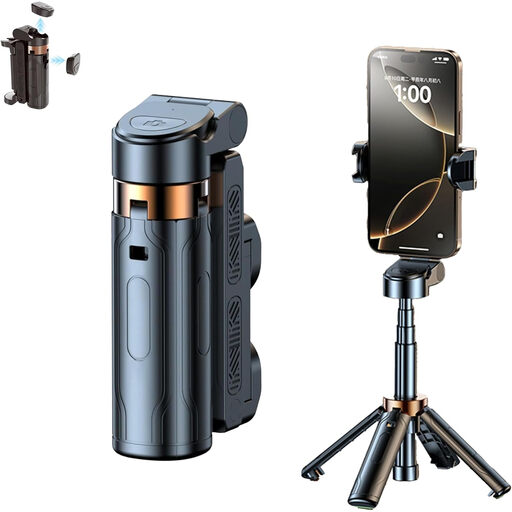 No image available
3-in-1 Bluetooth selfie stick with 360° holder
For smartphone basket photos where you need a holder and a detachable remote control to take shots from a distance.
Features a tripod and 360° rotating phone holder; the product title says it’s designed for iPhone, Samsung and Android smartphones.
View at Joybuy
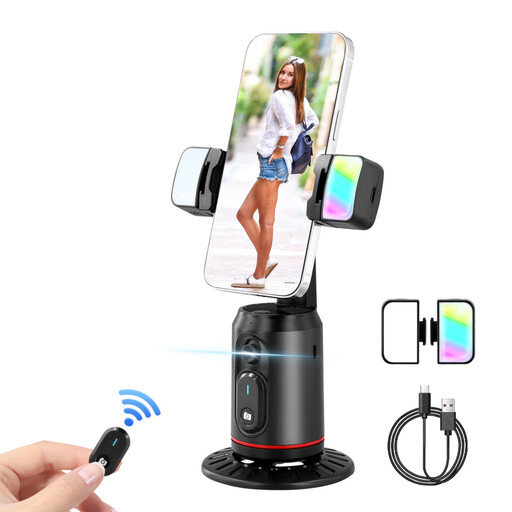 No image available
360° auto-tracking smartphone gimbal with 2 selfie lights
For smartphone photography where a detachable Bluetooth remote and tripod mount suit your set-up.
Features a detachable Bluetooth remote control, a 1/4-inch tripod thread and two selfie lights.
View at Joybuy
 No image available
Ulanzi JJ02 phone tripod with Bluetooth remote control
For taking smartphone photos on a stable surface when you want to trigger the shutter remotely and attach accessories to the mount.
Features an extendable mini tripod, detachable Bluetooth remote control and two cold shoe mounts.
View at Joybuy
Frequently asked questions
How can I tell whether a remote shutter release is compatible with my camera?
Check your camera’s full model name against the manufacturer’s list of approved accessories. For cable releases, you’ll need to check the connection and whether an adapter is required; Fujifilm specifies a 2.5 mm to 3.5 mm adapter for certain RR-100 combinations.
Do I need to buy a remote shutter release for a basket that won’t move?
Not necessarily. If your camera has a suitable self-timer, you can use it to avoid touching the camera when taking a photo. A compatible camera app may also be an option, provided it works with your camera model.
What should I set up before taking my first Bluetooth photo?
Check that your camera model is supported and follow the relevant pairing instructions. The available features depend on the camera and connection type: Canon Academy describes Bluetooth shutter release without Live View in Camera Connect, as well as remote shooting with Live View.
What else should I check before buying?
Check whether your camera combination needs an adapter, what power source the remote uses and who to contact if you have questions. Fujifilm notes that certain RR-100 combinations require an additional adapter. Germany’s Federal Network Agency recommends checking where the item will be shipped from and whether there’s a contact in the EU.


