What should you look for when buying?
Start by checking your platform and game version, then count the inputs you need. Only after that should you decide between wireless, wired or extra settings.
PS5: DualSense or DualSense Edge
A good fit if: You need another controller for local PS5 games. Choose the Edge if you want to make use of its profiles and customisable inputs.
Consider: There’s no evidence that the extra settings offer a general advantage in basketball games if all you need is a second controller.
Xbox or compatible Windows PC
A good fit if: You’re looking for a wireless model for a specifically supported platform, or you can run a cable neatly to your seat.
Consider: Connection options vary by model and platform. Check support for the specific game and plan the cable route.
Switch 2
A good fit if: You need another compatible input for NBA 2K27 on Switch 2. The Pro Controller also has freely assignable GL/GR buttons.
Consider: Nintendo requires a compatible controller for each player in multiplayer mode; the extra buttons aren’t essential for everyone.
| Buying priority |
What to check |
Who is it important to? |
| Platform and game |
Check the exact model, platform, connection type and any required firmware against the manufacturer’s information. |
If I want to avoid buying a controller that won’t work with my system or game, I’ll check the exact model first. Around 31% of consumers prioritise platform and game compatibility. |
| Enough inputs |
Check the player limit for your specific game version and count the compatible controllers you already have. |
If another person wants to join in, I’ll count the available inputs before comparing extra features. Around 25% of consumers prioritise an additional gaming input. |
| Connection where you sit |
Check which connections your platform supports, as well as the distance and cable route to your seat. |
If I play from the sofa, the connection needs to reach where I’m sitting, and any cable must be safely routed. Around 19% of consumers focus on the connection where they play. |
| Controls and customisation |
Check the button mapping and settings available on the exact model; don’t mistake manufacturer claims for independently measured gaming performance. |
If I want to tailor buttons or profiles to the way I play, I’ll compare the settings available on the specific models. Around 13% of consumers prioritise feel and customisable inputs. |
| Cost of additional controllers |
First count how many controllers you’re missing, then compare compatible standard and feature-rich models. |
If I still need several inputs, I’ll work out how many controllers I need before weighing up the extras. Around 12% of consumers prioritise the cost of additional controllers. |
Controller selection at Joybuy
The models below include extra controllers for PS5, Xbox and Switch 2, as well as wired options for Xbox and Windows.
 No image available
PlayStation 5 DualSense Controller, Starlight Blue
For an extra local input on PS5, if a standard DualSense suits your needs.
Colour: Starlight Blue.
Joybuy
 No image available
Microsoft Xbox Wireless Controller, Pulse Red
For an extra wireless input with the Xbox consoles listed in the product name or a compatible PC.
Platforms listed in the product name: Xbox One, Xbox Series X/S and PC. Colour: Pulse Red.
Joybuy
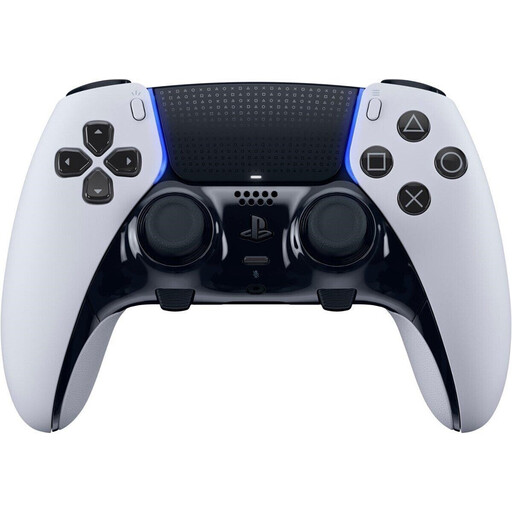 No image available
PlayStation DualSense Edge Wireless Controller, Black/White
For PS5 players who want to make targeted use of customisable button mappings and profiles; Sony describes these settings for the DualSense Edge.
Model: DualSense Edge Wireless Controller. Colour: Black/White.
Joybuy
 No image available
Nintendo Switch 2 Pro Controller
For an extra input on Switch 2; Nintendo requires a compatible controller for each person playing NBA 2K27.
Nintendo says the GL/GR buttons can be freely assigned. A USB charging cable is included.
Joybuy
 No image available
GameSir G7 HE Wired Controller
For an extra wired input with the Xbox platforms listed in the product name or a Windows PC, provided the cable reaches your seat.
The product name specifies Hall Effect sticks and the colour black.
Joybuy
Frequently asked questions
Is one extra controller enough for a local match?
It depends on how many people are playing and how many compatible inputs you already have. The PlayStation Store page for NBA 2K27 on PS5 lists 1–4 players; Nintendo requires a compatible controller for each person playing NBA 2K27 multiplayer on Switch 2. Check the details for your specific game version.
How do I set up another DualSense on PS5?
Connect the controller to your PS5 with a USB cable while the console is switched on, then press the PS button to pair it for the first time. Sony says you can disconnect the cable once the controller has enough charge; up to four controllers can be used at the same time.
Can I use the Stealth Pivot wirelessly with an Xbox?
No. Turtle Beach specifies a wireless connection for PC, but explicitly requires a wired connection for Xbox consoles.
Will a different controller make the game easier to see in a bright room?
No. Visibility and reflections depend on your screen, lighting and seating position, not on a controller feature. Sony notes that a TV’s automatic brightness adjustment won’t necessarily compensate for reflected light.
What are your rights in Germany if a controller is faulty?
Your statutory rights against the retailer are separate from any voluntary guarantee. The Verbraucherzentrale describes repair or replacement as the forms of remedy you should request first. Many online purchases also generally come with a 14-day right to cancel, although exceptions may apply depending on the circumstances.


