What should you look for when buying?
First, check that the controller matches your console or PC and game. Then decide whether a wireless or wired connection works for the seating positions you have in mind. Check the view of the screen separately.
| What to look for |
What to check before buying |
Who should pay particular attention? |
| Platform and game |
Check that the console or PC, the specific version of the game and the supported input devices are compatible. Also check whether the game supports any individual controller features. |
If I want to avoid buying a controller that won’t work with my system or basketball game, I’ll check both in advance. Around 36 % of consumers put platform and game compatibility first. |
| Freedom to move and connection |
Try out the seating positions you plan to use, and consider a safe cable route or where to place the wireless receiver. Manufacturers’ figures based on ideal laboratory conditions don’t guarantee a reliable connection in your own room. |
If I’m sitting off to the side, I want to play without an inconvenient cable and still have a suitable connection. Around 29 % of consumers put freedom of movement and a reliable connection from their seat first. |
| Multiplayer |
Check the game mode and how many controllers you need. Pair any additional controllers before the match, and check their charge level or connections. Nintendo specifies one compatible controller per player for NBA 2K27 on Switch 2. |
If everyone needs a controller that’s ready to use and assigned correctly before the game starts, easy setup matters. Around 21 % of consumers prioritise multiplayer. |
| View of the screen |
Check the game screen from all the seats you plan to use, and adjust the seating arrangement or game settings if needed. A different controller won’t change the screen’s viewing angle. |
If I can’t see the action clearly from the side, I want to work out whether the seating position, screen or game settings are the issue first. Around 14 % of consumers put a clear view of the action first. |
Controllers on Joybuy
This selection includes wireless controllers for PC, Switch or Switch 2, PS5 and Xbox. Before buying, check compatibility with your specific platform and support for your basketball game.
 No image available
The G-Lab K-PAD-HELIUM-WL Wireless Controller
For a Windows PC and a seat off to the side, the specified wireless connection is worth considering if you want to avoid running a controller cable through the seating area.
Described as compatible with Windows 10/11, with a 2.4-GHz USB receiver and two programmable rear buttons. Check whether your basketball game supports the controller.
View on Joybuy
 No image available
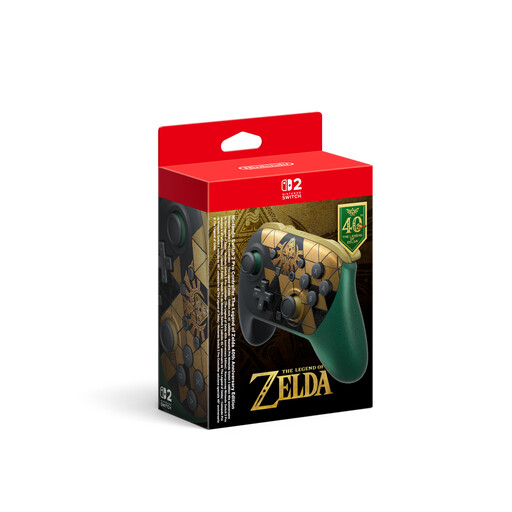
Nintendo Switch 2 Pro Controller, The Legend of Zelda 40th Anniversary Edition
For a basketball game on Nintendo Switch 2, this is listed as a Switch 2 Pro Controller. Be sure to check the requirements of the specific game too.
The product name lists HD Rumble 2, Mouse Controls, amiibo and GameChat. Wireless connectivity and USB-C charging are also specified.
View on Joybuy
 No image available
Gaming Controller with Dual Vibration & Gyro for Switch & PC
For a seat off to the side, the specified Bluetooth connection could save you running a controller cable through the seating area. Check separately whether your basketball game supports it.
Described as compatible with Switch and PC, with a gyroscope, two vibration motors, a D-pad, buttons and sticks.
View on Joybuy
 No image available
PlayStation DualSense Wireless Controller Midnight Black
For local basketball on PS5, the DualSense is a suitable starting point, provided the specific game supports the mode you want to play. Its wireless connection can give you more flexibility when choosing where to sit.
Described as a wireless controller compatible with PS5; the product name specifies a USB cable. Sony says up to four DualSense controllers can be used at the same time.
View on Joybuy
 No image available
Microsoft Xbox Wireless Controller Shock Blue
This controller is worth considering for Xbox or a Windows PC if you want to play without running a cable through the seating area. Check the wireless connection from the seat you plan to use and make sure your game supports it.
The product name lists Xbox One, Xbox Series X|S and PC. Microsoft specifies Xbox Wireless for consoles and Bluetooth for Windows PCs. According to the product description, the controller has a hybrid D-pad and a 3.5-mm headset jack.
View on Joybuy
Frequently asked questions
Does everyone need their own controller for a local basketball game?
It depends on the game and platform. Nintendo specifies one compatible controller per player for NBA 2K27 on Switch 2; the German PlayStation Store lists NBA 2K26 on PS5 as supporting one to four players. Also check the game mode you want to play and how players are assigned.
How do I connect a second PS5 controller?
Sony explains that you can use the first controller to pair a second DualSense by going to Settings, Accessories, General and Bluetooth Accessories. On the second controller, press and hold the Create and PS buttons at the same time.
Will a wireless controller help if I can’t see the screen clearly from the side?
No. A wireless connection won’t change the screen’s viewing angle. It can give you more flexibility over where you position the controller, but check the display from each seat before buying another gamepad because the view isn’t clear.
Can I simply return a controller I bought online?
For a standard distance sale between a consumer and a trader, EUR-Lex describes a 14-day right of withdrawal from the day you receive the goods; statutory exceptions apply. The right of withdrawal is separate from the process for dealing with a faulty product.
What are my rights if a controller I’ve bought is faulty?
EU consumer information describes a statutory minimum two-year legal guarantee from the day you receive the goods, which you can claim from the seller. If a product is faulty, the remedies described include repair or replacement in the first instance; an additional manufacturer’s warranty does not replace these rights.


