PS5 players
If you play a basketball game on PS5, choose a controller that’s compatible with the console. Sony lists the DualSense as its PS5 controller; screen reflections in daylight are a separate issue.


First, choose a controller that suits your console or PC and the basketball game you want to play. Then decide between wired and wireless based on where you sit, and check that the grip and buttons work for the way you play. A different controller won’t fix reflections on your screen: you’ll need to consider the lighting and screen position separately.
If you play a basketball game on PS5, choose a controller that’s compatible with the console. Sony lists the DualSense as its PS5 controller; screen reflections in daylight are a separate issue.
If you play on a supported Xbox or Windows PC, you can choose based on connection type, how far you sit from the screen and how you like to play. 2K lists NBA 2K27 for Xbox consoles and Windows PC, among other platforms.
For a basketball game on Nintendo Switch 2, look for a controller designed for that console. Nintendo advises that accessories for Switch 2 and the original Switch shouldn’t be assumed to be interchangeable just because their names are similar.
First check that the controller is compatible with your device and game. Then consider the connection and how far you sit from the screen, followed by the controls you’ll actually use. 2K lists PlayStation 5, Xbox, Nintendo Switch 2 and PC among the platforms for NBA 2K27; controller support depends on the platform you’re using.
| What matters | What to check before buying | Who should pay particular attention? |
|---|---|---|
| Game and platform compatibility | Check the console or operating system, game version and supported connection. | If I want to make sure the controller works with my device and game, compatibility is the top priority for around 42% of consumers. |
| Visibility in a bright room | Check windows, light sources and screen position; a gamepad won’t change reflections. | If I want to see the game clearly despite bright room lighting, visibility is the main concern for around 25% of consumers. |
| Seating distance and power | For wired use, check that the cable reaches your seat; for wireless use, factor in batteries or charging. | If you want to play comfortably from your usual seat, connection and power are especially important. Freedom of movement is the deciding factor for around 17% of consumers. |
| Grip and buttons | Compare the shape of the grip and how easy the buttons are to reach. Only prioritise extra features if they suit the way you play. | If a comfortable grip and easy-to-reach controls matter to me, these are the main priorities for around 16% of consumers. |
Reflections are caused by the screen and lighting conditions, not the gamepad. The German Federal Institute for Occupational Safety and Health treats glare and protection from sunlight as matters of the screen environment.
Check your light sources and screen position before changing controllers because of poor visibility.
A new controller may be an unnecessary purchase if the visibility problem remains.
The Xbox Wireless Controller uses AA batteries or a compatible rechargeable battery pack. Microsoft notes that rechargeable AA batteries can’t be charged in the controller.
Before buying, check the recommended power source and how you’ll recharge or replace it.
Depending on the power option you choose, you may need spare batteries, an external charger or a compatible rechargeable battery pack.
Sony says adaptive triggers only work when supported by the game. Extra buttons alone don’t guarantee an advantage in a particular basketball game.
Check the platform and basic controls first. Only prioritise special features if you can use them in the game you play.
DualSense for PS5; can also connect to supported PCs via USB or Bluetooth.
The Xbox Wireless Controller is designed for supported Xbox consoles and Windows PCs.
The Switch 2 Pro Controller is an option for players using Nintendo Switch 2.
The G7 HE is a wired option for supported Xbox consoles and Windows PCs.
The Ultimate 2 Wireless is aimed at Windows users who want a 2.4 GHz USB receiver and a charging dock.
The Joybuy controllers below are intended for PC, Xbox, PS5 and Nintendo Switch 2 setups. Choose one that suits the device you’ll be playing on, and check that any wired model will reach your seat.
 No image available
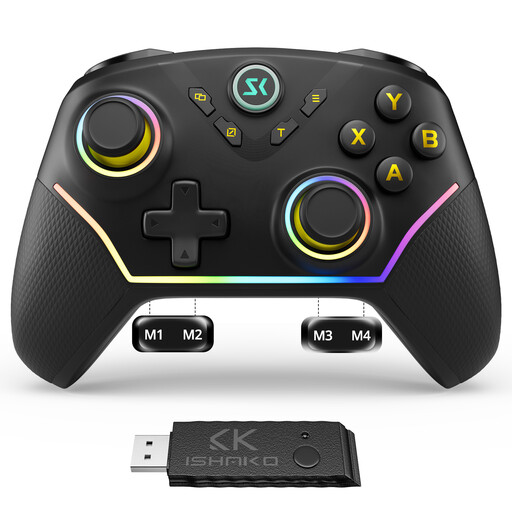
For PC and Nintendo Switch players looking for extra rear buttons and a choice of connection options.
The product description lists Bluetooth, 2.4 GHz and USB, along with four programmable rear buttons and Hall Effect sticks and triggers.
According to the product description, it isn’t compatible with Xbox or PlayStation. Check support for your specific device and game.
 No image available
For players using supported Xbox consoles or Windows PCs who want to play wirelessly.
The listing includes Xbox Wireless and Bluetooth, as well as textured grips and a hybrid D-pad.
Requires two AA batteries. Microsoft notes that rechargeable AA batteries can’t be charged in the controller.
 No image available
For PS5 players; Sony also describes connecting to supported Windows PCs via USB or Bluetooth.
The listing includes haptic feedback, adaptive triggers and a USB cable.
Sony says adaptive triggers are only available when supported by the game.
 No image available
A wired option for supported Xbox consoles and Windows PCs, if a cable is convenient where you sit.
GameSir lists Hall Effect sticks and two lockable rear buttons. It connects via USB-C.
The listing specifies a 3 m USB-C connection; check that it reaches from your device to your seat.
 No image available
For players specifically looking for a controller for Nintendo Switch 2.
Nintendo lists assignable GL/GR buttons and a headphone jack. The listing describes a wireless connection and an included USB-C cable.
Check your exact Switch model to make sure the controller and console are compatible.
No. Reflections are caused by the screen and incoming light, not the controller. The German Federal Institute for Occupational Safety and Health treats glare and protection from sunlight as matters of the screen environment, so check your light sources and screen position separately.
Yes. Sony says you can connect it to supported Windows devices via USB or Bluetooth. The game must support the controller, and some features may not be available depending on the game and device.
No. Microsoft notes that rechargeable AA batteries can’t be charged in the controller and need a suitable external charger.
For goods bought in the EU, you’re generally entitled to a minimum two-year legal guarantee from the date you receive them, as explained by Your Europe, the European Union’s information portal. This right is against the seller and is separate from any additional manufacturer’s warranty.
The German Environment Agency recommends removing batteries and rechargeable batteries from old electrical appliances before returning them, if this can be done easily, and disposing of them appropriately.