
Lieferung heute & morgen

Qualitätsgarantie

Willkommens-Angebote freischalten: KOSTENLOSE Lieferung | Bis zu 80 % RABATT | Kostenlose 30-Tage-JoyPlus-Testphase
App herunterladen
Choosing a new computer mouse can be more complicated than it first appears. The market is flooded with models that advertise high DPI counts, countless buttons, and aggressive marketing slogans. However, not every expensive or heavily promoted mouse is the right one for your needs. Often, these exaggerated features are what lead to a bad purchase. As your Joybuy Product Recommendation Officer, I'll help you identify the crucial criteria and make an informed decision.
Before you decide on a model, you should be aware of the three most common traps that lead to dissatisfaction and unnecessary expense:
To avoid a bad purchase, focus on the technical fundamentals that are relevant to your daily use. Here are the three most important aspects to consider.
The choice of connection technology directly impacts reliability, flexibility, and use case.
The sensor is the heart of every mouse. The DPI number indicates how sensitive the mouse is to movement.
The physical shape of the mouse is crucial for long-term comfort.
Here are some models tailored to specific user profiles that successfully avoid the pitfalls mentioned.
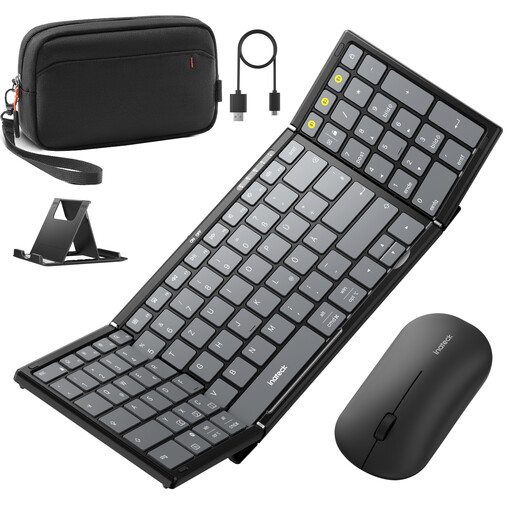
Why This Fits Their Persona: Ideal for commuters, students, or home office users who frequently switch between devices (PC, tablet, smartphone). The set is compact, easy to transport, and offers maximum connectivity for productive work on the go.
Bypasses the unreliable wireless connection trap with Tri-Mode connectivity (2.4G + Dual-Bluetooth), ensuring a stable connection across various devices.
A complete solution with a keyboard, mouse, stand, and pouch. The mouse supports simultaneous connection to multiple devices with quick switching.
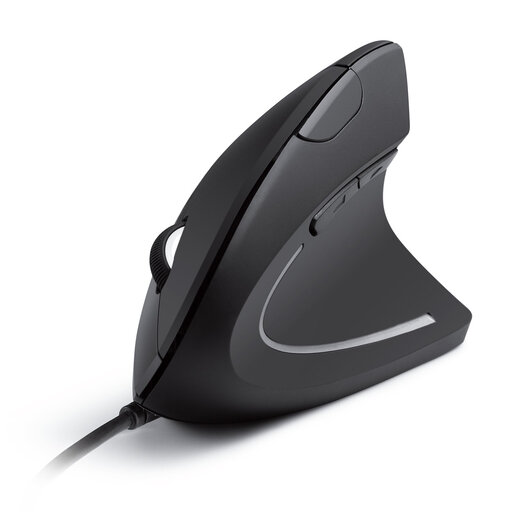
Why This Fits Their Persona: Perfect for office workers and creatives who spend long hours at the PC and want to prevent or alleviate wrist discomfort. The vertical posture provides noticeable relief for the arm and wrist.
Debunks the "one-size-fits-all" ergonomics myth by offering a specific, science-based solution for wrist strain, rather than just a vaguely contoured shell.
Promotes a natural "handshake" position to reduce muscle strain. The wired connection ensures maximum reliability without battery changes.
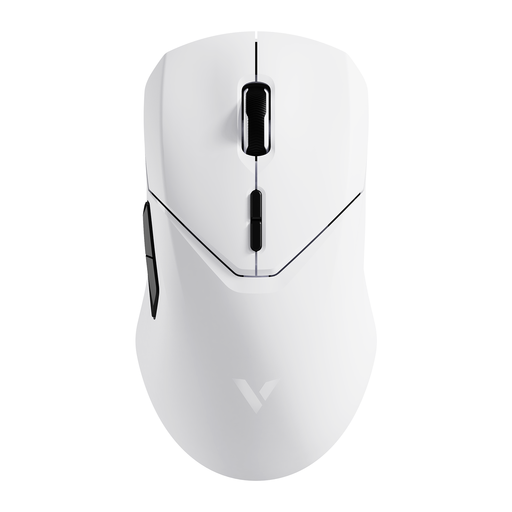
Why This Fits Their Persona: Designed for gamers who demand the highest precision, minimal latency, and customisation. This mouse offers competition-level technical specifications without unnecessary gimmicks.
Sidesteps the DPI trap by not only offering a high maximum value (26,000 DPI) but combining it with a high-quality PAW-3398 sensor and a 4K polling rate, which delivers real, tangible precision.
Extremely low latency thanks to a 4000 Hz wireless polling rate. The lightweight design (68g) and long battery life (up to 180 hours) support extended gaming sessions.
We have compiled a complete, up-to-date list of products that fully meet these strict selection criteria and German safety regulations.
Battery life varies greatly depending on the model, frequency of use, and battery type. Simple models with AA batteries can last several months to a year, such as the RAPOO 1680 with a stated runtime of up to 12 months. High-performance gaming mice with built-in rechargeable batteries, like the RAPOO VT9Pro, often provide over 100 hours of active use per charge. Always check the manufacturer's specifications and look for power-saving features like an automatic standby mode.
Yes, in many cases, a gaming mouse is an excellent choice for the office. They typically offer superior precision, high-quality sensors, and a durable, ergonomic build. The additional programmable buttons can also be useful for office applications. A potential drawback could be the often flashy design with RGB lighting, which might look out of place in a professional environment. For open-plan offices, a dedicated silent mouse is often the more considerate choice.
DPI stands for "Dots Per Inch" and is a measure of the mouse's sensitivity. A higher DPI number means the cursor moves further across the screen for the same physical movement of the mouse. For everyday office work and web browsing on a Full HD monitor, 800 to 1600 DPI is ideal. Gamers or users with very large monitors (4K or Ultrawide) benefit from higher, adjustable DPI values to quickly switch between precise control and fast movements. However, a value above 8000 DPI is not practical for the vast majority of users.