
Lieferung heute & morgen

Qualitätsgarantie

Willkommens-Angebote freischalten: KOSTENLOSE Lieferung | Bis zu 80 % RABATT | Kostenlose 30-Tage-JoyPlus-Testphase
App herunterladen
A big-screen experience in your own home, more flexible than any TV—the fascination with projectors is as strong as ever. But the market is full of technical promises that, upon closer inspection, turn out to be costly disappointments. As your Joybuy Product Recommendation Officer, I'll help you identify the crucial features and avoid marketing traps, ensuring your investment pays off in the long run.
Before we dive into the important specifications, let's shed light on the three most common pitfalls that can lead to frustration when choosing a projector.
To make an informed decision, focus on the following three technical features. They are the key to a long-lasting and satisfying home cinema experience.
The native resolution is the actual number of physical pixels the projector can display. It is the most important factor for image sharpness.
Brightness, measured in ANSI lumens, determines how well the image is visible in different lighting conditions.
Modern projectors are far more than just playback devices. Their smart capabilities and connection options define their ease of use.
Here are some recommendations tailored to specific use cases that meet the quality criteria mentioned above.
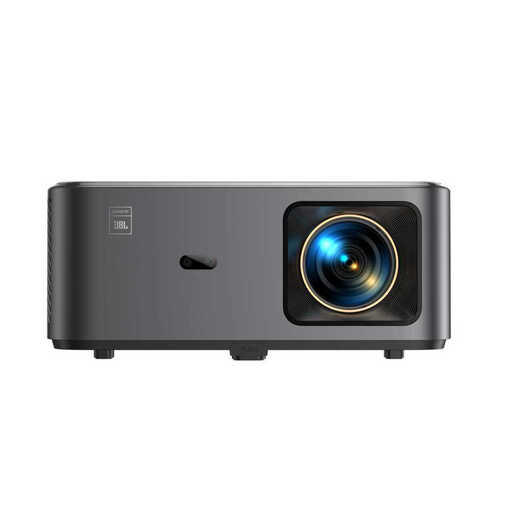
Why This Fits Their Persona: Ideal for users seeking an all-in-one solution for their living room cinema. The integrated Google TV provides direct access to over 7,000 apps, while the JBL sound system delivers room-filling audio without needing an additional soundbar.
It bypasses the "smart deception" by relying on the fully certified Google TV. Additionally, the native 1080p resolution is clearly communicated, avoiding the "4K-supported" fallacy.
Fully integrated Google TV for direct app access; Sound by JBL with Dolby Audio support; Automatic focus and keystone correction.
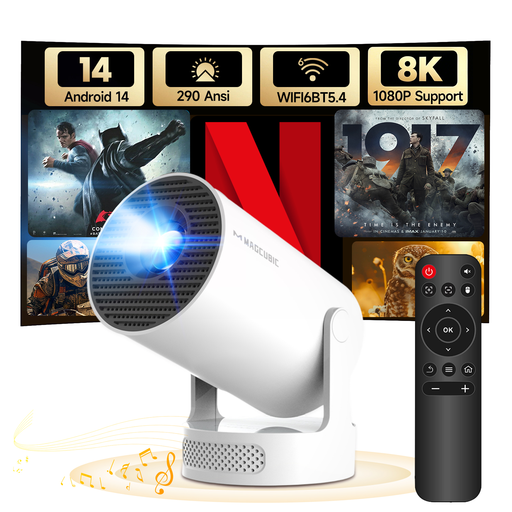
Why This Fits Their Persona: Perfect for renters in smaller apartments or people who want to use the projector in different rooms. Its extremely compact design and 180° rotating stand allow for projection onto walls or even the ceiling.
The brightness is realistically stated at 290 ANSI lumens for a mini projector, instead of advertising with fantasy values. The modern Android 14 system ensures future-proof and smooth app usage.
Ultra-portable design with a 180° rotating stand; Integrated Android 14; Wi-Fi 6 and Bluetooth 5.4 for fast connectivity.
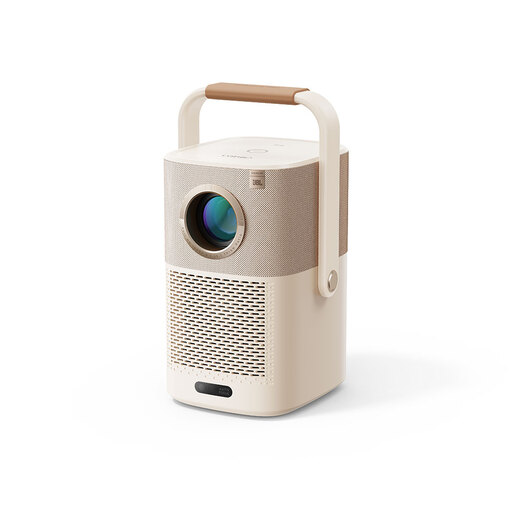
Why This Fits Their Persona: Designed for outdoor use. The integrated battery allows for up to 2.5 hours of movie playback, ideal for garden parties, camping, or movie nights on the patio, all without a power outlet. The practical handle doubles as a stand.
This model is an honest outdoor solution. It doesn't promise exaggerated brightness for daytime use but is optimised for dusk and darkness. The Google TV dongle provides full-fledged smart functionality.
Integrated battery for mobile use; Practical handle and stand design; Google TV for a comprehensive streaming experience.
We have compiled a complete, real-time updated list of products that fully meet these strict selection criteria and local safety regulations.
1. How many ANSI lumens do I really need? This heavily depends on your environment. For a dedicated, completely dark cinema room, devices with 300-500 ANSI lumens are sufficient. For a living room that can be darkened with curtains, 500-1500 ANSI lumens are a good choice. If you plan to use the projector in daylight or outdoors at dusk, you should consider models with over 1500 ANSI lumens.
2. Can a projector completely replace a TV? Yes, a modern smart projector can replace a TV. The key requirements are sufficient brightness for your room, a fast and stable operating system like Google TV for app access, and good audio quality or easy connection options for external speakers. Also, consider the lamp life, which for LED projectors is often 20,000 hours or more, corresponding to many years of daily use.
3. What do automatic keystone correction and autofocus mean? These are convenience features that significantly simplify setup. The autofocus automatically sharpens the image, so you don't have to manually turn a dial. Automatic keystone correction adjusts for distortions that occur when the projector is not placed centrally and at a right angle to the screen. The image is automatically straightened into a perfect rectangle, allowing for flexible placement of the device in the room.