
Lieferung heute & morgen

Qualitätsgarantie

Willkommens-Angebote freischalten: KOSTENLOSE Lieferung | Bis zu 80 % RABATT | Kostenlose 30-Tage-JoyPlus-Testphase
App herunterladen
Choosing the right AM5 motherboard is the foundation for any high-performance PC built on the AMD Ryzen 7000, 8000, or 9000 series. But the market is flooded with technical specs and marketing jargon that make an informed decision difficult. As your Joybuy Product Recommendation Officer, I'm here to help you cut through the noise and avoid common cost traps, ensuring you get a component that perfectly fits your needs.
Before we dive into the technical details, let's clear up three common misconceptions that often lead to poor purchasing decisions.
To buy a suitable AM5 motherboard, you should focus on the specifications that will impact your actual usage.
The chipset is a key determinant of your system's functionality and expansion capabilities.
Modern interfaces are crucial for the longevity and convenience of your system.
Here are some recommendations tailored to different user profiles that specifically avoid the pitfalls mentioned above.
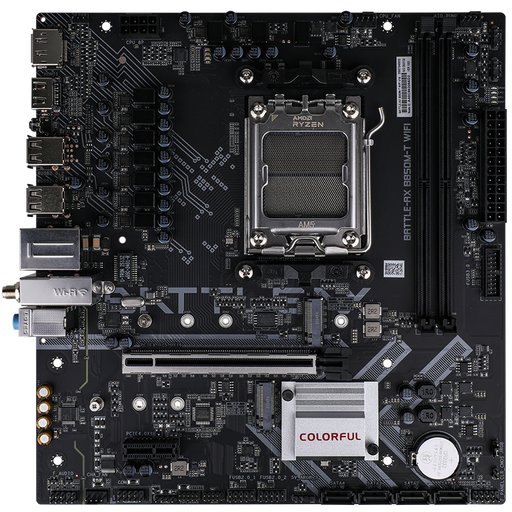
Why This Fits Their Persona: This M-ATX board provides all the essential AM5 features, like a PCIe 5.0 x16 slot and DDR5 support. It's ideal for users who want to build a powerful yet compact and cost-effective system without unnecessary luxury features.
It avoids the cost trap of an oversized power delivery system, focusing on a solid baseline feature set that is sufficient for most CPUs and use cases.
Offers a modern foundation with PCIe 5.0 for the GPU, a PCIe 5.0 M.2 slot, and 2.5G LAN at an attractive price point.
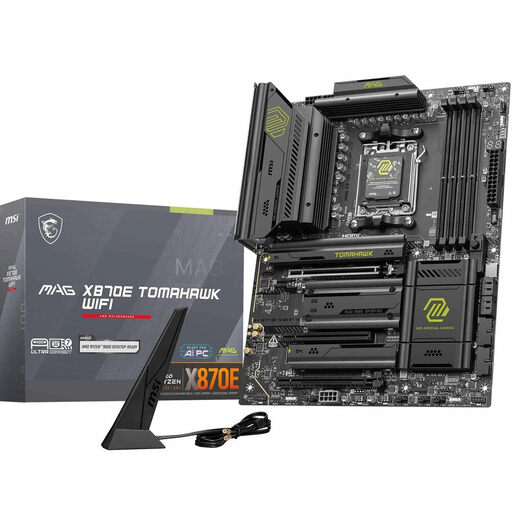
Why This Fits Their Persona: This MSI motherboard is designed for demanding gamers. It combines robust power delivery for high-end CPUs with cutting-edge connectivity like WiFi 7, 5G LAN, and multiple PCIe 5.0 slots for maximum gaming and streaming performance.
It solves the problem of neglected connectivity with a comprehensive I/O panel, including a USB4 port that prevents data throughput bottlenecks with external devices.
Stable power delivery via a 14+2+1 Duet Rail Power System and future-proof connectivity with two M.2 Gen5 slots and Wi-Fi 7.
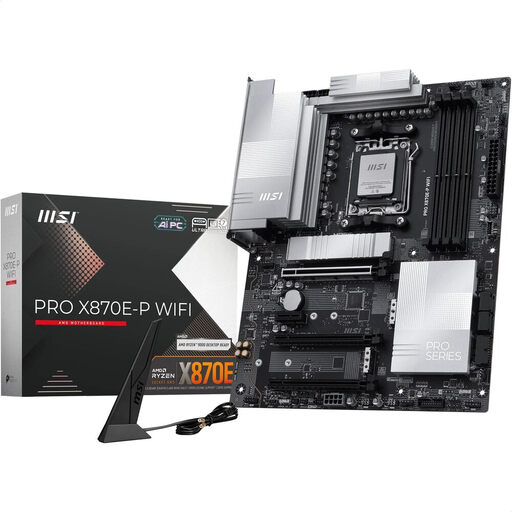
Why This Fits Their Persona: This board is designed for professional users and enthusiasts who need maximum bandwidth for data-intensive tasks like video editing or 3D rendering. The combination of the X870E chipset, USB4, and 5G LAN is ideal for this purpose.
It offers genuine, usable future-proofing. The investment in features like an M.2 Gen5 slot and USB4 (40Gbps) pays off for power users who need to move large amounts of data quickly.
Comprehensive high-speed connectivity with PCIe 5.0, USB4, and Wi-Fi 7. The robust 14+2+1 phase power delivery ensures stable operation even under full load.
We have compiled a complete, real-time updated list of products that fully meet these strict selection criteria and quality standards.
Do I really need an X870E motherboard, or is a B850 sufficient? For the vast majority of users, including most gamers, a B850 motherboard is perfectly sufficient. It offers the most important modern features, like PCIe 5.0 for the graphics card and fast DDR5 support. An X870E board is only worth considering if you plan to run multiple PCIe 5.0 devices (e.g., two M.2 Gen5 SSDs) simultaneously at full speed or engage in extreme overclocking.
What is the advantage of PCIe 5.0 for M.2 SSDs in 2026? The main advantage is the theoretical doubling of transfer speeds compared to PCIe 4.0. In practical use, especially for game loading times or launching applications, the difference is currently barely noticeable for most users. However, for professional users who regularly edit very large files (e.g., 8K video footage), the time savings can be significant. For most others, a fast PCIe 4.0 SSD is the more cost-effective choice.
How important is the power delivery (VRM) for a Ryzen 9000 processor? Stable power delivery is crucial for the CPU's performance and longevity. A Ryzen 9 processor has higher power demands than a Ryzen 5. Instead of just counting the number of phases, it's more important to look at the quality of the components (e.g., "Smart Power Stages" or "DrMOS") and good VRM cooling. A high-quality motherboard with a 12+2+1 phase design is typically more than sufficient for running a Ryzen 9 under normal conditions and even with moderate overclocking.