
Lieferung heute & morgen

Qualitätsgarantie

Willkommens-Angebote freischalten: KOSTENLOSE Lieferung | Bis zu 80 % RABATT | Kostenlose 30-Tage-JoyPlus-Testphase
App herunterladen
A tablet offers portability, while a laptop delivers productivity. An Android tablet with a keyboard combines the best of both worlds, offering a versatile solution for school, work, and leisure. The challenge is finding a device that packs the right features at a reasonable price without getting lost in marketing hype.
This article serves as your guide. We'll introduce a selection of devices and explain the key features to consider when making your decision. Our goal is to provide you with an objective basis for purchasing a tablet that truly meets your specific needs.
Choosing the right tablet depends on your individual needs. The following criteria will help you understand the technical specifications and make an informed decision.
Screen size is a key factor. A large 13-inch tablet provides a comfortable workspace that nearly rivals a laptop, making it excellent for multitasking or media playback. Smaller models around 10 inches are more compact and portable.
For creative tasks, the technology is just as crucial as the size. A tablet for drawing should support high pressure sensitivity. Levels like 4096 points of pressure allow for precise stylus input with a compatible pen. A high refresh rate (e.g., 120 Hz) also ensures smoother visuals during fast motion and scrolling.
Your ability to be productive is largely determined by the accessories. A bundle that already includes a tablet with a stylus and keyboard ensures all components are perfectly matched, with no extra costs for peripherals.
For users who need to be online on the go, a tablet with SIM card and LTE is a smart choice. It provides mobile internet access without needing a Wi-Fi network or a smartphone hotspot. Pay attention to the supported network standards (e.g., 4G LTE) and whether the device supports Dual SIM for added flexibility.
A tablet's performance determines how smoothly applications run. An octa-core processor is standard today for fluid multitasking. The amount of RAM is also crucial, especially if you use multiple apps simultaneously. Some models offer virtual RAM, which expands the physical memory when needed.
An up-to-date operating system, like on an Android 15 tablet, not only provides access to the latest features and apps but also ensures regular security updates. For many users handling basic office tasks, emails, and video conferences, a powerful tablet can certainly serve as a laptop replacement.
Based on the criteria above, we have curated a selection of devices that offer a comprehensive package of performance, accessories, and value for money.
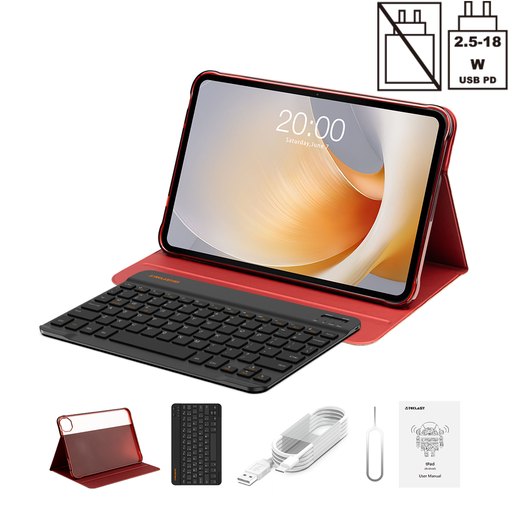
Why It Stands Out: The T65 Plus stands out with its exceptionally large 13.4-inch display featuring a smooth 120 Hz refresh rate. Combined with comprehensive connectivity through Dual SIM 4G LTE and 5G Wi-Fi, it's designed for demanding multitasking and media consumption.
Pros:
Who Is It For? This model is aimed at users who want large screen real estate for productive tasks or an immersive movie experience. Its LTE functionality also makes it a great choice for professionals and travellers who need a versatile device as a laptop replacement on the go.

Why It Stands Out: The ArtPad Pro is specifically tailored for creative users. Its 12.7-inch 2K display, paired with the included T-Pen, supports 4096 levels of pressure sensitivity, making it a precise tool for digital drawing and note-taking.
Pros:
Who Is It For? Ideal for aspiring creatives, students, and hobby artists looking for a tablet for drawing and taking notes. Anyone wanting to buy a Teclast tablet that combines creativity and productivity will find this to be a cohesive package.
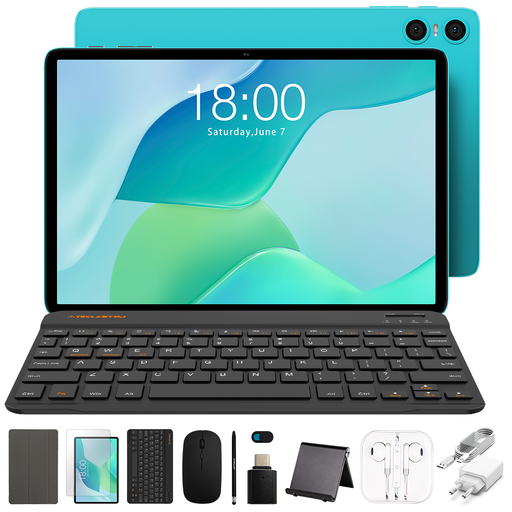
Why It Stands Out: The P33 is an extremely budget-friendly all-in-one package. It includes not just the tablet but also a keyboard case, a mouse, and a stylus, making it ready for basic office and study tasks right out of the box.
Pros:
Who Is It For? This model is an ideal budget tablet for students, families, or users with basic needs like browsing, email, and video streaming. It offers unbeatable value for money for anyone looking for a ready-to-go, all-in-one solution.
Didn't find the right model for your needs? Every use case is unique, and sometimes different specifications or sizes are required. For a broader selection of devices that combine productivity and mobility, it's worth exploring other alternatives.
Discover our full range of bluetooth keyboard tablets and find the perfect device for your needs.
For many everyday tasks like web browsing, writing emails, video conferencing, streaming, and using office apps, a powerful tablet can serve as a laptop replacement. However, for specialized software that demands high computing power (e.g., professional video editing or complex programming environments), a dedicated laptop is generally still the more suitable choice.
A budget tablet for students should offer a good balance of price and features. Key characteristics include sufficient battery life for long lecture days, a clear display for reading texts, stylus support for handwritten notes, and an included keyboard for writing papers. Solid performance for research and multitasking is also a plus.
The connection process is usually straightforward: