
Lieferung heute & morgen

Qualitätsgarantie

Willkommens-Angebote freischalten: KOSTENLOSE Lieferung | Bis zu 80 % RABATT | Kostenlose 30-Tage-JoyPlus-Testphase
App herunterladen
Choosing the right CPU cooler is crucial for the stability and performance of any PC. However, the market is flooded with marketing promises, complex technical data, and a seemingly endless selection of models. This often leads to purchase decisions you later regret—whether due to unexpected incompatibility, disappointing cooling performance, or excessive noise.
As your Joybuy Product Recommendation Officer, I'm here to help you identify these pitfalls and make an informed decision. We'll focus on the facts that truly matter.
Before we get to the recommendations, let's look at three common issues that frequently lead to buyer's remorse:
To avoid these mistakes, you should check three core parameters. These form the foundation for stable and quiet CPU cooling.
The most basic requirement is compatibility with your motherboard's CPU socket. Current platforms are primarily Intel LGA1700 (and its successor, LGA1851) and AMD AM5. Check the product specifications to ensure the mounting hardware for your socket is included.
Furthermore, measure the available space in your case:
Both technologies have their place and are suited for different use cases:
A cooler's performance depends heavily on the fans used. Two metrics are key here:
Modern PWM-controlled fans, like NZXT fans or ARCTIC's P-series, allow for dynamic speed adjustment, providing a good balance between cooling performance and low noise levels.
Here are some products tailored to specific user profiles that expertly navigate the pitfalls we've discussed.
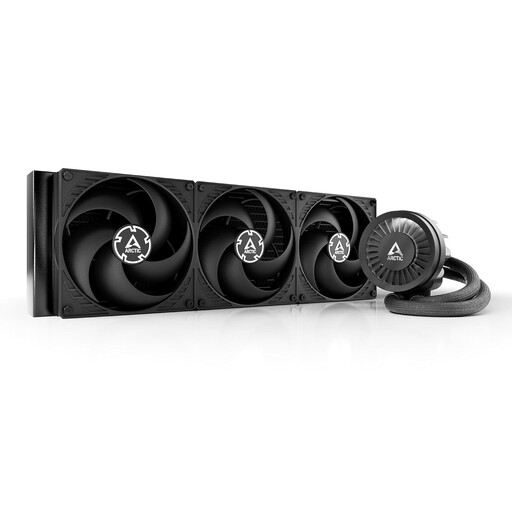
Why This Fits Their Persona: Ideal for users who want to get the absolute maximum out of high-end CPUs from Intel or AMD. The large 420mm radiator surface provides enormous thermal headroom for demanding applications and overclocking.
Sidesteps the "bigger is better" trap because, in this case, size genuinely correlates with high cooling performance. The additional VRM fan addresses system stability holistically, rather than just cooling the CPU.
High cooling capacity thanks to a 420mm radiator and three 140mm fans. Integrated VRM cooling for stable operation under load. Simplified cable management.
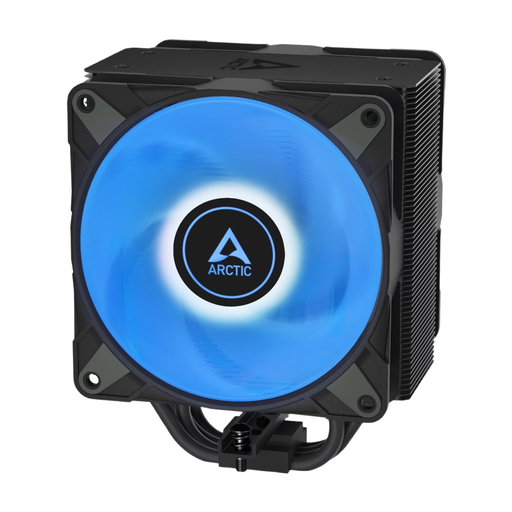
Why This Fits Their Persona: Perfect for users seeking a reliable and quiet air cooler with customisable A-RGB lighting, without the complexity and potential risks of liquid cooling.
Avoids the "RGB trap" by using ARCTIC's proven P-series fans, which are optimised for high static pressure. The lighting is an addition, not a compromise on cooling performance.
Efficient push-pull configuration with two 120mm fans. Simplified fan mounting via a click system. High reliability of air cooling.

Why This Fits Their Persona: An excellent choice for PC builders who value a clean interior and a straightforward assembly process. The integrated frame for two fans significantly reduces the effort of installation and cable management.
Directly solves the frustration of the compatibility and installation trap. Instead of having to align and wire two separate fans, a single, stable unit is mounted. This saves time and frustration.
Greatly simplified installation and clean cable management. The fans are designed for a balanced compromise between static pressure and airflow.
We have compiled a complete, up-to-date list of products that fully meet these strict selection criteria and UK safety regulations.
No. Compatibility depends on two factors: the CPU socket (e.g., AM5, LGA1700) and the physical dimensions. Always check the manufacturer's socket compatibility list. Additionally, measure the clearance for tall RAM modules and the maximum allowable cooler height for your PC case to ensure the cooler will physically fit.
A CPU air cooler transfers heat via metal heat pipes to a fin stack, which is cooled by fans. It is mechanically simple and very reliable. An AIO liquid cooler uses a fluid that is pumped through a closed loop to a radiator, where the heat is dissipated into the ambient air. AIOs can often achieve higher cooling performance and provide a cleaner look inside the case, but they have more potential points of failure (pump, tubing).
That depends on the specific product. Many modern RGB fans use a standardised 3-pin 5V ARGB connector that can be connected directly to compatible motherboards. However, some ecosystems, like NZXT's, offer advanced features and easier synchronisation via a proprietary controller and its associated software. It's essential to check the product description to ensure compatibility.