
Lieferung heute & morgen

Qualitätsgarantie

Willkommens-Angebote freischalten: KOSTENLOSE Lieferung | Bis zu 80 % RABATT | Kostenlose 30-Tage-JoyPlus-Testphase
App herunterladen
By the Joybuy Product Recommendation Officer, 10 July 2026
Many ambitious PC gamers face a difficult choice: should their new monitor offer a crystal-clear 4K resolution for immersive single-player adventures, or an ultra-high refresh rate for a competitive edge in esports titles? Until now, this often meant making a compromise or even purchasing two separate displays. The introduction of dual-mode gaming monitors aims to solve this dilemma.
This article explains how this technology works and presents select models that unite both worlds—high resolution and maximum speed—in a single device. Our goal is to provide you with an objective basis for your purchasing decision.
Choosing the right monitor depends on several technical factors. Here are three key aspects to consider when deciding on a dual-mode model.
The core feature of these monitors is the ability to switch between two native operating modes at the touch of a button or via the on-screen display (OSD) menu. Typically, these are:
To take full advantage of both modes, a powerful graphics card is required that can handle both 4K gaming at high frame rates and the extreme refresh rates in FHD mode.
For a monitor that needs to deliver both brilliant colours and high speeds, panel technology is crucial. A Fast IPS 1ms monitor is an excellent choice here. Compared to older IPS panels, these offer a significantly improved response time, often rated at 1 millisecond (Grey-to-Grey, GTG). This minimises ghosting and motion blur, which is beneficial for both the rich detail of 4K and the speed of an esports 320Hz monitor. At the same time, they retain the high colour accuracy and stable viewing angles typical of IPS panels.
Modern gaming setups often consist of more than just a PC. A monitor with HDMI 2.1 is therefore an essential feature for making the most of current consoles like the PlayStation 5 or Xbox Series X. The HDMI 2.1 standard allows for the transmission of 4K signals at up to 120 Hz. For PC gamers, DisplayPort 1.4 remains the port of choice to achieve the highest refresh rates of 160 Hz in 4K or 320 Hz in FHD. A selection of these ports offers maximum flexibility.
Based on the criteria mentioned, we have compiled a few models from the current market for you.
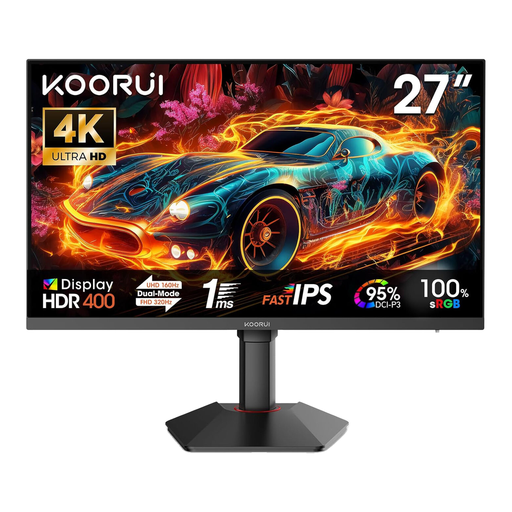
Why This Model Stands Out
The KOORUI G2741L is a prime example of dual-mode technology. It was specifically designed to bridge the gap between high-resolution story-driven gaming and responsive esports. The ability to switch between a sharp 4K image at 160 Hz and an extremely fast FHD image at 320 Hz at the touch of a button makes it a versatile centrepiece for any gaming setup.
Objective Specifications:
Who Is This Model For?
This model is aimed at users who don't want to compromise. It's a fitting solution for PC gamers who want to enjoy the graphical splendour of AAA titles in 4K and also benefit from maximum refresh rates in competitive shooters. Thanks to its HDMI 2.1 ports, it is also an interesting option for PS5 or Xbox Series X owners.
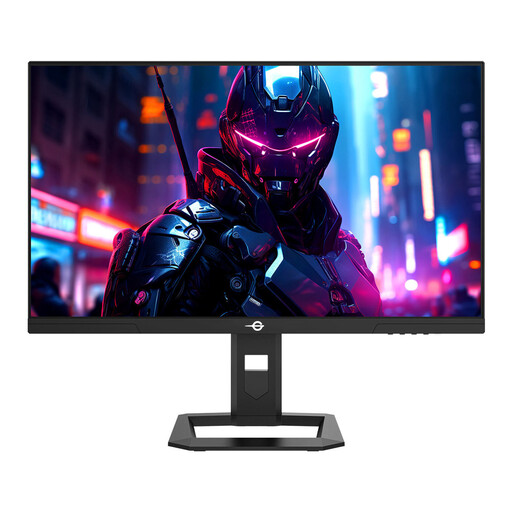
Why This Model Stands Out
The TITAN ARMY P2710S is not a dual-mode monitor, but it represents a focused alternative for competitive gamers. It concentrates on the "sweet spot" for many current gaming PCs: QHD resolution (2560 x 1440). With a very high refresh rate of 240 Hz, it offers an extremely smooth experience that goes beyond the standard 144 Hz or 165 Hz, without the demanding hardware requirements of 4K.
Objective Specifications:
Who Is This Model For?
This model is ideal for gamers whose primary focus is on fast-paced multiplayer games and who want a higher resolution than Full HD. Anyone with a mid-to-high-end graphics card aiming for maximum frames at 1440p will find this a specialised and powerful option.
Haven't found the right model for you yet? The gaming monitor market is diverse and constantly evolving. Discover more models, from ultrawide screens to specialised 4K displays, in our comprehensive Monitor Screens category.
1. Do I need a specific graphics card for a dual-mode monitor? Yes, to fully leverage the potential of such a monitor, a high-end graphics card (e.g., from the NVIDIA GeForce RTX 40 series or AMD Radeon RX 7000 series) is recommended. In particular, operating in 4K 160Hz mode places high demands on the GPU. For FHD 320Hz mode, a powerful CPU is also important, in addition to a strong GPU, to achieve the high frame rates.
2. Is a 27-inch 4K gaming monitor worth it? Yes, a 27-inch 4K gaming monitor offers a very high pixel density of about 163 PPI (Pixels Per Inch). This results in extremely sharp images, crisp text, and fine details in games. For users who sit close to the screen, the increase in sharpness is clearly noticeable and can significantly enhance immersion.
3. What is the advantage of HDMI 2.1 on a gaming monitor? The HDMI 2.1 port is particularly relevant for console gamers. It allows the PlayStation 5 and Xbox Series X to display games in 4K resolution at up to 120 Hz. For PC users, the standard also offers high bandwidth, but DisplayPort 1.4 is still typically used to achieve the highest refresh rates above 160 Hz.