
Lieferung heute & morgen

Qualitätsgarantie

Willkommens-Angebote freischalten: KOSTENLOSE Lieferung | Bis zu 80 % RABATT | Kostenlose 30-Tage-JoyPlus-Testphase
App herunterladen
Daily computer work puts a strain on your hands and wrists for many hours. A standard PC mouse often forces an unnatural forearm rotation, which can lead to increased strain on muscles and tendons. An ergonomic mouse is designed to keep the hand in a more neutral position, closer to its natural posture. This can help reduce strain and increase comfort during extended use.
This article analyses the technical features that define a good ergonomic mouse and presents a selection of models for different user profiles.
Choosing the right mouse depends on specific, measurable criteria. The following technical parameters are relevant for making an informed decision.
The form factor is the defining feature of an ergonomic mouse.
The connection technology affects flexibility and compatibility.
DPI (Dots Per Inch) indicates the sensitivity of the mouse sensor. A higher DPI value means the cursor travels a greater distance on the screen with the same hand movement. Models with adjustable DPI allow the user to tailor sensitivity to the task at hand—a lower DPI for precise graphic work, a higher one for fast navigation.
Programmable buttons, a second scroll wheel (often for horizontal scrolling), or dedicated customisation software can significantly boost daily workflow efficiency. These features are particularly relevant for power users and office professionals who want to automate repetitive tasks.
Based on the technical criteria above, we have compiled a selection of models for various use cases.
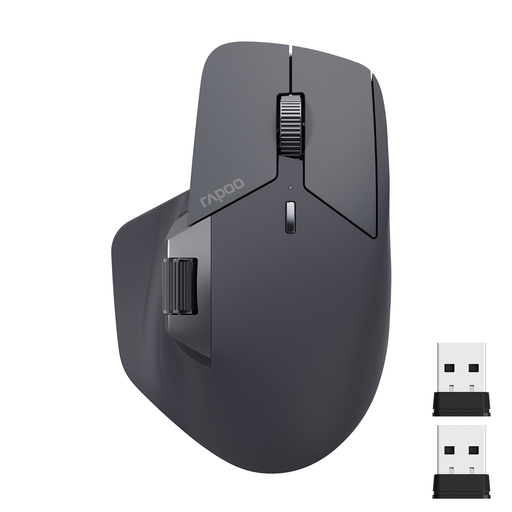
Why We Recommend It The RAPOO MT760L is engineered for maximum connectivity and customisation. Its ability to connect with up to four devices simultaneously (via Bluetooth 5.0, 2.4G, and cable) and switch between them seamlessly makes it a powerful tool for complex work environments. The M+ Cross-Computer Technology even allows control of multiple computers by moving the cursor across screen edges. With 11 programmable buttons and a side scroll wheel, it offers a high degree of personalisation.
Pros
Who It's For This model is ideal for power users, developers, and analysts who work across multiple devices and monitors and require a highly efficient, customisable workflow.
View the RAPOO MT760L on Joybuy.de
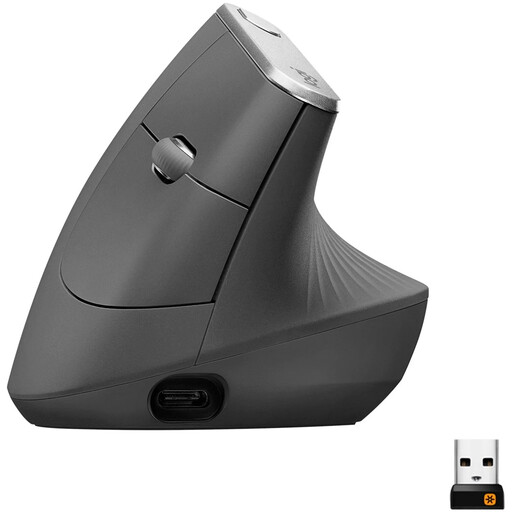
Why We Recommend It The Logitech MX Vertical stands out for its unique form factor. The 57-degree angle is engineered to place the hand in a natural handshake position, thereby reducing wrist pressure and forearm muscle activity. Its high-precision 4000 DPI sensor reduces the need for large hand movements. The mouse also supports switching between up to three devices.
Pros
Who It's For Users who specifically want to reduce wrist strain and are looking for a vertical mouse with a science-backed design approach. It is an excellent choice for long workdays in the office.
View the Logitech MX Vertical on Joybuy.de
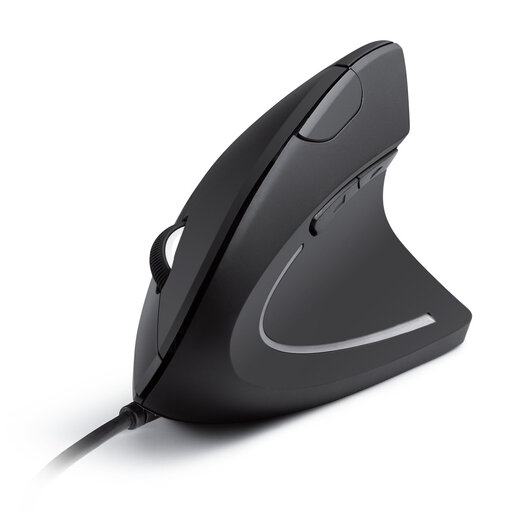
Why We Recommend It The Anker CE100 focuses on the core function of an ergonomic mouse: the vertical hand posture. As a wired model, it eliminates any concerns about battery life or connection stability. Its plug-and-play functionality makes it ready to use instantly, with no driver installation required. The additional forward and back buttons facilitate web browser navigation.
Pros
Who It's For Users looking for a straightforward and budget-friendly entry into the world of vertical mice. It is also suitable for those who prefer a permanently stable, wired connection for their PC mouse with no charging required.
View the Anker CE100 on Joybuy.de
The models featured here cover a range of needs. If you haven't found the perfect product for your specific requirements, you can find more alternatives in our collection.
Explore the full Computer and Mouse category
1. What makes a mouse ergonomic? A mouse is considered ergonomic when its shape is designed to hold the hand, wrist, and forearm in the most natural, neutral, and relaxed position possible. This is often achieved through special contouring, thumb rests, or a vertical orientation to reduce muscle strain during prolonged use.
2. How long does it take to get used to a vertical mouse? The adjustment period varies from person to person but typically ranges from a few days to two weeks. At first, control may feel unfamiliar as different muscle groups are engaged for fine motor skills. Most users report a more comfortable experience after a short break-in period.
3. Is a wireless or wired ergonomic mouse better? There is no one-size-fits-all answer; the choice depends on your priorities. A wireless mouse offers maximum flexibility and a clutter-free desk. A wired mouse provides a consistently stable, latency-free connection and never needs charging, making it a reliable choice for stationary workstations.
About the Author