
Lieferung heute & morgen

Qualitätsgarantie

Willkommens-Angebote freischalten: KOSTENLOSE Lieferung | Bis zu 80 % RABATT | Kostenlose 30-Tage-JoyPlus-Testphase
App herunterladen
Long days at the computer can lead to strain in the hand, wrist, and arm. An ill-fitting mouse often exacerbates this problem unnoticed until discomfort sets in. At the same time, managing multiple devices—like a laptop, desktop PC, and tablet—has become a daily challenge. A thoughtfully chosen ergonomic wireless mouse can not only increase comfort but also noticeably improve your work efficiency.
This article serves as a guide. We will provide you with objective selection criteria and present a curated list of models designed for professional users. Our goal is to offer you a solid basis for making an informed decision, grounded in technical features and practical benefits.
Choosing the right tool for your work should go beyond aesthetics. Three key aspects are particularly relevant for professional users.
The type of connection is crucial for flexibility. A multi-device Bluetooth mouse offers the advantage of not requiring an additional USB receiver (dongle). This is especially practical for users of MacBooks or ultrabooks, where USB-A ports are often scarce. Many models allow pairing with up to three devices, with the ability to switch between them at the press of a button. A wireless dongle, such as the Logi Bolt, can ensure a more stable connection in environments with significant wireless interference.
Ergonomics are personal. A mouse that is perfect for one person may be unsuitable for another. Look for a shape that matches your hand size and grip style (Palm, Claw, or Fingertip Grip). Contoured mice, like the MX Master series, are shaped for a relaxed hand posture, while vertical mice place the wrist in a more natural, handshake-like position. The goal is always to minimise strain on tendons and muscles.
Modern mice offer more than just clicking and scrolling. For developers, designers, and data analysts, the following features are important:
Based on the criteria mentioned, we have compiled a selection of models suitable for demanding work environments.
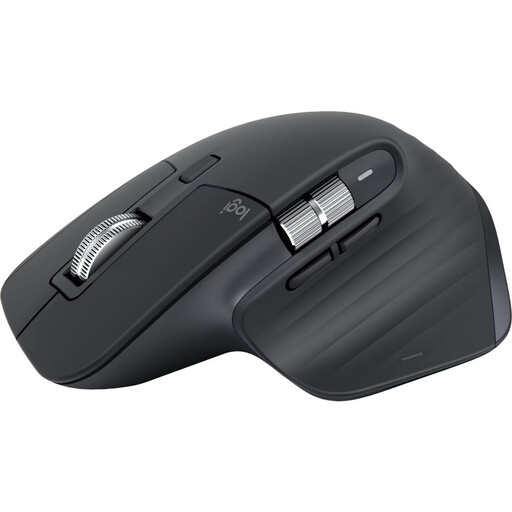
Why It Stands Out: The MX Master 3S Bluetooth Edition intentionally omits a USB dongle, relying entirely on a direct Bluetooth connection. This makes it the ideal mouse for MacBook and PC users who prefer a clean setup without occupied ports. According to Logitech, the Darkfield sensor with 8,000 DPI works on virtually any surface, including glass.
Pros:
Who It's For: Professional users who need a reliable multi-device mouse for a setup without USB-A ports and who value a quiet work environment.
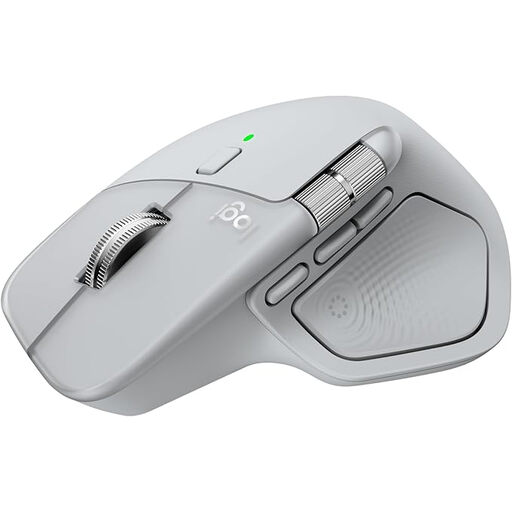
Why It Stands Out: The MX Master 4 builds on the success of its predecessors, introducing innovative features like customisable haptic feedback and the "Actions Ring"—a dynamic overlay that displays context-sensitive shortcuts directly at the cursor. It offers dual connectivity via Bluetooth and the included Logi Bolt USB-C receiver.
Pros:
Who It's For: Power users, creatives, and a great mouse for developers who seek cutting-edge technology to optimise their workflow and can benefit from customisable haptic and visual aids.
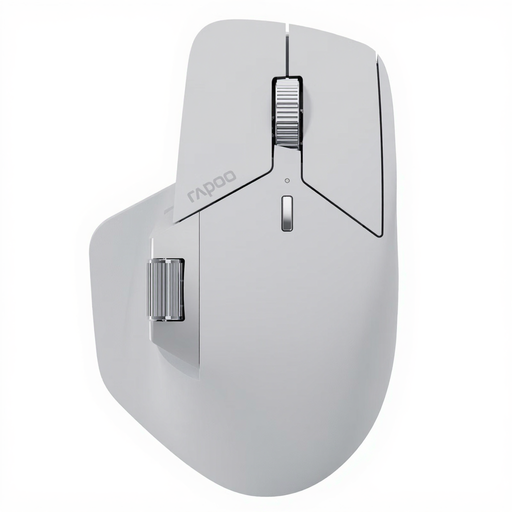
Why It Stands Out: The Rapoo MT760 PRO utilises innovative NearLink wireless technology, which promises extremely low latency and high energy efficiency. With the ability to connect to up to seven devices simultaneously (via NearLink, Bluetooth, and cable), it is a solution for highly complex workstations. The M+ Cross-Computer technology also enables seamless file transfers between different computers.
Pros:
Who It's For: Users with a large number of devices who require maximum connectivity and customisation. Its high polling rate and DPI also make it appealing to users who use their mouse for both work and demanding gaming.
The models presented cover many, but not all, use cases. If you are looking for different form factors, such as a vertical mouse, or other specialised features, you can find additional options in our broader selection.
? Discover more models in the Ergonomic Mouse category
An ergonomic mouse is designed to position the hand, wrist, and arm in the most neutral, relaxed posture possible. This is achieved through contoured shapes, thumb rests, or a vertical orientation. The goal is to reduce the unnatural twisting of the forearm (pronation) and the strain on tendons that can occur when using conventional flat mice.
Most multi-device mice have a dedicated button (often on the bottom or in the thumb area) to activate pairing mode and switch between devices. Typically, you press and hold the button to put the mouse into pairing mode, then select it in the Bluetooth settings of your computer, tablet, or smartphone. This process is repeated for each device. A short press of the same button will then switch between the connected devices.
For standard office applications on a Full HD monitor, a high DPI (Dots Per Inch) count is not essential. Values between 800 and 1,600 DPI are usually sufficient. A high DPI, such as 8,000 or more, becomes relevant when you are working with high-resolution monitors (4K or higher) or require very precise and fast mouse movements, as is the case with graphic design or gaming. A higher DPI value means the cursor travels a greater distance on the screen for the same physical movement of the mouse.