
Lieferung heute & morgen

Qualitätsgarantie

Willkommens-Angebote freischalten: KOSTENLOSE Lieferung | Bis zu 80 % RABATT | Kostenlose 30-Tage-JoyPlus-Testphase
App herunterladen
The search for a new gaming keyboard can quickly become overwhelming. The market is flooded with hundreds of models, all competing for attention with aggressive advertising and long feature lists. However, not every keyboard marketed as a "gaming keyboard" is a worthwhile investment. Many buyers only realise weeks later that they've fallen for marketing hype and purchased a product that doesn't meet their needs.
As a Joybuy Product Recommendation Officer, I'm here to help you identify these pitfalls. Instead of being dazzled by empty promises, we'll focus on the objective criteria that truly matter. Here are the most common mistakes to avoid when buying a keyboard:
To avoid a bad purchase, you should focus on three core aspects. These define the performance, feel, and longevity of your future keyboard.
The switches under each key determine the typing feel and response time. A mechanical keyboard offers a wide variety in this regard. The three main categories are:
Additionally, technologies like magnetic (Hall effect) switches are becoming established, which allow for an adjustable actuation distance (Rapid Trigger) for extremely precise control in games.
The size of the keyboard directly impacts ergonomics and the available space on your desk.
When making your selection, be sure to choose a German QWERTZ layout to avoid compatibility issues and frustration in daily use.
Modern keyboards offer more than just a USB port.
Here are some models that represent a considered choice for specific user groups based on objective features.
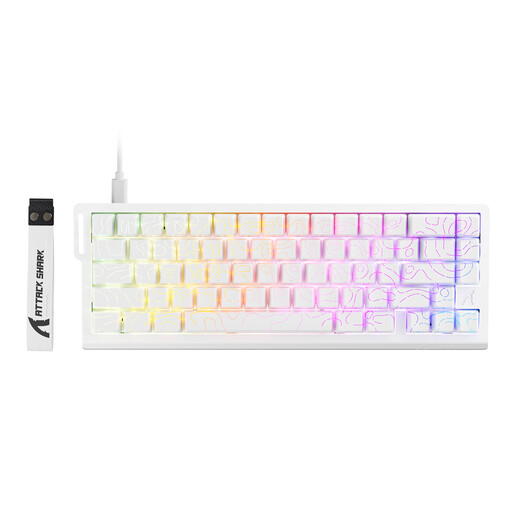
Why This Fits Their Persona: For gamers where every millisecond counts. The magnetic switches with Rapid Trigger functionality enable extremely fast and precise responses, as the actuation and reset points of the keys can be dynamically adjusted.
Instead of relying on empty "gaming" promises, this keyboard delivers measurable performance advantages through its 8000Hz polling rate and actuation sensitivity adjustable down to 0.1 mm.
The magnetic switch technology (Hall effect) offers superior customisability and durability compared to traditional mechanical contacts.

Why This Fits Their Persona: For users who value a custom typing feel, sound, and high-quality build. The gasket-mount structure and multi-layer dampening provide a rich, soft typing experience.
It bypasses the "switch lottery" by offering full hot-swap support for 5-pin switches. This gives the user complete control to adapt the typing feel to their preferences at any time.
The tri-mode connectivity (Bluetooth, 2.4GHz, USB-C) and the 4000mAh battery offer maximum flexibility for various devices and long usage periods without a cable.

Why This Fits Their Persona: Perfect for users seeking a clean desk and high performance in a compact format. The 65% layout saves space without sacrificing dedicated arrow keys.
This keyboard masterfully solves the "layout mistake": It offers a full German QWERTZ layout in a compact form factor, a rarity in the market for small keyboards.
The original CHERRY MX Low Profile Speed Switches guarantee extremely fast, precise, and durable performance, backed by a rating of over 100 million actuations.
We have compiled a complete, up-to-date list of products that fully meet these strict selection criteria and German safety regulations.
1. What is the difference between mechanical, optical, and magnetic switches? Mechanical switches actuate via a physical metal contact. Optical switches interrupt a beam of light, which speeds up the actuation process and reduces wear. Magnetic (Hall effect) switches measure the key's travel distance using a magnetic field, allowing for precise adjustment of the actuation point (Rapid Trigger) and are considered exceptionally durable.
2. How long does the battery of a wireless gaming keyboard last? Battery life varies greatly depending on usage and lighting. Models with large batteries (e.g., 4000 mAh or more) can last for several weeks or even months with moderate use and RGB lighting turned off. With intensive use and full illumination, the battery life can drop to just a few days. Many models can be used while charging via a USB-C cable.
3. Is a hot-swap keyboard suitable for beginners? Yes, absolutely. A hot-swap keyboard is actually very beginner-friendly. It lowers the barrier to entry into the world of custom keyboards, as no soldering skills are required. You can easily try out different switch types to find the perfect typing feel or replace a faulty switch yourself in seconds.