
Lieferung heute & morgen

Qualitätsgarantie

Willkommens-Angebote freischalten: KOSTENLOSE Lieferung | Bis zu 80 % RABATT | Kostenlose 30-Tage-JoyPlus-Testphase
App herunterladen
As a Joybuy Product Recommendation Officer, I see every day how saturated the market for PC accessories has become. Especially when searching for a new gaming keyboard, users are flooded with technical jargon and marketing promises. The result is often expensive buyer's remorse. Before you invest, you should know the three most common pitfalls that leave gamers and power users dissatisfied.
To make an informed decision, focus on the technical features that directly impact your user and gaming experience.
The switch under each key determines the typing feel, volume, and response speed. A mechanical keyboard offers a clear advantage here over cheaper membrane models. The most common types are:
The size of the keyboard directly affects ergonomics and the available space for your mouse.
Regardless of the size, be sure to select the correct regional QWERTY layout to avoid compatibility issues.
The choice of connection method depends on your priorities: maximum performance or maximum flexibility.
Here are some models tailored to specific user profiles that cleverly avoid the aforementioned pitfalls.

Why This Fits Their Persona: This model is designed for pure performance. The wired connection and linear Cherry MX Red switches guarantee lag-free input. The compact TKL keyboard format creates valuable space for wide mouse movements, which is crucial in competitive games.
It forgoes superfluous software and focuses on core features like a robust build with a metal plate and reliable switches, rather than marketing gimmicks.
High-quality CHERRY MX2A RED switches with a lifespan of over 100 million actuations; proper QWERTY layout.

Why This Fits Their Persona: This user wants to perfect their gear. The hot-swappable sockets allow for easy replacement of mechanical switches without soldering. The ultra-compact 65% layout saves space while retaining the essential arrow keys.
Instead of being locked into one switch type, the user can adapt the keyboard to their preferences. This prevents the 'wrong switch choice' pitfall and secures the investment long-term.
Hot-swap functionality for maximum customisation; dual-layer sound-dampening foam for improved acoustics; per-key RGB keyboard lighting.
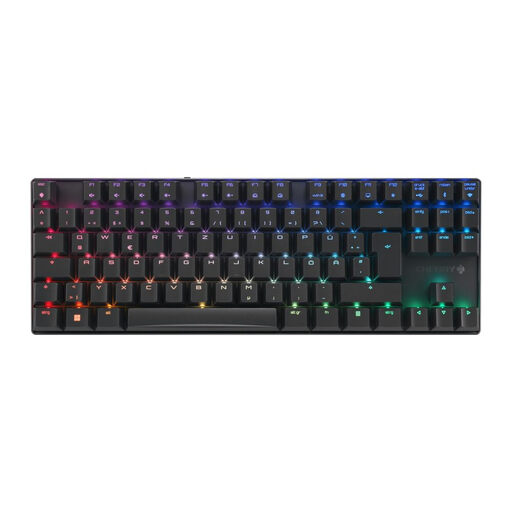
Why This Fits Their Persona: This person needs a keyboard for both gaming and productive work. The triple-mode connectivity (2.4 GHz, Bluetooth, wired) offers maximum flexibility. The tactile MX2A Brown switches are an ideal compromise between gaming response and a comfortable typing feel.
It addresses latency concerns in wireless keyboards with its <1ms gaming mode and solves the acoustics pitfall with tactile switches that won't disturb others in an office or home office setting.
Versatile triple-mode connectivity; robust aluminium housing; high-quality tactile Cherry MX Brown switches.
We have compiled a complete, up-to-date list of products that fully meet these strict selection criteria and all relevant safety standards.
A mechanical keyboard uses an individual, spring-loaded switch for each key. This results in a more precise, consistent, and durable typing experience with distinct tactile feedback. Membrane keyboards, found in most standard office keyboards, use a continuous rubber sheet under the keys. These wear out faster and provide what is often described as a "mushy" typing feel.
The lifespan is typically rated in millions of keystrokes per switch. High-quality switches, like those from Cherry MX, are often certified for over 50 million or even 100 million actuations. With normal to heavy use, such a keyboard can easily last for many years, making it a long-term investment in your setup.
Yes. Modern wireless gaming keyboards that use a dedicated 2.4 GHz wireless connection achieve latencies of under one millisecond. This value is imperceptible to humans and indistinguishable from a wired connection. Therefore, these models are fully suitable for professional gaming and esports. Only connections via Bluetooth may introduce a noticeable delay.