
Lieferung heute & morgen

Qualitätsgarantie

Willkommens-Angebote freischalten: KOSTENLOSE Lieferung | Bis zu 80 % RABATT | Kostenlose 30-Tage-JoyPlus-Testphase
App herunterladen
Choosing a gaming PC case is a fundamental decision when building or upgrading a system. It not only defines the aesthetics of your setup but also has a significant impact on cooling performance, noise levels, and the longevity of your components. Given the growing performance demands of modern graphics cards and processors, a well-thought-out case design is more important than ever.
This guide is designed to offer you objective assistance. We will highlight the crucial features of current cases and present a selection of models that are suited for various requirement profiles due to their specific characteristics.
Before you decide on a model, several technical and functional aspects should be considered to ensure the compatibility and performance of your future system.
An effective cooling concept is the foundation of a stable and high-performance gaming system. An airflow PC case with perforated front and top panels (mesh) allows for unrestricted airflow. This is particularly important for efficiently dissipating the waste heat generated by the CPU and GPU. In contrast, cases with solid glass fronts often offer a different aesthetic but can limit air intake. Pay attention to the number and size of potential fan positions, as well as compatibility with radiators for a PC case for water cooling.
The mid-tower ATX case is the most common form factor, offering a good compromise between space for powerful components and a moderate size. Ensure that the case is compatible with your motherboard's form factor (e.g., ATX, Micro-ATX, E-ATX). A recent trend is back-connect cases, designed for motherboards like ASUS BTF or MSI Project Zero. With these, the cable connections are moved to the back of the motherboard tray, resulting in exceptionally clean cable management in the visible area. Dual-chamber cases, which house the power supply and drives in a separate chamber, also contribute to a tidy interior and optimized airflow.
A PC case with a glass window, usually made of tempered glass, allows a view of your carefully selected components. In combination with an ARGB case, you can individually control and synchronize the lighting of fans and other elements. Practical aspects like tool-free removable side panels, well-placed dust filters, and a thoughtful cable management system with ample space behind the motherboard tray significantly simplify assembly and maintenance.
Here you will find a selection of cases that emphasize different aspects of design, cooling, and innovative features.
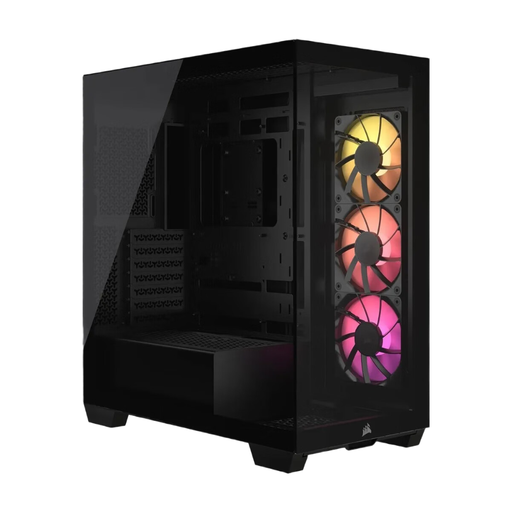
Why It Stands Out: The Corsair 3500X ARGB features a frameless panoramic aesthetic with continuous glass panels on the front and side. This design provides an unrestricted view of the components and is also engineered for compatibility with modern back-connect motherboards, enabling an exceptionally clean look.
Advantages:
Who Is It For? For PC builders who aim for a flawless and modern presentation of their hardware and want to leverage the benefits of back-connect systems for minimalist cable management.
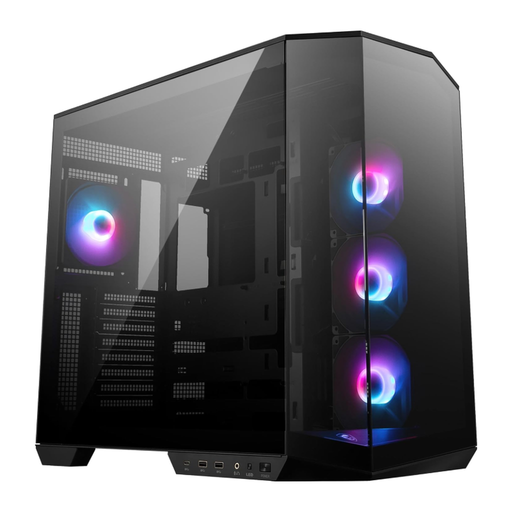
Why It Stands Out: The MSI MAG PANO 100R PZ is designed as a dual-chamber case that thermally separates the main heat-generating components from the power supply and drives. It is explicitly optimized for back-connect motherboards and comes with four pre-installed ARGB fans and a vertical GPU bracket.
Advantages:
Who Is It For? For users seeking a functional dual-chamber design for optimized thermal performance and planning to build a system with an MSI Project Zero or a similar back-connect motherboard.
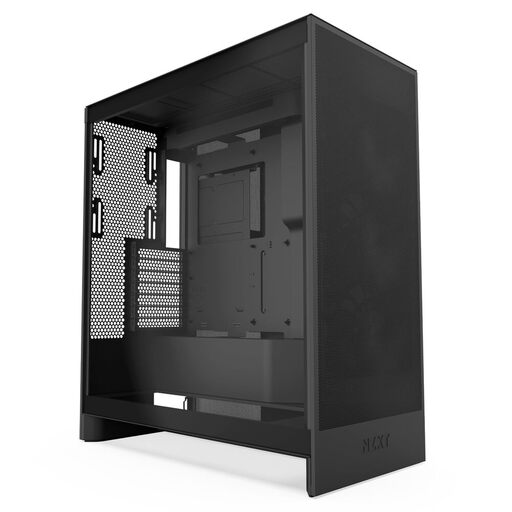
Why It Stands Out: The NZXT H7 Flow is consistently designed for maximum cooling performance. Its perforated panels and thoughtful fan layout make it a high-performance airflow PC case. A special feature is the ability to mount three 120mm fans on the bottom, directing cool air straight to the graphics card.
Advantages:
Who Is It For? For performance-oriented users and gamers who run a system with high-end components and for whom maximum cooling performance is the top priority.
If the models presented here don't exactly match your vision or if you're looking for a different color variant like a black PC case, you can find a wider selection in our corresponding category. There, you can compare various models that fit your individual setup.
Browse through our entire selection of Black PC Cases.
The key is a combination of three factors: sufficient airflow to cool your components, compatibility with the size of your motherboard, the length of your graphics card, and the height of your CPU cooler, and practical features like a good cable management system and easily accessible dust filters to simplify building and maintenance.
A back-connect case is specifically designed to support motherboards where the primary power and data connectors (e.g., 24-pin ATX, 8-pin CPU, SATA) are located on the back of the board. This allows nearly all cables to be routed behind the motherboard tray, resulting in an extremely tidy and cable-free appearance in the main chamber of the PC.
The required number heavily depends on the installed components. A solid base configuration for most gaming PCs includes two or three intake fans at the front and one exhaust fan at the rear. For particularly powerful systems with high-end CPUs and GPUs, additional fans on the top or bottom can significantly improve cooling performance and prevent heat buildup.