
Lieferung heute & morgen

Qualitätsgarantie

Willkommens-Angebote freischalten: KOSTENLOSE Lieferung | Bis zu 80 % RABATT | Kostenlose 30-Tage-JoyPlus-Testphase
App herunterladen
For many, the idea of enjoying films, series, or sporting events on a giant screen is the epitome of the perfect home cinema experience. However, with a vast array of technical terms and features, choosing the right device can quickly become overwhelming. Today's modern projectors offer far more than just a big picture; they are smart entertainment hubs that are easy to set up and flexible to use.
This article serves as your guide. We'll explain the most important features of a modern 4K home cinema projector and present a selection of models that stand out for their combination of image quality, smart features, and user-friendly operation.
To make an informed decision, it's helpful to understand a few core features that define a contemporary device.
Many projectors on the market advertise "4K supported" but have a native resolution of 1080p. This means the projector can receive and process a 4K signal, but it projects the image using a native Full HD display (1920 x 1080 pixels). Technologies like pixel-shifting enhance the perceived image sharpness, creating a detailed picture that is a clear step up from pure 1080p. These devices offer a great balance between high image quality and an accessible price point.
A smart 4K projector often makes external media players like streaming sticks or laptops redundant. Thanks to integrated operating systems (e.g., Google TV or Android TV), you can directly access apps like Netflix, YouTube, Prime Video, or Disney+. Look for a projector with Netflix and YouTube integration for maximum convenience. Connectivity is just as important: a projector with Wi-Fi and Bluetooth not only enables wireless content streaming (screen mirroring) but also allows for the easy connection of external speakers or headphones for better audio.
The days of painstakingly aligning a projector by hand are over. A projector with autofocus and keystone correction automatically sharpens the image and compensates for off-axis projection angles within seconds. This is especially practical if the device cannot be placed exactly in the centre of the screen or is frequently used in different locations—for example, as an outdoor projector for a movie night in the garden.
Based on the criteria above, we have curated a selection of projectors that are perfectly suited for the modern home cinema with their well-designed features.
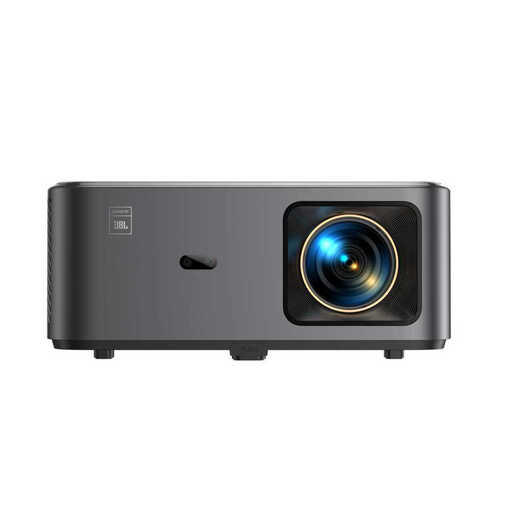
Why it stands out: The Yaber K2s positions itself as a versatile entertainment system. The combination of integrated Google TV, which offers access to over 7,000 apps, and the JBL co-developed sound system makes it a true all-in-one solution. A standout feature is its NFC function, which allows you to mirror your smartphone screen with a simple tap.
Pros:
Who is it for? For users seeking a hassle-free, all-in-one solution for movie nights and streaming, who also value good built-in sound quality without needing to immediately connect an external sound system.
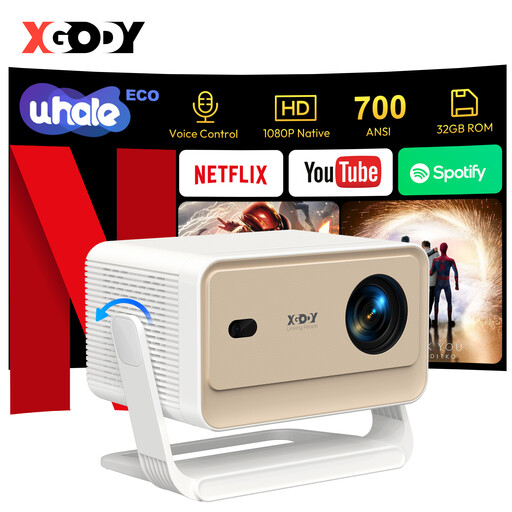
Why it stands out: The XGODY Gimbal N6 Pro distinguishes itself with its WhaleOS 3.0 operating system, featuring officially licensed Netflix. This ensures stable and smooth playback of the popular streaming service. Its fully automatic image adjustment, which even detects and adapts to obstacles, makes setup exceptionally convenient.
Pros:
Who is it for? For users for whom seamless and officially supported Netflix integration is a top priority. Ideal for anyone who appreciates a "plug-and-play" solution with advanced automatic features for maximum convenience.
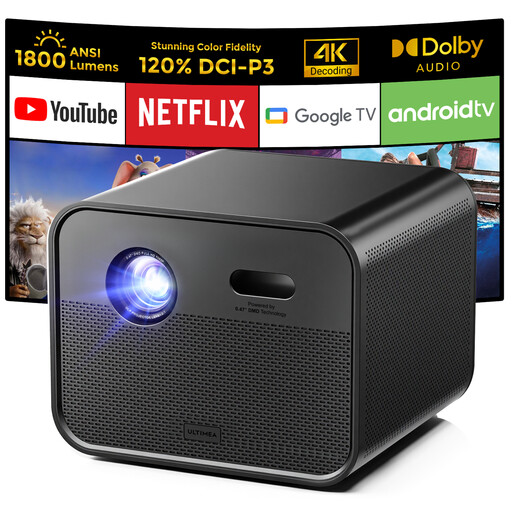
Why it stands out: The Ultimea Poseidon E100 focuses on high brightness and colour quality. With 1800 ANSI lumens and DLP technology, it is designed to deliver a bright and clear picture even in rooms that aren't completely dark. Its 120% coverage of the DCI-P3 colour space also promises exceptionally vibrant and true-to-life colour reproduction.
Pros:
Who is it for? For film and sports enthusiasts who demand the highest standards for image quality and are looking for a projector that impresses with its brightness and colour intensity. Its performance makes it a great choice for living rooms or as a flexible outdoor projector.
If our recommendations don't include the perfect model for your specific needs, don't worry. The market offers a wide variety of other devices with different specialities, whether it's portability, brightness, or specific gaming features.
Explore our entire selection of projectors that support 4K content and find the device that's the perfect fit for your home cinema.
? Explore More 4K Support Projectors
1. What does "4K supported" mean for a projector with a native 1080p resolution? Such a projector uses a Full HD chip (1920 x 1080 pixels) as its base. However, it can process a 4K video signal (3840 x 2160 pixels) and projects an image that appears sharper and more detailed than a pure 1080p picture, thanks to techniques like pixel-shifting. It's a cost-effective method to achieve higher image quality without the expense of a native 4K projector.
2. Can I watch Netflix directly on a smart projector? Yes, most modern smart projectors with operating systems like Google TV, Android TV, or proprietary systems (e.g., WhaleOS) allow you to install and use streaming apps like Netflix directly. Models with an official Netflix license often provide the most stable and user-friendly experience.
3. How important are autofocus and keystone correction really? These features are crucial for user convenience. Autofocus automatically ensures a sharp image without you having to manually adjust the lens. Keystone correction straightens the image when the projector isn't placed perfectly perpendicular to the screen. Together, these features enable flexible placement and setup in seconds, which is especially useful when the projector is used in different locations.