
Lieferung heute & morgen

Qualitätsgarantie

Willkommens-Angebote freischalten: KOSTENLOSE Lieferung | Bis zu 80 % RABATT | Kostenlose 30-Tage-JoyPlus-Testphase
App herunterladen
A good laptop backpack is more than just a way to carry your things; it's a daily companion for work, university, and travel. But the market is flooded with models whose marketing promises often fall short in practice. The results are poorly protected devices, impractical handling, and ultimately, a purchase you'll regret. As your Joybuy Product Recommendation Officer, I'll help you identify the crucial features and avoid the typical pitfalls.
Before we dive into the features worth looking for, it's important to understand the most common problems that often only become apparent after you've made the purchase.
To avoid a bad purchase, you should base your decision on objective and verifiable features. Focus on the following three core parameters.
The material determines the durability and protective capability of your backpack.
The heart of any laptop backpack is the compartment for your device.
A backpack must be comfortable, even when fully loaded.
Here are some models tailored to specific user profiles that successfully avoid the pitfalls mentioned.
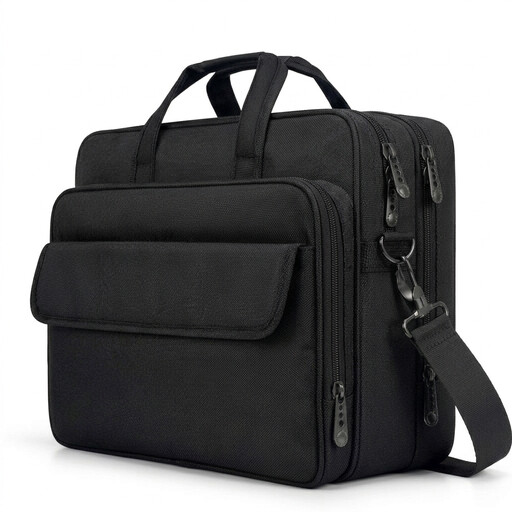
Why This Fits Their Persona: Ideal for business trips, as it can be carried as a briefcase or a shoulder bag. The expandable feature provides space for an overnight change of clothes, while the luggage strap makes it easy to attach to a suitcase. Fits laptops up to 17.3 inches.
This bag avoids the inadequate padding trap with a dedicated laptop compartment featuring 0.5 cm thick foam padding. The material description as water-resistant polyester fabric is honest and avoids the false promise of being fully waterproof.
The expandable capacity and over 10 compartments allow for a clear separation of tech, documents, and personal items. The detachable shoulder strap offers flexibility.
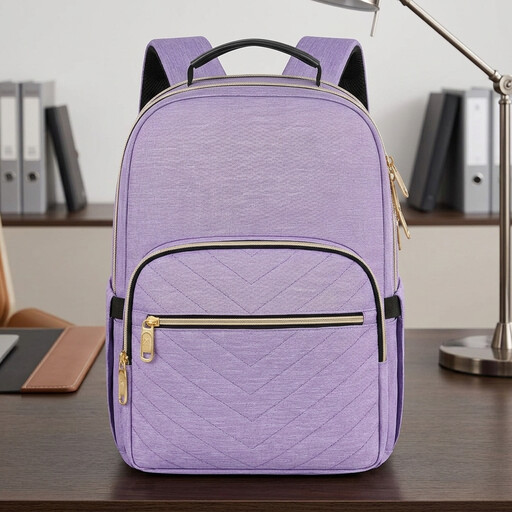
Why This Fits Their Persona: This women's laptop backpack combines functionality with security. It's lightweight, fits a 15.6-inch laptop, and is perfect for the commute to university or work. The USB port and security pockets are tailored for modern daily life.
Instead of vague security promises, this model offers a tangible, hidden anti-theft pocket on the back for valuables. The USB port is securely integrated and equipped with an internal cable, making it a useful feature rather than just a marketing gimmick.
The combination of an RFID-blocking pocket and the anti-theft compartment provides enhanced security for cards and valuables. The integrated luggage strap adds convenience for travel.
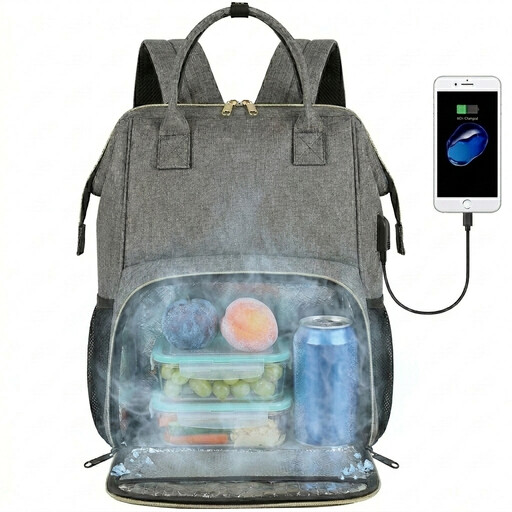
Why This Fits Their Persona: Perfect for anyone who brings their lunch to work or university. This backpack combines full-fledged laptop protection with a separate, insulated compartment for food and drinks, making it an extremely practical everyday companion.
Instead of many small, useless pockets, this model features a highly specialised, leak-proof and insulated cooler compartment. Its function is clearly defined and offers real added value, rather than just being a marketing buzzword.
The 2-in-1 functionality as a laptop and cooler bag is unique. According to the manufacturer, the insulated compartment keeps food warm or cold for 2-4 hours and is lined with leak-proof aluminium foil.
For even better organisation on the go, any of these backpacks can be perfectly paired with a packing cube set. Sets like the 8-Pcs Travel Packing Cube Set help keep clothes, tech accessories, and toiletries neatly separated and compressed.
We've compiled a full, up-to-date list of products that fully meet these strict selection criteria and UK regulations.
1. How do you clean a laptop backpack with a USB port? Most polyester or nylon backpacks should not be machine-washed, as this can damage the water-resistant coating and padding. Instead, clean the surface with a damp cloth and mild soap. The USB port is typically a passive pass-through; ensure it does not get wet during cleaning.
2. Will my 17-inch laptop really fit in a backpack designed for it? Don't rely on the screen size alone. Measure the exact external dimensions of your laptop (length, width, height) and compare them with the internal dimensions of the laptop compartment, which should be listed in the product description. The chassis size of laptops can vary significantly even with the same screen diagonal.
3. Is an anti-theft backpack truly secure? Features like hidden zips on the back, cut-proof materials, or RFID-blocking pockets significantly increase security by making opportunistic theft more difficult. They are effective deterrents but do not offer an absolute guarantee. The most secure solution is often a main compartment with zips that sit directly against your back, making them inaccessible while the backpack is being worn.