
Lieferung heute & morgen

Qualitätsgarantie

Willkommens-Angebote freischalten: KOSTENLOSE Lieferung | Bis zu 80 % RABATT | Kostenlose 30-Tage-JoyPlus-Testphase
App herunterladen
By Joybuy Product Recommendation Officer, July 05, 2026
The search for a device that combines the productivity of a laptop with the flexibility of a tablet often leads to one clear solution: a large tablet with a keyboard. For students and home office professionals in particular, such a device can be a cost-effective and highly versatile alternative. This article serves as your guide, showcasing a curated selection of devices engineered for both productivity and entertainment. We will focus on objective technical specifications to help you make a well-informed decision.
Before you decide on a model, there are several technical aspects to consider that are crucial for a seamless user experience.
A large display is the key feature for productivity. A 13-inch tablet or larger offers ample screen real estate to edit documents, manage emails, or use multiple windows side-by-side. Also, pay attention to the refresh rate. A 120Hz rate ensures noticeably smoother visuals during fast motion, which is apparent when scrolling through websites or watching videos. For entertainment, support for Widevine L1 is also essential. This DRM certificate is required to play streaming content from providers like Netflix or Disney+ in HD quality, making such a device a fully-fledged tablet for streaming.
A key advantage over many laptops is mobile connectivity. A tablet with a SIM card and Wi-Fi allows internet access even without an available Wi-Fi network. With 4G LTE support, you can stay productive on the go, participate in online lectures, or check emails. This flexibility makes it a practical companion and highlights its function as an affordable laptop replacement.
The combination of processor, RAM, and internal storage determines the device's performance. Modern octa-core processors provide a solid foundation for most everyday applications. An Android 15 tablet also benefits from the latest system optimisations and security features. Since a large display consumes more power, a tablet with a large battery is essential. Capacities of 8,000 mAh or more are recommended to ensure all-day use without constant recharging.
Here is a selection of devices that are well-suited for the use cases described, thanks to their technical specifications and included accessories.
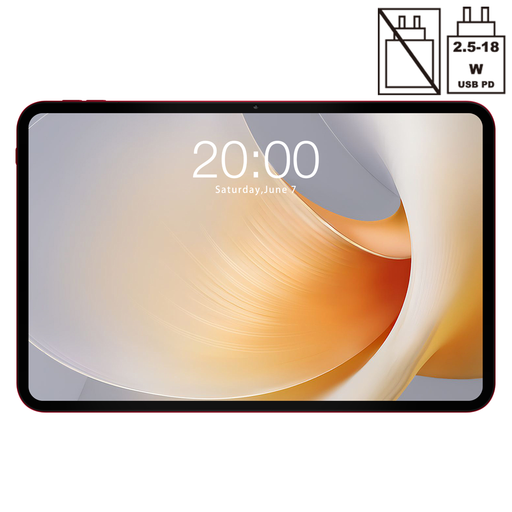
Why it stands out: The TECLAST T65 Plus positions itself as a strong contender for multimedia and multitasking with its very large 13.4-inch display and a smooth 120Hz refresh rate. The combination of Android 15, dual SIM 4G LTE, and 5G Wi-Fi offers modern connectivity.
Advantages:
Who is it for? Users looking for a tablet with an exceptionally large and smooth display for streaming and browsing, who also value up-to-date connectivity standards. Anyone considering to buy a Teclast T65 Plus will find this a solid entry point.
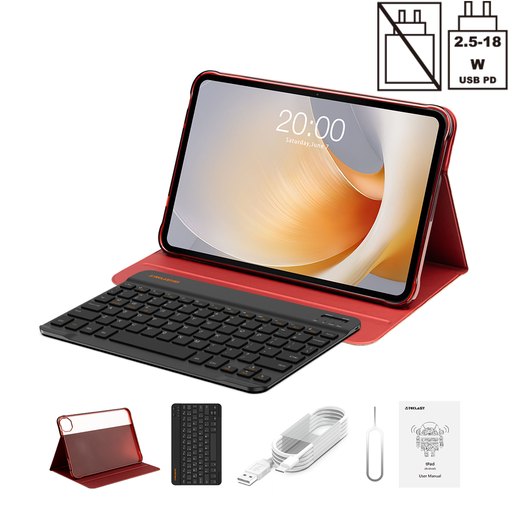
Why it stands out: This package builds on the strengths of the T65 Plus and enhances it with crucial accessories. The included Bluetooth keyboard (English layout) and protective case instantly transform it into a complete workstation. The doubled internal storage of 256GB also offers more space for apps, documents, and media.
Advantages:
Who is it for? Users looking for an all-in-one solution who want to use the tablet as an affordable laptop replacement right away, without needing to purchase additional accessories.
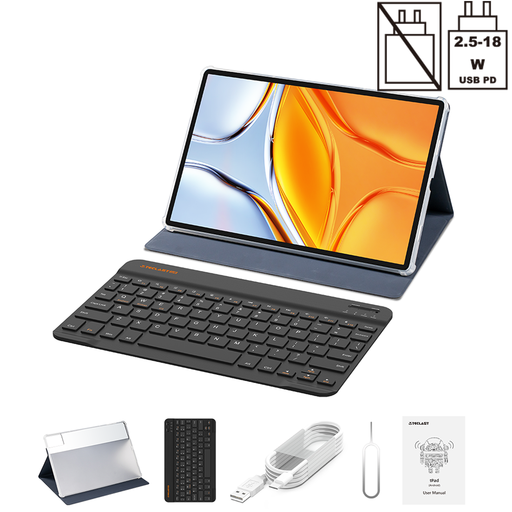
Why it stands out: The T70 sets new standards for screen size and endurance with its huge 14-inch display and a massive 10,000mAh battery. It is designed for users who need maximum screen real estate for their work and also expect extremely long battery life. This model also includes a keyboard and case in the box.
Advantages:
Who is it for? Users for whom maximum screen size and exceptional battery life are the highest priorities. Ideal for long workdays or extended movie nights without access to a power outlet.
The featured models offer a combination of a large screen, long battery life, and useful accessories. If you are specifically looking for devices with a certain battery capacity, you can find more options that might meet your needs in our 1200mAh battery category and beyond.
1. Can a large tablet with a keyboard truly replace a laptop? For many everyday tasks like word processing, email, web browsing, and video conferencing, a large tablet with a keyboard can replace a laptop. It often offers more flexibility with its touch interface and mobile connectivity (LTE). However, for very demanding applications such as professional video editing or using specialised software, tablets still have their limitations.
2. What does Widevine L1 mean on a tablet? Widevine is a DRM (Digital Rights Management) system developed by Google used to protect streaming content. There are different security levels. Widevine L1 is the highest level and a technical requirement for streaming services like Netflix, Amazon Prime Video, or Disney+ to play content in high definition (HD, Full HD, or 4K) on the device. Without L1 certification, playback is usually limited to standard definition (e.g., 480p).
3. What should I look for in an Android 15 tablet? A tablet with Android 15 provides access to the latest operating system features, such as enhanced privacy settings, optimised notifications, and better performance efficiency. Ensure that the manufacturer provides regular security updates to keep the device secure long-term. Features like memory expansion (virtual RAM) are also system-level optimisations more commonly found in newer Android versions.