
Lieferung heute & morgen

Qualitätsgarantie

Willkommens-Angebote freischalten: KOSTENLOSE Lieferung | Bis zu 80 % RABATT | Kostenlose 30-Tage-JoyPlus-Testphase
App herunterladen
The search for the perfect mechanical gaming keyboard can quickly become overwhelming. Manufacturers often promote aggressive aesthetics and a flood of technical jargon, making it difficult to discern a product's true value. Many users invest in models that fail to meet their expectations after just a few months. This guide will help you understand the critical features and avoid common purchasing pitfalls.
Before we dive into the key specifications, let's highlight the three most common issues that lead to dissatisfaction.
To make an informed decision, you should carefully examine three technical aspects. These are crucial in determining the typing feel, functionality, and longevity of your new keyboard.
The mechanical switches beneath each key define the typing feel and response time. There are three main types:
An increasingly important feature is hot-swap capability. A hot-swap keyboard allows you to change out the switches without any soldering. This is ideal for customising the typing feel or easily replacing a faulty switch, which significantly extends the keyboard's lifespan.
The size of the keyboard affects not only your desk space but also ergonomics and functionality.
When making your selection, always ensure it has the correct regional layout (e.g., QWERTZ) to avoid compatibility issues.
The construction has a major impact on sound and stability. A gasket mount keyboard, for example, uses silicone or foam gaskets to isolate the PCB from the case. The result is a more muted, softer typing experience and a more pleasant sound profile.
Additional features can significantly enhance the user experience:
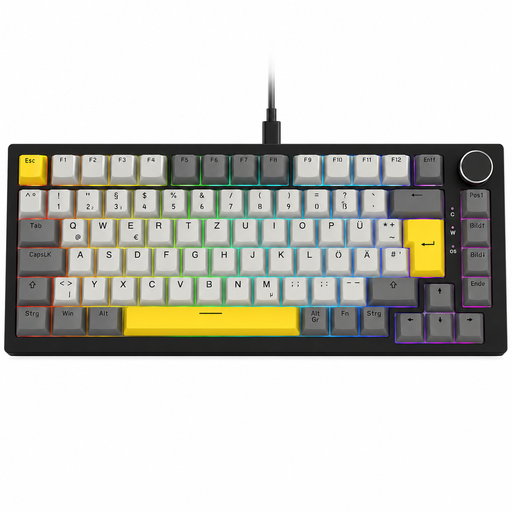
Why This Fits Their Persona: This model is ideal for users seeking a functional, high-quality keyboard for both gaming and work without spending a fortune. The compact 75% form factor with a German QWERTZ layout and the practical volume knob offer high utility for daily use.
It bypasses the "gaming tax" trap by focusing on substance: a gasket-mount design, hot-swap capability, and a German layout take precedence over mere aesthetics.
German QWERTZ layout in a functional 75% form factor. Hot-swap sockets for easy customisation and repair.
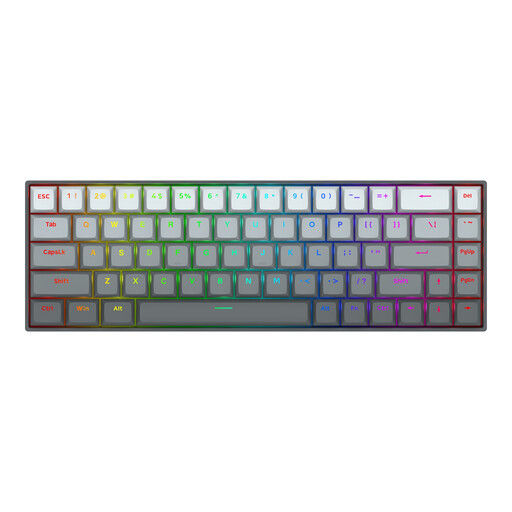
Why This Fits Their Persona: For esports enthusiasts where every millisecond counts. This keyboard is engineered for maximum speed. Hall Effect magnetic switches with Rapid Trigger and an 8000Hz polling rate deliver a level of responsiveness that can make all the difference in fast-paced games like Valorant or CS2.
This model invests in pure performance technology (Rapid Trigger, 8K Polling) instead of superficial gimmicks. It delivers measurable advantages for competitive gaming and isn't just a lifestyle product.
Adjustable actuation point (0.2-4.0 mm) and Rapid Trigger for extremely fast responses. Sturdy construction with an aluminium top plate.

Why This Fits Their Persona: For users who want one keyboard for everything: work, gaming, and customisation. Its tri-mode connectivity (wired, Bluetooth, 2.4G), large 10,000 mAh battery, TFT display, and volume knob make it a versatile powerhouse for any desk setup.
It justifies its price with an abundance of useful features. The TFT display is more than just a gimmick; it shows system information and connection status. The gasket-mount construction provides a typing experience rarely found in more budget-friendly models.
Flexible tri-mode connectivity and a very large battery capacity. Useful TFT display and rotary knob for advanced control.
We have compiled a complete, real-time updated list of products that fully meet these strict selection criteria and all relevant safety standards.
The lifespan of a mechanical keyboard is primarily determined by its switches. Most mechanical switches are rated for 50 to 100 million keystrokes. With average use, a well-maintained keyboard can last for many years. Models with a hot-swap feature have a potentially even longer lifespan, as individual switches can be easily replaced if they fail.
Yes, absolutely. Linear switches, often found in quiet mechanical keyboards, are very popular with gamers. They allow for fast, smooth keystrokes without a distracting clicking sound. This does not negatively affect response time. They are an excellent choice for streamers or gamers who play in a quiet environment.
Many modern mechanical keyboards are compatible with both Windows PCs and Macs. Look for explicit compatibility mentions in the product description. Wireless models with multi-device support often allow you to easily switch between a PC and a Mac with a keypress. Some keyboards even include extra keycaps for Mac-specific keys (Command, Option).