
Lieferung heute & morgen

Qualitätsgarantie

Willkommens-Angebote freischalten: KOSTENLOSE Lieferung | Bis zu 80 % RABATT | Kostenlose 30-Tage-JoyPlus-Testphase
App herunterladen
Shopping for a new mechanical gaming keyboard can quickly become overwhelming. The market is flooded with technical jargon, marketing buzzwords, and a huge selection of models. Many users invest in expensive keyboards, only to find after a few months that the typing feel doesn't meet their expectations or that crucial everyday features are missing. As your Joybuy Product Recommendation Officer, I'm here to help you identify these pitfalls and make an informed decision.
Before we dive into the technical details, let's highlight three common issues that often lead to disappointment.
To avoid the problems mentioned above, you should focus on a few core features that significantly impact the user experience.
A crucial factor for the typing experience is how the PCB is mounted inside the case. Modern, higher-end keyboards increasingly use a gasket mount keyboard design. Here, the PCB assembly "floats," sandwiched between silicone or foam gaskets.
A clean, cable-free desk is a key goal for many users. A wireless mechanical keyboard offers huge advantages here. Look for models with Tri-Mode connectivity, which combines three connection types:
This flexibility allows you to switch seamlessly between your gaming PC, work laptop, and other devices.
A custom mechanical keyboard doesn't have to be complicated. The most important feature for customisability is the hot-swap keyboard. Hot-swappable PCBs allow you to change the mechanical switches without any soldering.
For users in German-speaking regions, the keyboard layout is also crucial. Specifically look for a QWERTZ gaming keyboard with a German ISO-DE layout to use umlauts (?, ?, ?) and special characters directly and without workarounds.
Here are a few recommendations tailored to different needs and budgets, all of which incorporate the quality features mentioned above.
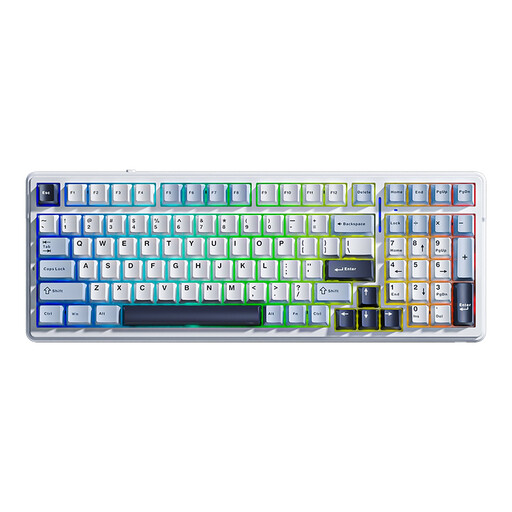
Why This Fits Their Persona: Ideal for users who want to try premium features like gasket mount and hot-swap without a large investment. The 99-key layout is a great compromise between compactness and functionality.
It provides a soft, dampened typing feel thanks to its gasket-mount structure and is future-proof due to its hot-swap capability. You aren't locked into the factory switches.
A combination of gasket mount, tri-mode connectivity, and a large 8000 mAh battery at a very accessible price point.

Why This Fits Their Persona: Perfect for power users in Germany who need one keyboard for gaming, programming, and office work. The full-size QWERTZ layout with a number pad is essential for productivity tasks.
It directly solves the layout problem by offering a full-size German QWERTZ layout. No compromises on key mapping for work and daily use.
Full-size German ISO-QWERTZ layout, gasket mount, hot-swap, and a useful TFT color screen with a rotary knob.

Why This Fits Their Persona: Aimed at users seeking uncompromising build quality and an exceptional typing experience. The CNC-milled aluminum case and leaf-spring mount deliver an enthusiast-grade experience.
It bypasses the "gamer aesthetic" trap by focusing on material quality. The solid aluminum case and advanced leaf-spring mount offer a tangibly more premium feel than any plastic case.
Full aluminum construction, leaf-spring mount for a flexible typing feel, and a practical ISO-DE layout in a compact 75% form factor.
An ergonomic posture is just as important as the right keyboard. Discover matching accessories to complete your workspace.
Both are advanced mounting styles that improve the typing experience. Gasket mount uses soft gaskets to cushion the PCB, creating a soft and rich feel. Leaf spring mount uses flexible metal or plastic arms (leaf springs) that give the PCB more room to flex. This results in an even bouncier, more flexible typing feel that many enthusiasts appreciate.
Not exactly. Most hot-swap keyboards are compatible with MX-style mechanical switches, which have either 3 or 5 pins. 5-pin sockets are more universal, as they can accept both 3-pin and 5-pin switches. When buying new switches, make sure they are compatible with your keyboard's socket type. Optical switches are not compatible with mechanical hot-swap sockets, and vice versa.
For gaming alone, it's not strictly necessary, as most games allow for custom key mapping. However, as soon as you also use the keyboard for writing emails, for work, or for in-game chat, a QWERTZ gaming keyboard with a German layout is significantly more convenient. You'll save yourself the hassle of hunting for umlauts and special characters and can switch seamlessly between gaming and everyday tasks.