
Lieferung heute & morgen

Qualitätsgarantie

Willkommens-Angebote freischalten: KOSTENLOSE Lieferung | Bis zu 80 % RABATT | Kostenlose 30-Tage-JoyPlus-Testphase
App herunterladen
The search for a new keyboard leads many users away from conventional membrane models and into the world of mechanical keyboards. The reasons for making the switch are diverse—whether it's for more precise inputs in gaming, a more satisfying feel when typing long texts, or the potential for customisation. However, the market is vast, and the technical jargon can be overwhelming.
This article serves as a guide. We will introduce various concepts and present a selection of models that cater to different needs. Our goal is to provide you with the information you need to make an informed decision, whether you're looking for a gaming keyboard or want to optimise your work setup.
The choice of a model heavily depends on personal preferences and the intended use case. Three key aspects can help narrow down the selection.
The size of the keyboard directly impacts ergonomics and the available space on your desk. Common formats include:
The heart of every mechanical keyboard is the switches beneath each key. They determine the typing feel and acoustics. The three main types are:
A key feature for enthusiasts is hot-swap capability. A hot-swap keyboard allows you to change the switches without any soldering. This offers maximum flexibility to customise the typing feel or easily replace faulty switches.
Modern keyboards offer a range of other features:
Here, we present three models that are interesting for different user profiles due to their specific features and configurations.
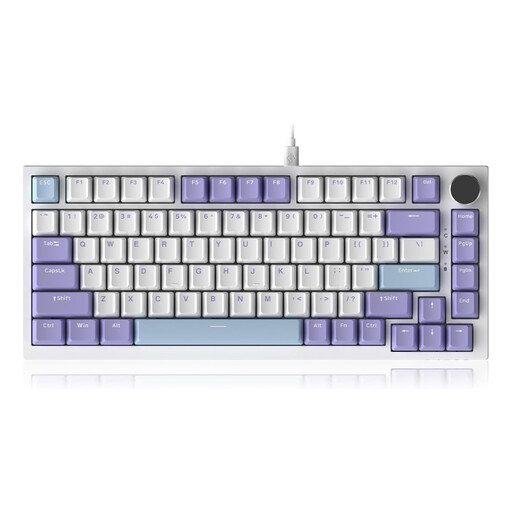
Why it stands out: The AK820 combines a compact 75% layout with high-end features often found in more expensive models. Its gasket-mount structure, where the PCB is cushioned between gaskets, works with multiple dampening layers to create a muted and pleasant typing sound. The CNC-machined rotary knob for volume control is a practical detail for daily use.
Pros:
Who is it for? This model is aimed at users seeking a compact yet fully functional keyboard for gaming and productive work. Those who value a refined typing experience and practical features like a volume knob will find this a suitable option.
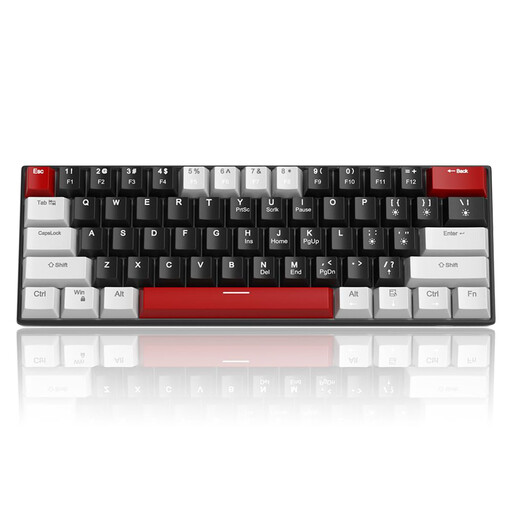
Why it stands out: The MageGee STAR 61 focuses on the essentials: an ultra-compact 60% keyboard layout and reliable performance for gaming and typing. By omitting dedicated arrow and function keys, it achieves maximum desk space savings. These functions remain accessible via FN key combinations.
Pros:
Who is it for? The STAR 61 is a great choice for newcomers to the world of mechanical keyboards, as well as for purists and gamers who prefer a minimalist setup. Its portability and straightforward plug-and-play approach make it a practical companion.

Why it stands out: The AK980 V2 is a powerhouse of functionality and flexibility. As a wireless mechanical keyboard, it offers three connection modes (Bluetooth, 2.4 GHz, wired) and a large 10,000 mAh battery. The highlight is its integrated TFT colour display, which can show system information, connection status, or even custom GIFs, all controlled by the programmable rotary knob.
Pros:
Who is it for? This model appeals to power users, tech enthusiasts, and anyone who desires maximum connectivity and customisability. If you need a flexible setup for multiple devices and appreciate innovative features like a status display, the AK980 V2 is a comprehensive solution.
The models presented here already cover a broad spectrum. However, if you are looking for different layouts, specific switch types, or alternative designs, it's worth taking a look at our extended collection.
? Discover a wider selection in our Gaming USB Keyboard category.
A hot-swap keyboard allows you to change the mechanical switches under the keycaps without tools or soldering. This offers two main advantages: First, you can customise the typing feel and sound of your keyboard at any time by trying out different switch types (e.g., switching from linear to tactile). Second, it simplifies maintenance, as a faulty switch can be easily pulled out and replaced with a new one.
Whether a mechanical keyboard is "better" depends on personal preference. Many users find the tactile and audible feedback of mechanical switches more satisfying, which can lead to higher perceived typing accuracy. Unlike standard membrane keyboards, the variety of switch types (linear, tactile, clicky) allows for fine-tuning to an individual's typing style.
TKL is an abbreviation for "Tenkeyless." A TKL keyboard is a model that omits the numeric keypad on the right side. This makes the keyboard narrower than a full-size model. This saves desk space and allows for a more ergonomic posture, as the mouse can be positioned closer to the body.