
Lieferung heute & morgen

Qualitätsgarantie

Willkommens-Angebote freischalten: KOSTENLOSE Lieferung | Bis zu 80 % RABATT | Kostenlose 30-Tage-JoyPlus-Testphase
App herunterladen
The idea is appealing: a single device that vacuums and mops on its own, freeing up your time for more important things. But the market for robot vacuums with mopping is filled with marketing claims that often fail to deliver in practice. Before you invest, it's crucial to understand the common pitfalls that lead to disappointment and unnecessary expense.
Many users report devices that cause more problems than they solve. The most common frustrations include:
A smart purchase isn't based on the highest number on a spec sheet, but on understanding the core technologies that are relevant to your home.
To avoid a bad purchase, you should focus on three core technical areas. These will determine whether a robot vacuum and mop will be a genuine help or a constant source of frustration.
Raw suction power, measured in Pascals (Pa), is only half the battle. A value between 5,000 and 8,000 Pa is a good benchmark for most households. However, the interplay with the main brush is what truly matters.
Mopping technology has evolved significantly. Pay attention to the difference between passive and active systems.
The robot's ability to move intelligently and autonomously through your home is fundamental.
Instead of making a one-size-fits-all recommendation, we have identified models that are tailored to specific needs and living situations.
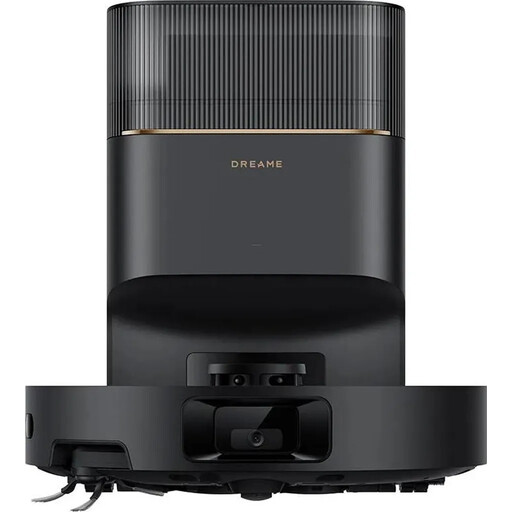
Why it's a great fit: Engineered to handle the challenges of pet hair and everyday dirt. Its high suction power and special brush design minimise maintenance, while the large station provides weeks of autonomy.
According to the manufacturer, the HyperStream Detangling DuoBrush is designed to prevent hair from tangling—a direct solution to the common pitfall of a constantly clogged brush roller.
The self-empty station with a 5-litre dust bag allows for up to 150 days of use without manual emptying. The extendable side brush improves edge cleaning.
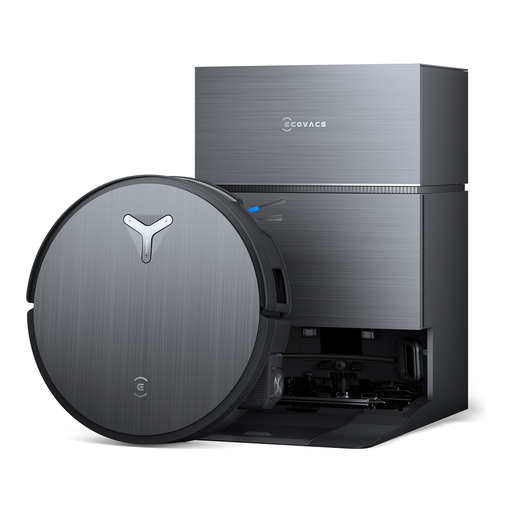
Why it's a great fit: For users who value maximum automation and intelligent features. This model integrates AI-powered cleaning and a highly advanced station for minimal manual interaction.
The OMNI station washes the mop pads with 40–75°C hot water. This dissolves grease and stubborn stains far more effectively than cold water, avoiding the pitfall of simply spreading dirt around.
The AI Stain Detection 2.0 adapts its cleaning strategy based on the type of mess. The YIKO-GPT voice assistant enables control without needing external devices.
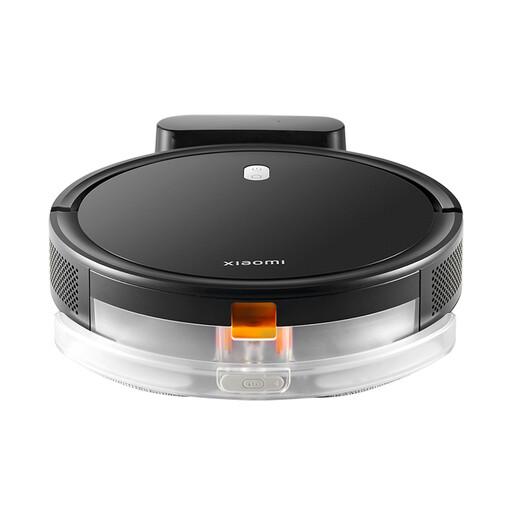
Why it's a great fit: Offers solid 2-in-1 basic functionality for small to medium-sized apartments. It's a great choice for anyone looking to enter the world of robot vacuums without a large initial investment.
Instead of moving around randomly, this model uses a planned Z-shaped cleaning path. This avoids the pitfall of inefficient navigation and ensures systematic coverage of the area.
App control and compatibility with voice assistants offer convenience features that aren't a given in this price range. Its compact design is ideal for apartments with limited space.
Beyond automated robots, there is a wide variety of other floor cleaning devices. We have compiled a current selection of products that meet different needs for manual and specialised cleaning.
1. Do robot vacuums with mopping functions automatically detect carpets? Yes, most modern models are equipped with ultrasonic or infrared sensors for carpet detection. When a carpet is detected, good devices will lift their mop pads and simultaneously increase suction power to ensure a deep clean without getting the carpet wet. On simpler models, you may need to set up no-mop zones for your carpets in the app.
2. How often do I need to maintain the dust bag or water tanks in a docking station? This largely depends on the model and your usage. For a robot vacuum with a self-empty station, the dust bag in the station typically needs to be replaced every 60 to 150 days, depending on its size and the amount of dirt collected. The clean and dirty water tanks for the mop washing system need to be refilled or emptied more frequently, often after several cleaning cycles or about once a week with regular use.
3. Is setting up a robot vacuum complicated? The initial setup is generally straightforward. You need to place the station in a suitable location with enough space, charge the robot, and connect it to your Wi-Fi via the manufacturer's app. During its first run, the robot will create a map of your home. Afterwards, you can create cleaning schedules, name rooms, and define no-go zones in the app if needed. The process is mostly self-explanatory and takes about 15 to 30 minutes.