
Lieferung heute & morgen

Qualitätsgarantie

Willkommens-Angebote freischalten: KOSTENLOSE Lieferung | Bis zu 80 % RABATT | Kostenlose 30-Tage-JoyPlus-Testphase
App herunterladen
A quiet mechanical keyboard promises the tactile, precise typing feel of a mechanical board without the disruptive noise that's unwelcome in offices or quiet work environments. However, the market is flooded with models that often fail to deliver on their promises. Many keyboards marketed as "quiet" are still too loud for professional use, or they lack the essential features needed for a productive workflow.
This guide will help you identify the crucial features and avoid common marketing traps, ensuring you find a model that actually boosts your productivity instead of hindering it with compromises.
Before making a purchase, you should be aware of the most common pitfalls that often lead to disappointment.
To avoid a bad purchase, focus on the following three core technical aspects. These are the primary determinants of your keyboard's performance and utility in your daily work.
The mechanical switch defines the typing feel and noise level. For a quiet mechanical keyboard, two categories are particularly relevant:
The low-profile mechanical keyboard with low-profile switches plays a special role. These switches have a shorter travel distance, which not only enables quieter typing but also allows for a slimmer keyboard design that is often perceived as more ergonomic.
For a modern workspace, a reliable wireless mechanical keyboard is essential. Look for models that offer at least two connection types:
The right layout is crucial for efficiency. For the English-speaking market, a QWERTY layout is standard. Furthermore, a functional backlit keyboard is a significant advantage. Single-color, dimmable white backlighting improves legibility in low-light conditions without the visual distraction of colorful RGB lighting.
Here are some recommendations tailored to specific user needs that meet the criteria mentioned above.

Why This Fits Their Persona: Ideal for professional users who need to switch seamlessly between multiple devices and require a quiet yet tactile typing experience for long workdays in the office or at home. The design is focused on productivity, not gaming.
The "Tactile Quiet" switches provide tangible mechanical feedback but are acoustically optimized for office environments, avoiding the loud clicks that plague many keyboards marketed as "quiet."
Seamless switching between 3 devices (Bluetooth/Logi Bolt); Smart, adaptive key backlighting.
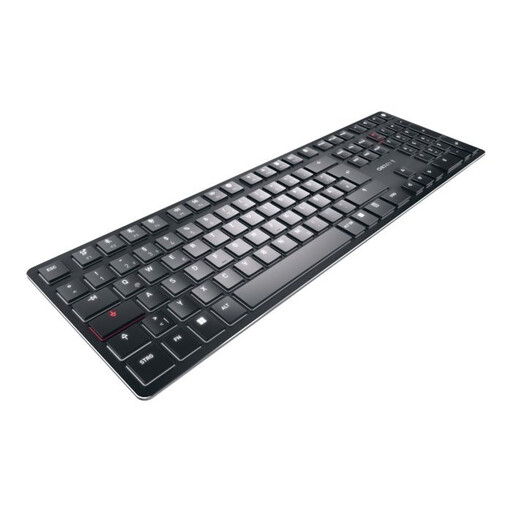
Why This Fits Their Persona: Perfect for users who place the highest value on a minimalist, ultra-slim design and premium materials without sacrificing a true mechanical typing feel. Ideal for modern, clean desk setups.
It uses exclusive CHERRY MX Ultra Low Profile switches, which were specifically developed for a slim build and quiet, precise typing. This is not a rebranded gaming keyboard but a dedicated office solution.
Extremely slim design with an aluminum housing; Multi-device connectivity for up to 4 devices (incl. 2.4 GHz).
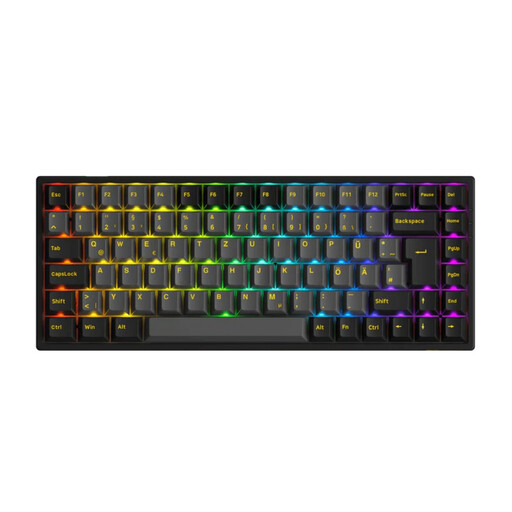
Why This Fits Their Persona: An excellent choice for developers and creatives looking for a customizable keyboard for programming. The compact 75% layout keeps the mouse closer, while its hot-swap capability allows for personalized tuning of the typing feel.
Instead of focusing on a bloated gaming aesthetic, this model concentrates on core features for power users: hot-swap sockets, PBT keycaps, and reliable tri-mode connectivity (Bluetooth, 2.4G, USB-C).
Fully hot-swappable (3/5-pin) for maximum customization; Durable double-shot PBT keycaps.
We have compiled a complete, up-to-date list of products that fully meet these strict selection criteria and local regulations.
1. How long do the switches on a quiet mechanical keyboard last? High-quality mechanical switches, like those from CHERRY or Logitech, are rated for a lifespan of 50 to 100 million keystrokes. With average office use, this translates to many years of reliable operation, making them significantly more durable than traditional membrane keyboards.
2. Is a low-profile mechanical keyboard truly ergonomic? Yes, a low-profile mechanical keyboard can offer ergonomic benefits. The lower profile reduces the wrist angle, which can lead to a more natural posture. This can decrease strain and, in many cases, eliminates the need for a separate wrist rest. However, the final assessment depends on personal preference and individual desk setup.
3. Do I need special software for a multi-device keyboard? The basic functionality—switching between devices—typically works directly via dedicated keys on the keyboard and requires no software. However, manufacturers like Logitech offer software (e.g., Logi Options+) that provides advanced options for customizing shortcuts, adjusting backlighting, and enabling workflow features like seamlessly controlling multiple computers with one mouse and keyboard.