Choosing a tablet in 2026 requires a close look at technical specifications to find a device that meets your individual needs. The market offers a wide variety of models that differ in display size, processor performance, operating system, and accessory compatibility. This guide analyses the key technical parameters that play a role in the purchasing decision for a tablet.
Buyer's Guide: Technical Criteria for Tablet Selection
The decision to buy a tablet should be based on an analysis of objective features. The following criteria provide a basis for a structured comparison.
1. Display: Size, Technology, and Refresh Rate
The display is the tablet's primary interface. Three factors are crucial here:
- Size: The screen diagonal, measured in inches, determines portability and the primary use case. A small tablet (under 10 inches) is lightweight and mobile, ideal for media consumption and reading on the go. A 12-inch tablet or larger offers more screen real estate, which is beneficial for productivity tasks like drawing or use with a keyboard.
- Technology: IPS (In-Plane Switching) displays are common and offer stable viewing angles and good color reproduction. OLED displays deliver higher contrast and deeper blacks but are often found in more premium devices. Terms like "Liquid Retina" (Apple) refer to high-resolution IPS displays with specific optimizations.
- Refresh Rate: A higher rate, measured in Hertz (Hz), ensures smoother motion. While 60 Hz is standard, 120 Hz or 144 Hz provides noticeably smoother scrolling and a more responsive experience in games (gaming tablet) or when using a stylus.
2. Processor Performance (SoC) and RAM
The processor (SoC - System on a Chip) is the heart of the tablet and determines its performance capabilities. Chips from manufacturers like Qualcomm (Snapdragon), MediaTek (Helio), or Apple (M-series) are designed for different performance tiers. For everyday tasks like browsing and video streaming, a mid-range processor is sufficient. A high-performance chip is required for demanding 3D games, video editing, or professional multitasking.
RAM (Random Access Memory) is responsible for running multiple apps simultaneously. 8 GB of RAM is a solid standard today for smooth multitasking. Some models offer virtual RAM, which uses a portion of the internal storage as additional memory when needed.
3. Operating System: Android vs. iPadOS
The choice of operating system has far-reaching implications for the user interface, app availability, and compatibility with other devices.
- Android Tablet: Offers a high degree of customization and an open ecosystem. File management is flexible, and there is a wide selection of devices from various manufacturers.
- iPad (iPadOS): Is distinguished by its streamlined ecosystem, intuitive operation, and a vast selection of high-quality apps optimized for tablets, especially in the creative field.
4. Connectivity and Accessories
Connectivity options and accessory compatibility significantly expand a tablet's functionality.
- Connectivity: Wi-Fi 6 or Wi-Fi 7 ensures fast and stable wireless connections. Models with cellular (4G/5G) capability allow for internet access on the go. A USB-C port is standard and, depending on its specification, can also support video output to an external monitor (DisplayPort).
- Accessories: For users who want to draw or take handwritten notes, a tablet with a stylus is essential. Pay attention to the pressure sensitivity levels (e.g., 4096). A tablet with a keyboard transforms the device into a lightweight laptop replacement for productive work.
Our Top Picks for 2026
Based on the technical criteria mentioned, we present three models designed for different user profiles.
ALLDOCUBE iPlay 70 mini Ultra
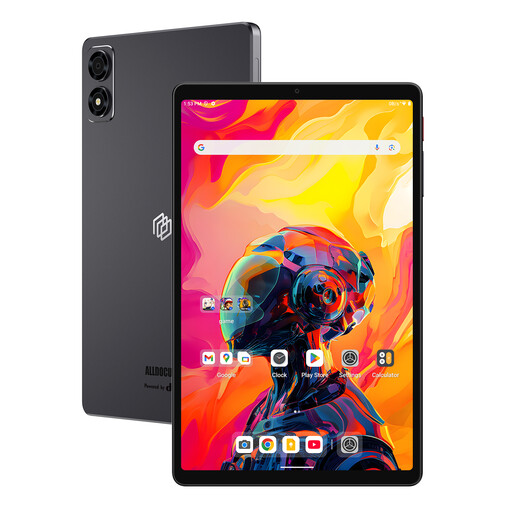
- Why we recommend this product: The Alldocube tablet combines high computing power with a compact form factor. The Qualcomm Snapdragon 7+ Gen3 processor and 144 Hz display make it a powerful device for demanding applications in a handy 8.8-inch format.
- Pros:
- Processor: Qualcomm Snapdragon 7+ Gen3 for high-end gaming and AI performance.
- Display: 8.8-inch IPS display with 2.5K resolution and a 144 Hz refresh rate.
- Battery: 7300 mAh battery for extended usage.
- Connectivity: USB 3.1 Gen1 Type-C with DisplayPort support and Wi-Fi 6.
- Who it's for: Users looking for a highly portable yet powerful gaming tablet who value smooth visuals.
Teclast ArtPad Pro
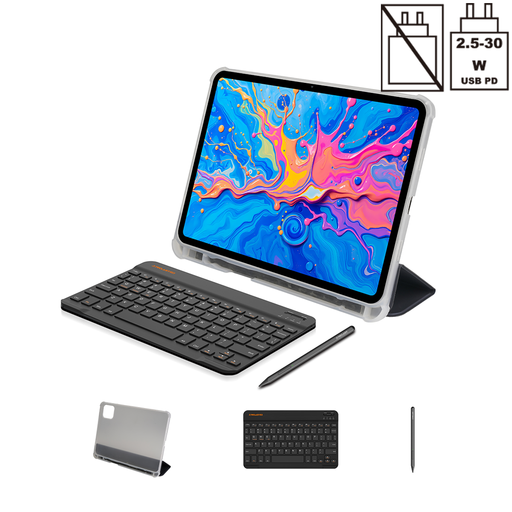
- Why we recommend this product: The Teclast tablet is designed as an all-in-one package for creative and productive users. With its large 12.7-inch display and the included T-Pen with 4096 pressure levels, it is immediately ready for use as a tablet for drawing and note-taking.
- Pros:
- Display: Large 12.7-inch display with 2K resolution.
- Accessories: Stylus (T-Pen), protective case, and Bluetooth keyboard are included in the box.
- Battery: Very large 10,000 mAh capacity.
- Storage: 256 GB of internal storage and 8 GB of RAM (expandable via virtual RAM).
- Who it's for: Students, digital artists, and professionals looking for a large-format tablet with stylus and keyboard support for versatile use.
Apple 13-inch iPad Air (M4, 2026)
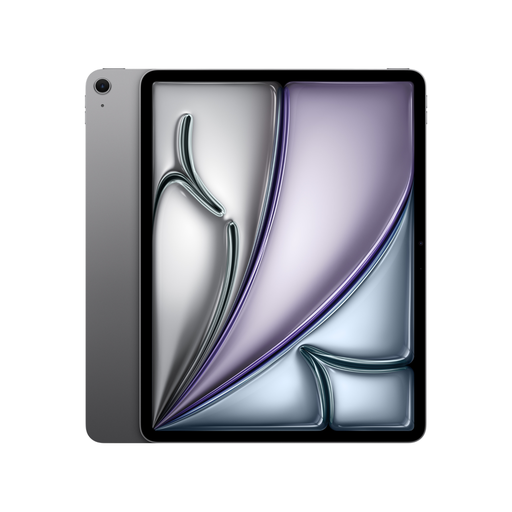
- Why we recommend this product: The Apple iPad Air with the M4 chip delivers extremely high system performance for the most demanding tasks. The bright Liquid Retina display and seamless integration into the Apple ecosystem make it a tool for creative professionals and power users.
- Pros:
- Processor: Apple M4 chip with an 8-core CPU and 9-core GPU for high graphics performance and AI applications.
- Display: 13-inch Liquid Retina display with a wide P3 color gamut and an anti-reflective coating.
- Connectivity: Wi-Fi 7 for ultra-fast wireless connections and USB-C with support for USB 3 (up to 10 Gbps).
- Ecosystem: Compatibility with Apple Pencil Pro and Magic Keyboard for precision work.
- Who it's for: Users who need maximum performance for professional applications like video editing, graphic design, or demanding multitasking and are already invested in the Apple ecosystem.
Discover More Tablet Models
The models featured here cover specific use cases. For a broader overview of different configurations and price ranges, it can be helpful to browse more tablet angebote.
Frequently Asked Questions (FAQ)
1. Which operating system is right for a tablet, Android or iPadOS? The decision depends on personal preference. Android offers high flexibility, extensive customization options, and a wide selection of devices from various manufacturers. iPadOS is known for its ease of use, tightly integrated ecosystem, and a large number of apps specifically optimized for the tablet experience.
2. What should you look for in a tablet for drawing? For drawing, three aspects are key: a responsive stylus with high pressure sensitivity (e.g., 4096 levels), a display with low latency and a high refresh rate (120 Hz or more), and a software selection that supports professional drawing apps. The display size should also be considered to ensure you have enough workspace.
3. How much storage does a tablet need? For basic use (streaming, browsing, a few apps), 64 GB can be sufficient. For comfortable use with many apps, photos, and some downloaded media, 128 GB is a good baseline. If you edit large files like 4K videos, install many games, or use the tablet as your primary work device, you should consider 256 GB or more.
Authored by the Joybuy Product Recommendation Officer

