
Lieferung heute & morgen

Qualitätsgarantie

Willkommens-Angebote freischalten: KOSTENLOSE Lieferung | Bis zu 80 % RABATT | Kostenlose 30-Tage-JoyPlus-Testphase
App herunterladen
The search for a versatile device suitable for university, the home office, and personal use often leads to a key question: should you get a laptop or a tablet? A tablet with a keyboard offers a flexible solution, combining the portability of a tablet with the functionality of a laptop.
This article serves as your guide. We will introduce a selection of devices and explain the key features to consider when making your choice. Our goal is to provide an objective foundation to help you find the right model for your needs and budget.
Choosing the right device depends on your individual needs. The following three criteria will help you filter your options and make an informed decision.
Screen size is a crucial factor. A compact 10-inch tablet is lightweight, portable, and ideal for on-the-go use, such as taking notes in lectures or giving presentations to clients. In contrast, a large tablet of 11 inches or more offers a greater workspace. This is beneficial if you plan to use the device as your primary tablet as a laptop replacement and frequently work with multiple windows or enjoy movies and shows in high quality. Besides size, also pay attention to the resolution (e.g., Full HD or 2K), as this determines the sharpness and detail of the display.
All tablets feature Wi-Fi connectivity for internet access at home or on public networks. However, if you also need a stable internet connection on the go, a 4G LTE tablet is the right choice. A large tablet with a SIM card allows you to stay online independently of Wi-Fi hotspots. This is particularly advantageous for commuters, students working on campus, or for outdoor use. Check if the device offers one or two SIM card slots in case you want to separate personal and professional data plans.
For a smooth workflow on a tablet for the home office or as an affordable tablet for university, RAM and internal storage (ROM) are crucial. 4 GB of RAM is sufficient for basic tasks like browsing, emails, and word processing. For more demanding multitasking or using creative apps, 8 GB of RAM or more is recommended. Expandable storage via a microSD card offers additional flexibility.
A key advantage of many bundles is the included accessories. A tablet with a case and stylus, along with a matching keyboard, makes the device ready to use right out of the box and saves you from purchasing accessories separately, significantly improving its value for money.
Based on the criteria above, we have compiled a selection of devices that stand out for their features and intended use cases.
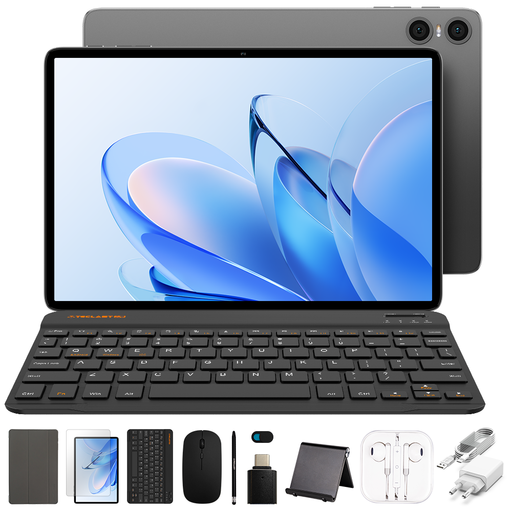
Why it stands out: This model is a complete starter package. With a keyboard and protective case included, it's ready for productivity and daily tasks right out of the box.
Pros:
Who is it for? This bundle is aimed at budget-conscious students and families looking for a reliable and affordable tablet for university, school, and entertainment. It covers all the basic needs, from writing documents to streaming videos.
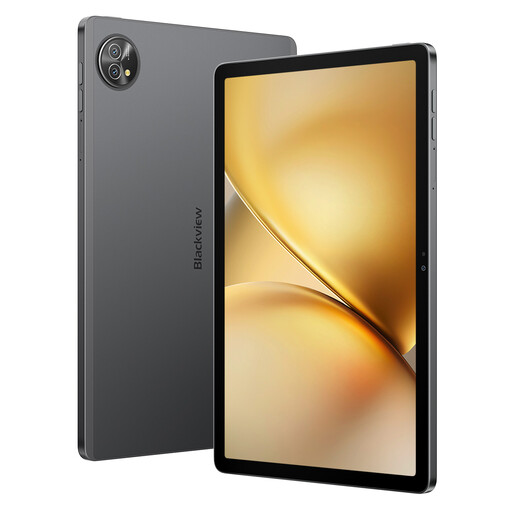
Why it stands out: The Blackview Zeno 10 combines a high-resolution display with comprehensive connectivity, including Dual SIM 4G support and a PC Mode for a laptop-like experience.
Pros:
Who is it for? Ideal for professionals and power users who need a versatile tablet as a laptop replacement. The combination of a large display, strong performance, and mobile connectivity makes it a reliable companion for the home office and on the go.
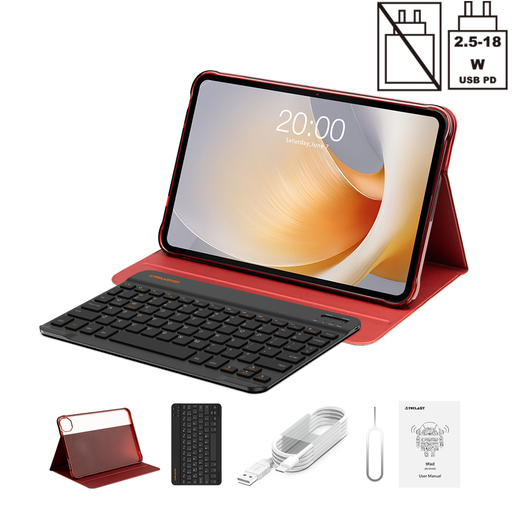
Why it stands out: With its exceptionally large 13.4-inch display and a 120 Hz refresh rate, this tablet clearly focuses on an immersive visual experience and productive multitasking.
Pros:
Who is it for? This model is designed for users seeking maximum screen real estate for productivity and entertainment. It's an excellent choice as a stationary tablet as a laptop replacement in the home office or for users who frequently work with spreadsheets, presentations, or in split-screen mode.
The models presented here cover a wide range of use cases. If you haven't found the right device for your specific needs yet, you might find a suitable alternative in our broader selection.
Discover our full range of Android Tablets with Keyboards and find the model that perfectly fits your needs.
For many everyday tasks like writing, browsing the internet, managing emails, and media consumption, a tablet with a keyboard can effectively replace a laptop. Models with a PC mode or desktop-style interfaces further enhance multitasking capabilities. However, for very resource-intensive specialised software (e.g., professional video editing or complex CAD applications), a powerful laptop often remains the more suitable choice.
For an affordable tablet for university, practical aspects are key: long battery life to last through a day of lectures, a low weight for portability, sufficient and expandable storage for documents and notes, and an included keyboard and case to stay on budget.
Virtual RAM is a feature that uses a portion of the internal storage (ROM) as temporary, additional RAM. When the physical RAM is fully utilised, the system can offload less active apps to this virtual memory. This helps improve performance during intensive multitasking and allows more applications to remain open in the background simultaneously.