
Lieferung heute & morgen

Qualitätsgarantie

Willkommens-Angebote freischalten: KOSTENLOSE Lieferung | Bis zu 80 % RABATT | Kostenlose 30-Tage-JoyPlus-Testphase
App herunterladen
Finding the right gift for a toddler can be a challenge. Many parents and relatives want a meaningful alternative to passive screen time—one that actively encourages creativity and early learning skills. A kids' learning tablet can be an excellent solution, but the market is vast, and the differences between models are significant.
This article serves as a guide. We'll introduce different types of learning tablets and provide you with objective criteria to help you make an informed decision that meets your child's needs.
Before you decide on a model, several fundamental aspects should be considered. These will help you find the right device for the child's age and developmental stage.
The most fundamental decision concerns the type of display. Classic tablets with LCD screens offer access to a wide variety of learning apps but require mindful limitation of screen time. Screen-free toys, on the other hand, often use interactive cards or buttons to create auditory and tactile learning experiences. An LCD writing tablet is another alternative: it provides a digital drawing and writing surface without any backlighting, making it easy on the eyes.
The content should match the child's developmental stage. For children aged three and up, an educational toy for ages 3+ is ideal, focusing on fundamentals like letters, numbers, colours, shapes, and logical reasoning. Check whether the games and activities spark curiosity and encourage active participation rather than just passive consumption. A good educational toy ideally grows with the child's abilities or offers various difficulty levels.
Safety is paramount. Look for durable materials like ABS plastic, rounded edges to prevent injuries, and compliance with European toy safety standards. The device should be free of harmful substances like BPA. For battery-powered devices, a securely screwed-in battery compartment is essential to prevent small parts from being swallowed.
Here is a selection of different devices that take various approaches to digital and interactive learning.
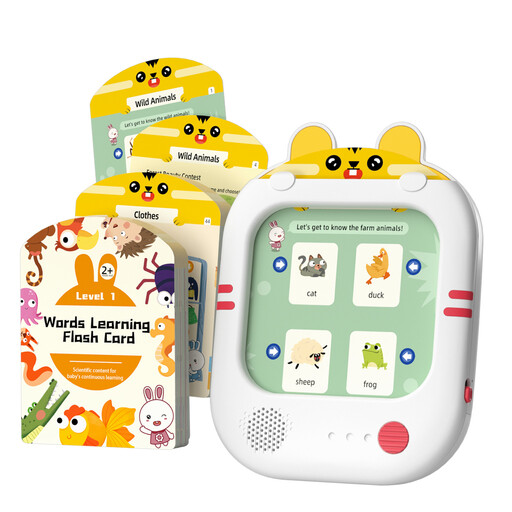
Why it stands out: This device is a purely screen-free toy based on an interactive card system. It actively promotes listening and cognitive association without exposing the child to a bright display.
Benefits:
Who is it for? Ideal for parents and grandparents looking for a gift for toddlers aged 3 to 5 who want to consciously avoid screen time. It is excellent for early language development and logical thinking training.
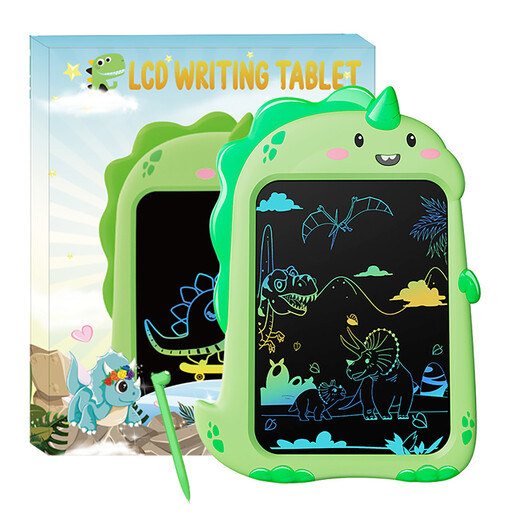
Why it stands out: This drawing tablet for kids combines the fun of drawing with an appealing dinosaur design. As an LCD writing tablet, it offers a reusable and mess-free surface for unlimited creativity.
Benefits:
Who is it for? Perfect for children between 3 and 8 who love to draw and doodle. As a dinosaur toy, it especially appeals to fans of prehistoric creatures and is an excellent choice for anyone looking for a simple, durable, and screen-free toy.
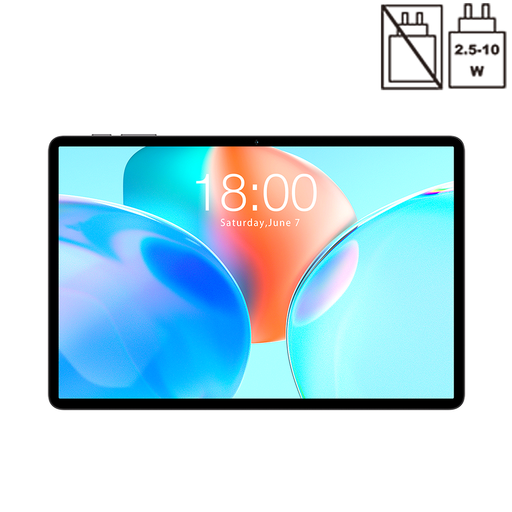
Why it stands out: The Teclast P50T is a full-featured Android tablet that offers flexibility for the whole family. It is suitable for using learning apps, watching media, and completing early school tasks under adult supervision.
Benefits:
Who is it for? This tablet is aimed at families looking for a multi-functional device. It is less a pure children's toy and more an option for older preschoolers or early school-age children who will use specific learning applications under parental supervision. It is important to follow the manufacturer's safety recommendations, especially regarding limiting screen time and using the device in a well-lit environment to protect their eyes.
Haven't found the right model yet, or want to compare more alternatives? Discover a wider variety of devices tailored to different age groups and learning goals.
? Explore our full range of learning tablets here
A dedicated kids' learning tablet is often a closed ecosystem with pre-installed, educationally vetted content. Many models are screen-free and focus on auditory or tactile interaction. A regular tablet (like the Teclast P50T) is an open system (e.g., with Android) that allows access to countless apps but also requires stricter parental controls and supervision.
Most manufacturers recommend their devices for ages 3 and up. At this age, children begin to understand logical connections and develop an interest in letters and numbers. An educational toy for ages 3+ is specifically designed for the motor and cognitive skills of this age group. For younger children, simpler, more robust toys without small parts are better suited.
Yes, an LCD writing tablet like the model from CHEERFUN uses a technology that does not emit its own light. The image is created by reflecting ambient light, similar to ink on paper. There is no backlighting, no flicker, and no blue light emission, which makes these devices very easy on the eyes.