
Lieferung heute & morgen

Qualitätsgarantie

Willkommens-Angebote freischalten: KOSTENLOSE Lieferung | Bis zu 80 % RABATT | Kostenlose 30-Tage-JoyPlus-Testphase
App herunterladen
A tablet's functionality is significantly defined by its available accessories. A bundle that includes a tablet, keyboard, stylus, and other components can transform a device from a simple media consumption tool into a productivity powerhouse for studies, work, or creative projects. Choosing the right package depends on the user's specific technical requirements. This article analyses various Teclast tablet and accessory configurations to provide a solid basis for an informed decision.
When selecting a tablet bundle, several technical parameters that define its use case and performance should be considered.
The display specifications are crucial for the visual experience. A screen size of 10 to 12 inches offers a good balance between portability and usable screen real estate. For tasks like editing documents or watching videos, a Full HD (1920x1080) resolution or higher is recommended. A higher refresh rate, such as 90 Hz, ensures smoother motion and animations. For graphic work like drawing, a high resolution (e.g., 2K) combined with accurate colour representation is advantageous.
The processor (CPU) is the central processing unit and determines the overall system speed. An octa-core processor is now standard for smooth multitasking. RAM (Random Access Memory) affects how many applications can run simultaneously without performance degradation. 4 GB of RAM is sufficient for basic tasks, while 8 GB or more (including virtual expansion) enables better performance for more demanding applications and games.
Connectivity options determine how the tablet interacts with the internet and other devices. Dual-band Wi-Fi (2.4 GHz + 5 GHz) ensures a stable and fast wireless connection. Models with 4G LTE support allow for mobile internet access via a SIM card. Essential ports include a USB-C port for charging and data transfer, as well as a 3.5mm audio jack for wired headphones. OTG (On-The-Go) capability allows for the direct connection of USB drives or other peripherals.
A tablet with a keyboard and stylus significantly expands its use cases. For a stylus, pressure sensitivity is a crucial feature, especially for drawing. Levels like 4096 pressure points allow for very fine and nuanced line work. A Bluetooth keyboard transforms the tablet into a laptop-like device, ideal for university or the home office. A protective case and a stand are practical additions for device protection and ergonomic use.
Based on the criteria above, we present three Teclast tablet packages designed for different user profiles.
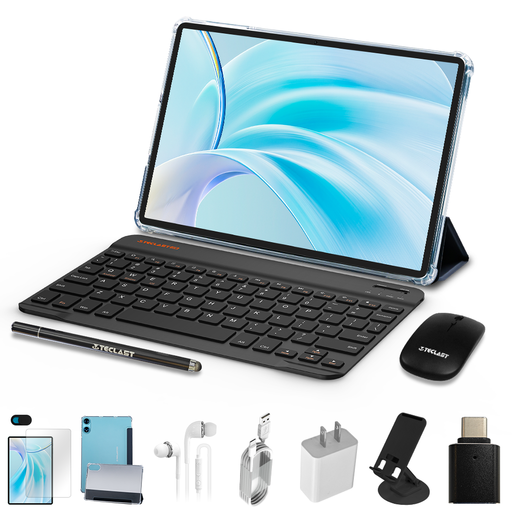
Why we recommend this product The Teclast P50 is designed as an all-rounder bundle. With its 11-inch display and 90 Hz refresh rate, it's well-suited for media consumption and everyday tasks. The comprehensive accessory package makes it ready to use out of the box for various scenarios, with no additional purchases necessary.
Pros
Who it's for This bundle is aimed at students and families looking for a versatile and affordable tablet set for entertainment, light office work, and web browsing.
View details for the Teclast P50

Why we recommend this product The Teclast ArtPad Pro is engineered for creative applications and demanding multitasking. The large 12.7-inch 2K display and support for a stylus with 4096 pressure levels make it a capable tool for digital drawing and note-taking. The powerful Helio G99 processor and expandable RAM also support computationally intensive tasks.
Pros
Who it's for This tablet for drawing is an excellent option for creative beginners, digital artists, and users who need a powerful Android 15 tablet with a large screen for productivity and design.
View details for the Teclast ArtPad Pro
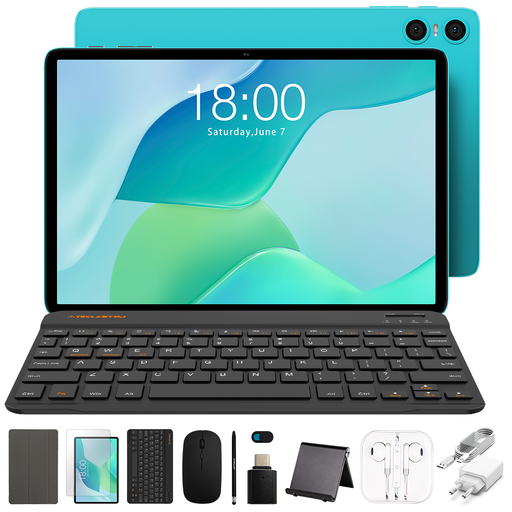
Why we recommend this product The Teclast P33 is designed as a cost-effective, entry-level package. It offers all the fundamental features of a modern tablet and comes with a complete set of accessories. This makes it a practical solution for users seeking a functional setup for simple tasks without a significant investment.
Pros
Who it's for This model is suitable for budget-conscious users, children, or as a secondary device for simple tasks like reading emails, video calling, and browsing the web.
View details for the Teclast P33
While the featured bundles offer a comprehensive setup, individual needs may call for specific accessories. If you already own a tablet and wish to equip it with new input methods, you can find a selection of compatible devices in our Keyboard and Touchpad category.
1. Is a Teclast tablet suitable for university? A tablet for university benefits greatly from an accessory bundle. Models like the Teclast P50 or ArtPad Pro, which come with a keyboard and stylus, are ideal for taking notes in lectures, conducting research, and creating presentations. The long battery life and Android OS, with access to numerous productivity apps, support daily student life.
2. Can you draw well on a Teclast tablet? For digital drawing, the Teclast ArtPad Pro is a suitable choice. Its large 2K display provides ample workspace, and its support for a stylus with 4096 levels of pressure sensitivity allows for precise control over line weight and opacity, similar to traditional drawing tools.
3. What does Android 15 on a tablet mean? An Android 15 tablet runs on a recent version of Google's operating system. This typically means access to the latest features, enhanced security standards, and an optimised user interface. It also ensures compatibility with the newest apps from the Google Play Store for a longer period.