
Lieferung heute & morgen

Qualitätsgarantie

Willkommens-Angebote freischalten: KOSTENLOSE Lieferung | Bis zu 80 % RABATT | Kostenlose 30-Tage-JoyPlus-Testphase
App herunterladen
Finding a tablet that is both powerful and attractively priced can be a challenge. Many users need a device for work, study, or leisure, but don't necessarily want to invest in the most expensive models. TECLAST has established itself as a brand that fills this exact gap by offering feature-rich tablets at an accessible price point.
This article serves as your guide. We will introduce a selection of TECLAST tablets, analysing their technical specifications and potential use cases. Our goal is to provide you with an objective basis for your purchasing decision, helping you find the model that best suits your specific needs.
Before you decide on a model, it's helpful to understand a few core features. These factors are crucial in determining how well the tablet will fit into your daily life.
Screen size is a critical criterion. An 11-inch tablet like the TECLAST P50 is compact and lightweight, making it ideal for on-the-go use and browsing on the sofa. For productivity tasks like editing documents or as a tablet for drawing, a larger display offers more workspace. Models up to 14 inches, such as the TECLAST T70, are excellent for multitasking and as a laptop alternative. Also, pay attention to the refresh rate (e.g., 90 Hz) for smoother visuals and the resolution (e.g., 2K) for sharper images.
The processor (CPU) and random-access memory (RAM) are the heart of any tablet. An octa-core processor, like the MediaTek Helio G99, provides a solid foundation for most applications, from streaming to office tasks. Some models offer virtual RAM, which expands the physical memory when needed to improve multitasking.
For users who need to be online while on the move, a tablet with 4G LTE is a practical solution. It allows you to establish a mobile data connection via a SIM card, which is particularly advantageous for a tablet for university and work.
A major advantage of many TECLAST packages is the included accessories. A tablet with a stylus and keyboard transforms the device into a versatile tool for notes, drawings, and writing longer texts. Check if these components are included to avoid additional costs. An up-to-date operating system like Android 15 ensures the device is compatible with the latest apps and receives security updates.
Here is a detailed look at three models that cater to different requirements.
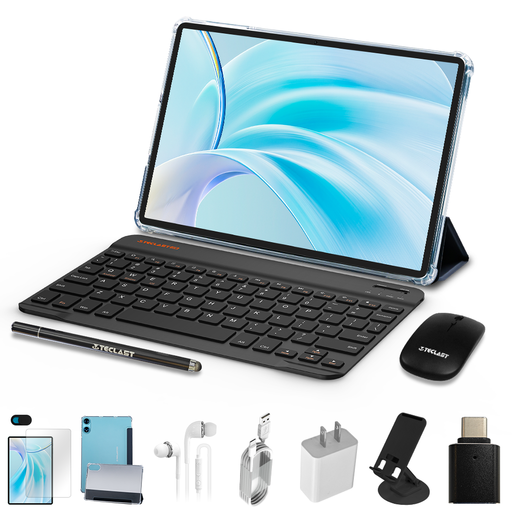
Why it stands out: The P50 is a well-rounded package that combines a fluid 90 Hz display with a complete accessory kit, positioning it as a value-packed option for daily use.
Advantages:
Who is it for? This model is a great choice for users looking for an affordable Android tablet for everyday tasks like web browsing, email, social media, and video streaming. Its compact size also makes it practical for families and as a secondary device.

Why it stands out: With its high-resolution 2K display and pressure-sensitive stylus, the ArtPad Pro is specifically tailored to the needs of creative professionals and productivity users.
Advantages:
Who is it for? Ideal for students, digital artists, and professionals who need a powerful tablet with a stylus and keyboard for notes, sketches, and demanding multitasking. The LTE functionality makes it a reliable companion for on-the-go use.
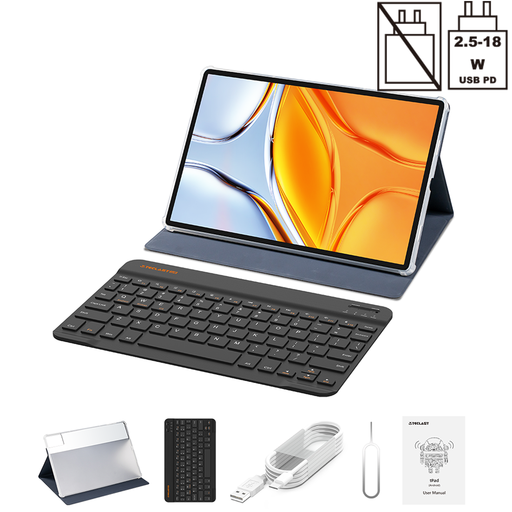
Why it stands out: With its massive 14-inch display, the T70 places a clear focus on media consumption and large-format productive work, almost like a laptop.
Advantages:
Who is it for? This tablet is aimed at users who want a device as a laptop replacement or as a primary entertainment hub at home. The large display makes it an excellent tablet for university and work, especially for tasks that require significant screen real estate.
While the featured tablets already come with protective cases, protecting your other tech devices is just as important. For example, an unprotected camera lens on your smartphone can compromise photo quality. If you want to comprehensively protect your gear, discover our selection of camera lens protectors.
1. Are TECLAST tablets suitable for demanding games? Models with powerful processors like the MediaTek Helio G99 and sufficient RAM can run many popular games smoothly. However, for graphically intensive titles at the highest settings, specialised gaming tablets might offer better performance. It is advisable to compare the game's system requirements with the tablet's specifications.
2. How does expandable RAM work on TECLAST tablets? The virtual RAM feature allocates a portion of the internal storage (ROM) to use as temporary memory. This can improve multitasking performance when many applications are open simultaneously. A device with 8 GB of physical RAM can run more smoothly under heavy load with the help of 12 GB of virtual RAM.
3. Can I use a UK keyboard layout with the included sets? The included Bluetooth keyboards often have an English (QWERTY) layout. However, since the Android 15 operating system can be set to your local language, it will recognise inputs according to your preferred layout (e.g., QWERTY for UK/US, QWERTZ for German). You can either type with the familiar layout or purchase a separate Bluetooth keyboard with your specific regional layout.