
Lieferung heute & morgen

Qualitätsgarantie

Willkommens-Angebote freischalten: KOSTENLOSE Lieferung | Bis zu 80 % RABATT | Kostenlose 30-Tage-JoyPlus-Testphase
App herunterladen
As a Joybuy Product Recommendation Officer, I analyse market data daily to provide you with objective, practical purchasing advice. My goal is to help you see through the marketing hype and make the right buying decision.
A TKL (Tenkeyless) gaming keyboard is the first choice for many PC gamers. The compact form factor frees up valuable desk space for sweeping mouse movements, which can make a real difference in fast-paced FPS titles. However, the market is crowded and full of pitfalls that can easily lead to a bad purchase.
To make an informed decision, you should focus on the core technical features that determine a keyboard's performance and longevity.
The switches beneath the keycaps define the typing feel and response speed. For gaming, linear switches have become the established standard.
The absence of the number pad is the hallmark of a TKL keyboard and offers tangible advantages.
Based on these objective criteria, we have identified a few models that are particularly well-suited for specific user profiles in Germany.
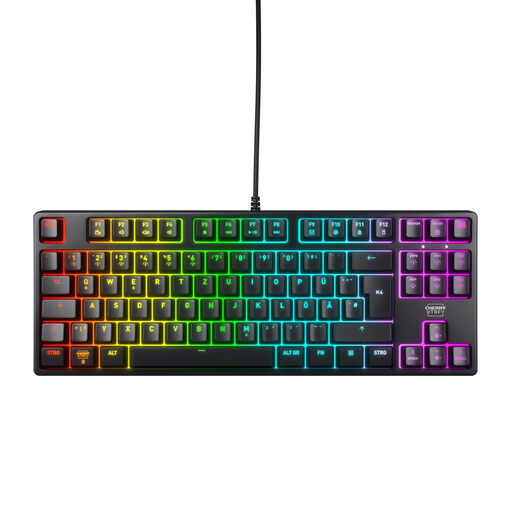
Why This Fits Their Persona: This model focuses on the essentials: fast and reliable performance. It's ideal for gamers who want a robust tool without distracting software or superfluous features. The German QWERTZ layout and durable switches make it a solid choice for ambitious use.
It relies on proven core components like CHERRY MX2A RED switches and a sturdy metal plate construction instead of purely cosmetic gimmicks. The RGB lighting is controllable directly on the keyboard and requires no resource-hungry software.
High durability (rated by the manufacturer for over 100 million keystrokes per key) and precise input recognition thanks to Full N-Key Rollover and a 1000 Hz polling rate.
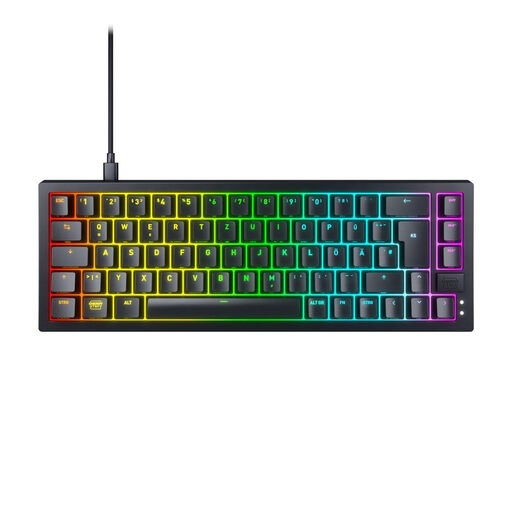
Why This Fits Their Persona: For users who love to customise and optimise their gear. The ultra-compact 65% layout maximises desk space, while the hot-swappable capability allows switches to be changed without soldering. This provides room to experiment with different switch types.
Instead of relying on permanently soldered, non-replaceable components, this model offers a future-proof platform. The high-quality, multi-layer sound dampening and pre-lubed stabilisers are features often found only on more expensive custom keyboards.
Hot-swap sockets for easy switch customisation and a high-quality, dampened construction for a pleasant typing sound. The Super-scan technology ensures extremely fast key detection.
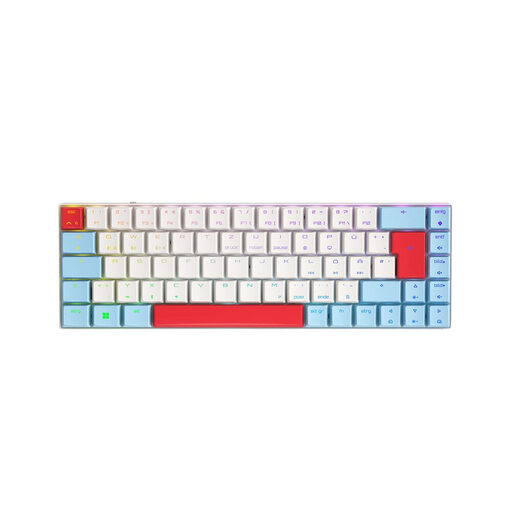
Why This Fits Their Persona: Perfect for users who want a single keyboard for gaming, work, and mobile use. The tri-mode connectivity allows for seamless switching between a gaming PC (via 2.4 GHz wireless), a laptop, and a tablet (via Bluetooth). Its low profile and light weight also make it highly portable.
Many wireless keyboards compromise on latency. This model offers a dedicated low-latency 2.4 GHz mode for gaming and adds Bluetooth for productivity use cases, rather than relying on a single, less performant wireless technology.
Maximum flexibility with three connection modes (2.4 GHz, Bluetooth, USB-C). The CHERRY MX Low Profile Speed switches enable fast actuation and a comfortable typing feel.
We have compiled a complete, up-to-date list of products that meet these strict selection criteria and German standards.
The lifespan is largely determined by the quality of the switches. Models with high-quality mechanical switches, such as the aforementioned CHERRY MX Switches, are specified by the manufacturer for a lifespan of over 50 or even 100 million keystrokes per key. With average use, such a keyboard can function reliably for many years.
Although linear switches are optimised for rapid gaming inputs, many users also find them very comfortable for daily typing. The smooth keystroke without tactile resistance can make typing feel more fluid. Ultimately, however, it is a matter of personal preference. Those who type a lot and prefer clear feedback might also consider tactile switches (e.g., MX Brown).
Not necessarily. Many manufacturers, especially those focused on esports performance, integrate the controls for the RGB lighting directly into the keyboard's firmware. Effects, colours, and brightness can then be adjusted via key combinations (e.g., using the FN key). This avoids the need to install additional software that can consume system resources.