
Lieferung heute & morgen

Qualitätsgarantie

Willkommens-Angebote freischalten: KOSTENLOSE Lieferung | Bis zu 80 % RABATT | Kostenlose 30-Tage-JoyPlus-Testphase
App herunterladen
Today, a PC is more than just a tool for work or gaming; it's often the centrepiece of a setup and an expression of personal aesthetic. The white PC build in particular is enjoying immense popularity, creating a clean and modern look. Paired with a white panoramic PC case, meticulously selected components like a powerful graphics card or an elaborate water-cooling system can be showcased perfectly.
This guide is for PC builders and hardware enthusiasts looking for a case that is not only functional but also serves as a glass showcase PC case. We will outline objective selection criteria and present several models that are well-suited for such projects due to their specific features.
The decision for a case should be based on technical requirements and compatibility. Here are three key aspects to consider when planning a build with a panoramic case.
Before you decide on a model, checking compatibility with your planned components is essential. Pay attention to the following specifications:
ATX mid-tower cases also offer space for E-ATX motherboards.PC case for water cooling, radiator compatibility is crucial. Check which radiator sizes (e.g., 240mm, 280mm, 360mm) can be mounted in which locations (top, side, front).An aquarium-style PC case with large glass panels places special demands on cooling. A well-thought-out airflow is critical to keep component temperatures within the optimal range.
A white gaming PC case with a panoramic view thrives on a clean and tidy interior.
PC cases with ARGB fans and an integrated controller or hub. This allows for easy lighting synchronisation.Based on the criteria above, we have compiled a few case models that are particularly suitable for showcase builds due to their specific features.
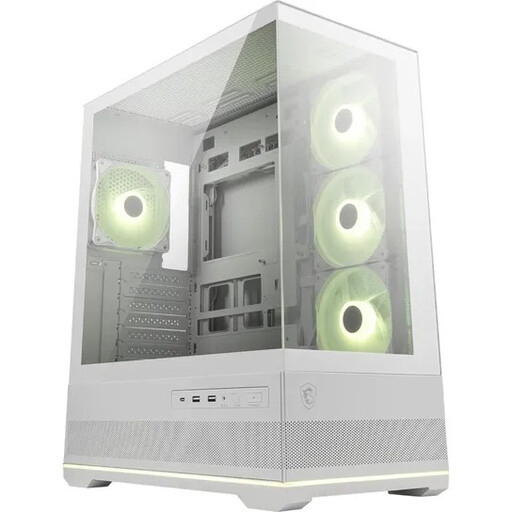
Why it stands out: The MSI MAG PANO 110R PZ is a prime example of a modern aquarium-style case. The 270° panoramic view from the front and side tempered glass panels offers an almost unobstructed view of the hardware. A special feature is the three pre-installed reverse-blade fans on the side, which display their lighting without the obtrusive fan frame.
Pros:
Who is it for? This case is ideal for users who want to create an aesthetically pleasing white PC build with a focus on RGB lighting and are looking for a hassle-free solution with pre-installed fans and a hub.
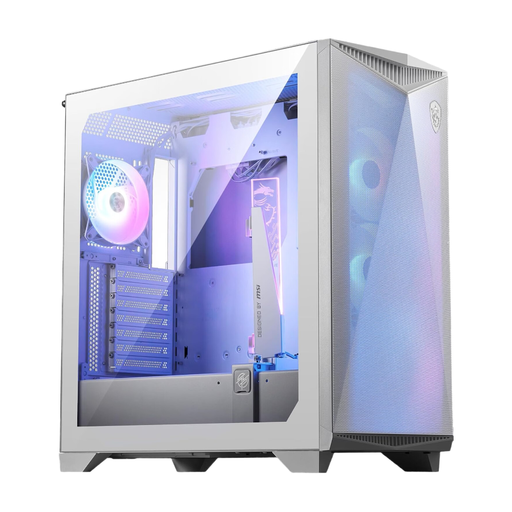
Why it stands out: The GUNGNIR 300R Airflow combines a white aesthetic with a strong focus on cooling performance. Instead of a full glass front, it features a high-airflow front panel. A unique feature is the included omnidirectional graphics card stand, which stabilises heavy GPUs while also serving as an ARGB element.
Pros:
Who is it for? Users planning a powerful white PC build with high-end components who prioritise high cooling performance without sacrificing an attractive look with a glass side panel.
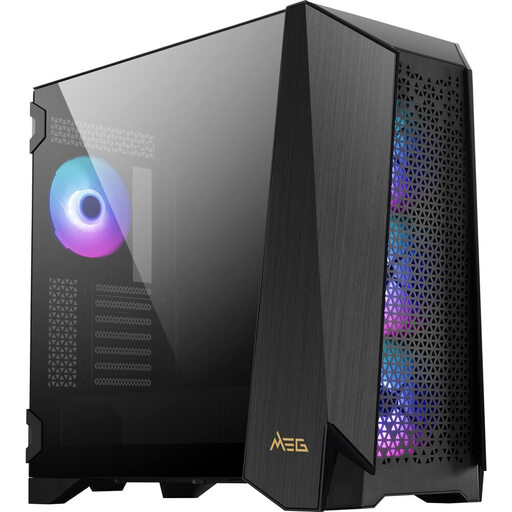
Why it stands out: Although this model comes in black, it deserves a mention for enthusiasts seeking advanced features. The standout feature of the MEG PROSPECT 700R is its 4.3-inch IPS touchscreen on the front. It allows you to control and monitor fan speeds, temperatures, and ARGB effects directly on the case, without any additional software.
Pros:
Who is it for? For PC enthusiasts who want the highest degree of control, modularity, and unique features like the touchscreen, and are willing to deviate from a purely white colour scheme for this functionality.
The models presented here offer a glimpse into the possibilities of modern case design. However, the market is diverse and offers numerous alternatives for different budgets and requirements. If you want to compare more models or get a broader overview, you can find a larger selection in our category.
? Discover More Gaming PC Cases on Joybuy.de
1. What is the advantage of a panoramic PC case? The main advantage is aesthetic. A panoramic case provides a comprehensive view of the internal components and RGB lighting. It transforms the PC from a purely functional device into a visual centrepiece of the room, ideal for users who are proud of their hardware.
2. Does a case with a lot of glass compromise cooling performance? A sealed glass design can potentially restrict airflow compared to a case with a mesh front. However, modern panoramic cases compensate for this with smart design choices. These include alternative air intakes on the side, bottom, or top, generous fan and radiator support, and dual-chamber layouts that focus airflow on the critical components.
3. Are the included ARGB fans compatible with my motherboard? Typically, ARGB fans use a standard 3-pin 5V ARGB header. Check if your motherboard has such a header. Many cases, like the MSI MAG PANO 110R PZ, include an ARGB hub. This hub connects to a single header on the motherboard and then controls multiple fans, which simplifies compatibility and cable management. Alternatively, the lighting can often be controlled via a button on the case.