
Lieferung heute & morgen

Qualitätsgarantie

Willkommens-Angebote freischalten: KOSTENLOSE Lieferung | Bis zu 80 % RABATT | Kostenlose 30-Tage-JoyPlus-Testphase
App herunterladen
An uncluttered desk, free from cable chaos, promotes focus and creates a pleasant work environment. A wireless keyboard and mouse set is a simple and effective solution to achieve this goal. Whether in a home office, the main office, or a lecture hall, the flexibility and convenience of wireless peripherals can significantly enhance your daily work on the computer.
This guide is designed to help you with your selection. We will outline the key criteria to consider when choosing between a 2.4 GHz RF keyboard and mouse or a Bluetooth keyboard and mouse combo, and present a selection of models for various needs.
The right set for you depends on your individual work habits and requirements. You should consider three key aspects.
The type of wireless connection is a fundamental differentiator.
Long workdays call for comfortable input devices. An ergonomic set for office use can help reduce strain on your hands and wrists. Look for features like adjustable keyboard tilt, a palm rest, or a mouse that fits comfortably in your hand.
For environments like open-plan offices or libraries, a quiet keyboard and mouse set is a major advantage. Models with scissor-switch technology in the keyboard and noise-reduced mouse clicks minimise disruption for you and your colleagues.
The choice of power source is a matter of personal preference.
Based on the criteria mentioned, we have curated a selection of sets that cater to different user profiles.
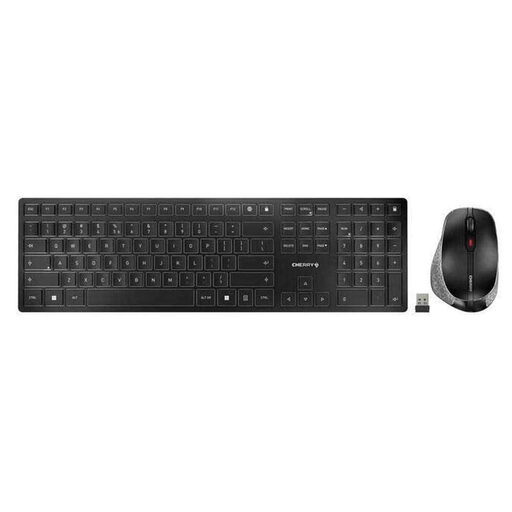
Why It Stands Out The CHERRY DW 9500 SLIM set combines a slim, premium design with versatile connectivity options. It is aimed at discerning users who value aesthetics, a precise typing feel, and flexibility.
Advantages
Who Is It For? Ideal for users in a home or corporate office who are looking for a stylish and functional wireless PC keyboard and mouse set and frequently switch between different devices (e.g., PC and laptop).

Why It Stands Out This set is laser-focused on quiet operation. According to Logitech, its SilentTouch technology reduces clicking and typing noises by over 90% compared to standard peripherals, making it an excellent choice for quiet environments.
Advantages
Who Is It For? Perfect for users in open-plan offices, libraries, or home offices who need a distraction-free, quiet work environment and prefer a straightforward, reliable set with long battery life.

Why It Stands Out The Logitech MX Keys S Combo is a set for power users, developers, and creatives, designed for maximum productivity and comfort. It combines a high-quality keyboard with an advanced mouse and extensive customisation options.
Advantages
Who Is It For? The right choice for professionals and demanding users who spend many hours at the computer daily, require the highest standards of precision and efficiency, and are willing to invest in a premium setup.
The models presented here already cover a wide spectrum. If you haven't found the right product for your specific needs or wish to compare more alternatives, you can find a greater variety in our Mouse and Keyboard Bundles category.
1. Can I use a wireless keyboard and mouse set for gaming? While most of the sets featured here are optimised for office and productivity tasks, models with a stable 2.4 GHz RF connection are also suitable for casual gaming. For ambitious or competitive gaming, however, dedicated gaming sets are often recommended as they are designed for minimal latency and higher polling rates.
2. How do I connect a wireless keyboard and mouse set to my PC? For an RF set, plug the included USB receiver into a free USB port on your computer. The devices usually connect automatically. For a Bluetooth combo, enable the Bluetooth function on your PC, put the keyboard and mouse into pairing mode (usually via a dedicated button), and select the devices in your operating system's Bluetooth settings.
3. What is the difference between a Logi Bolt and a Unifying receiver? Logi Bolt is a newer wireless standard from Logitech based on Bluetooth Low Energy, offering an encrypted, secure connection. The older Unifying standard is not compatible with Logi Bolt devices, and vice versa. When purchasing, ensure that your devices and the receiver use the same standard.