
Lieferung heute & morgen

Qualitätsgarantie

Willkommens-Angebote freischalten: KOSTENLOSE Lieferung | Bis zu 80 % RABATT | Kostenlose 30-Tage-JoyPlus-Testphase
App herunterladen
A tidy desk free of cable clutter isn't just a matter of aesthetics—it's also about efficiency. A wireless keyboard and mouse set is the obvious solution. However, the market is flooded with products whose marketing promises often fall short in practice. Before you invest, it's crucial to understand the common pitfalls that lead to frustration and unnecessary expense.
This guide will help you identify the critical features and make an informed choice for your home office and PC.
Many users experience disappointment after their purchase because certain product features don't stand up to the real demands of a daily work routine. Pay special attention to these three points:
To avoid a bad purchase, focus on the technical fundamentals that are crucial for a smooth workflow.
The type of wireless connection is one of the most important factors.
The typing experience and the resulting noise level are crucial for comfort, especially in shared office environments or a home office.
Furthermore, ensure the keyboard has a standard QWERTY layout for your region to avoid compatibility issues.
Instead of making a one-size-fits-all recommendation, we have identified products that meet specific user needs and avoid the pitfalls mentioned earlier.

Why This Fits Their Persona: This set is designed for power users who seamlessly switch between multiple computers and operating systems. The combination of a precision keyboard and an advanced mouse boosts productivity in demanding workflows.
The Easy-Switch technology enables a smooth transition between up to three devices. The battery life is optimised for professional use, thanks to smart illumination and USB-C fast charging.
The combination of spherically-dished keys for comfortable typing and the MX Master 3S mouse with an 8K DPI sensor for precise tracking on almost any surface is a clear plus.
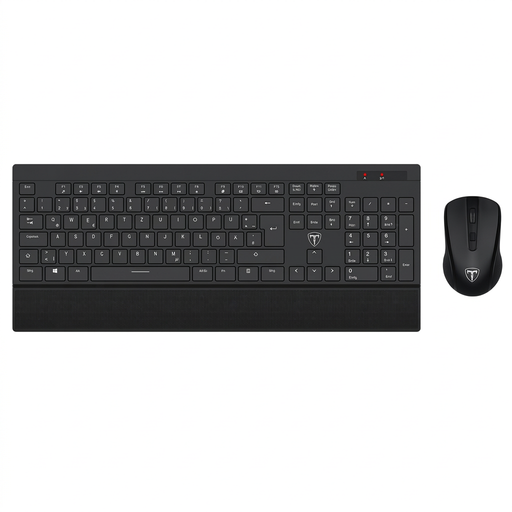
Why This Fits Their Persona: Ideal for users seeking a straightforward and reliable solution for daily use. This set focuses on the essentials: a clean setup, quiet operation, and a stable connection.
It avoids the complexity of multi-device setups by using a stable 2.4 GHz connection via a single dongle. The "silent" label is not just an empty phrase here but a core feature for distraction-free work.
The simple plug-and-play installation and the full-size QWERTY layout with a number pad make this set a practical and ready-to-use keyboard and mouse combo.
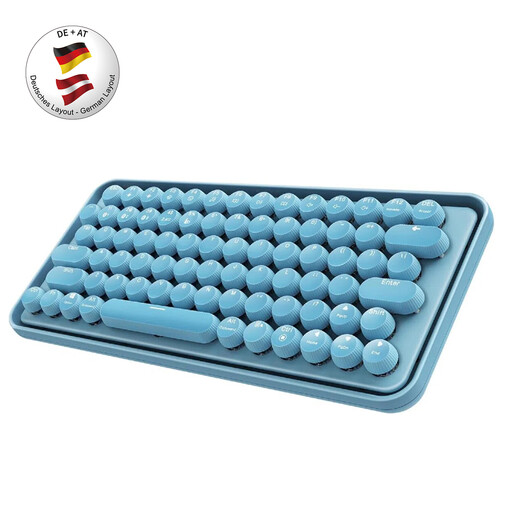
Why This Fits Their Persona: For users to whom design and aesthetics are just as important as functionality. This keyboard is an eye-catcher on any desk and is suitable for creatives who switch between PC, Mac, and tablets.
It debunks the myth that design comes at the expense of function. By supporting Bluetooth 3.0, 5.0, and 2.4 GHz, it offers flexible and reliable multi-device connectivity that works in practice.
The unique design with round keycaps and the integrated rechargeable battery offer a combination of style and modern convenience. Compatibility with both Windows and macOS is another advantage.
We have compiled a complete, real-time list of products that fully satisfy these strict selection criteria and UK safety regulations.
Actual battery life depends heavily on usage. Factors like frequency of use, backlight activation, and connection type (Bluetooth often consumes slightly more power than 2.4 GHz) play a role. Models with integrated batteries often provide a runtime of several weeks to months. For devices with replaceable batteries, the lifespan can be up to 12 months or longer, according to manufacturer specifications.
Yes, many modern sets are designed as multi-device keyboard and mouse combos. They can be paired with multiple devices (e.g., PC, laptop, tablet) via Bluetooth or a special USB receiver. Switching between devices is then usually done with a dedicated button. Look for product descriptions that explicitly mention "multi-device switching" or similar terms.
A 2.4 GHz connection uses a small USB receiver (dongle) to establish a direct and stable wireless link to the device. It is typically very reliable and easy to set up. A Bluetooth connection is made directly with the computer's or tablet's built-in Bluetooth module, so no USB port is occupied. This is especially practical for devices with few ports.