
Lieferung heute & morgen

Qualitätsgarantie

Willkommens-Angebote freischalten: KOSTENLOSE Lieferung | Bis zu 80 % RABATT | Kostenlose 30-Tage-JoyPlus-Testphase
App herunterladen
A tidy, cable-free desk is the first step towards a more productive workspace, whether in the office or at home. A wireless keyboard and mouse combo seems like the ideal solution. However, the market is flooded with products whose marketing promises often obscure more than they reveal. Before you make a decision, it's crucial to understand the most common pitfalls that can lead to a bad purchase.
As your Joybuy Product Recommendation Officer, I'm here to help you navigate this jungle of information. We will focus on the objective criteria that truly matter and expose three common buying traps:
To avoid these traps, you should focus on three core technical aspects. These determine the reliability, comfort, and long-term satisfaction with your Home Office Set.
The choice of connection technology is fundamental. There are two primary standards, each with its own advantages and disadvantages:
wireless keyboard and mouse combination uses a small USB receiver (dongle) that plugs into your computer. The advantage is typically an extremely stable and lag-free connection that is ready to use immediately after plugging it in (plug-and-play). This is ideal for a fixed workstation with a PC or docking station.Bluetooth keyboard and mouse does not require a separate dongle, provided your device (laptop, tablet, PC) has an integrated Bluetooth module. This makes it more flexible and ideal for users who frequently switch between different devices. Modern sets often support connecting to multiple devices (keyboard mouse set for multiple devices), allowing you to switch between them at the touch of a button.Some premium models offer both technologies, combining stability with flexibility.
The noise level and typing feel of a keyboard depend on its internal key mechanism. Finding a quiet keyboard mouse set means paying attention to the technology beneath the keycaps.
For an objectively quiet and durable typing experience, a keyboard with a scissor-switch mechanism is usually the better choice.
The question of power supply is a matter of convenience and running costs.
rechargeable keyboard mouse set is a sustainable and convenient solution. Ensure that the devices can be charged via a modern USB-C port and—most importantly—remain fully functional while charging. This prevents work interruptions.Based on these objective criteria, we have compiled a selection of products suitable for different user profiles and requirements in Germany. All keyboards featured here have the German QWERTZ layout.

Why it's a good fit: Ideal for users seeking a reliable and quiet basic setup for a home office or occasional office work without investing a large budget.
According to Logitech, SilentTouch technology reduces clicking and typing noises by over 90%, solving the problem of misleading "quiet" promises even in the entry-level segment.
A stable 2.4 GHz connection and very long battery life (up to 36 months for the keyboard, 18 for the mouse).
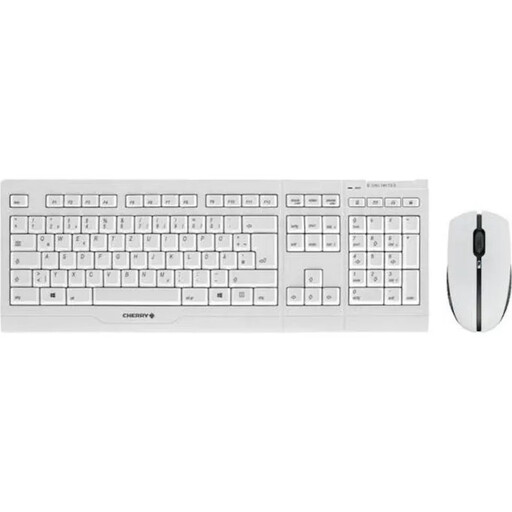
Why it's a good fit: Perfect for office professionals and heavy typists who value durability, a precise typing feel, and the convenience of rechargeable batteries.
It bypasses the battery cost trap with NiMH batteries that can be charged during use. The CHERRY SX scissor-switch mechanism ensures objectively quiet and pleasant typing.
Rechargeable during operation without work interruption, durable laser-etched keys, and secure AES-128 encryption.
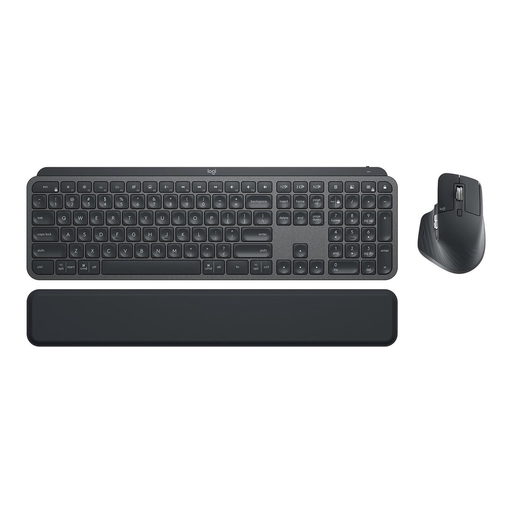
Why it's a good fit: Engineered for power users who need to switch seamlessly between multiple computers while demanding maximum precision, comfort, and efficiency.
It solves the connectivity trap with secure Logi Bolt technology and easy device switching. Premium features like smart illumination and a high-precision sensor justify the price.
Seamless switching between devices, an 8000 DPI sensor for tracking on almost any surface (including glass), and customisable keys.
We have compiled a complete, up-to-date list of products that fully meet these strict selection criteria and German regulations.
What is the difference between a radio and a Bluetooth connection in a keyboard-mouse combo? A radio connection (2.4 GHz) uses a dedicated USB dongle and generally offers a more stable, interference-free connection, ideal for a fixed workstation. A Bluetooth connection is more flexible as it doesn't occupy a USB port and allows for easy switching between multiple devices like laptops and tablets.
How long does the battery last in a rechargeable keyboard-mouse combo? Battery life varies greatly depending on the model and usage intensity. Many modern sets offer a runtime of several weeks or even months on a single charge. A crucial feature is the ability to continue using the devices while they are charging to avoid downtime.
Do I need special software for a wireless combo? Most wireless keyboard-mouse combos work via plug-and-play, meaning they are ready to use immediately after connecting the receiver or pairing via Bluetooth. For advanced features like customising special keys, configuring mouse DPI, or managing multi-device connections, manufacturers often provide optional software, but it is not required for basic functionality.