What should you look for when choosing?
First, consider the room and how close you can comfortably sit to the microphone. Then check the connection, positioning and level controls.
This guide is for consumers recording a seated, solo bilingual voice. Each row highlights the most important consideration for that particular need.
| Consideration |
What to look for when buying |
Who is this particularly important to? |
| Room noise |
Check the microphone type, directionality and comfortable speaking distance; make a test recording in your own room. |
If echo or background noise is noticeable, I want to capture a clear voice from my seat without relying on blanket claims about noise reduction. Room noise is the top priority for around 28% of consumers. |
| Easy connection |
Compare the USB connection and cable, and check whether you’ll need an adapter or an XLR interface. |
If I want to record directly to my computer without a separate interface, the connection needs to suit my device. Around 22% of consumers prioritise a simple setup. |
| Microphone positioning |
Check the included stand, whether it swivels, whether it can be mounted on an arm and whether there’s room for a book or screen. |
When reading aloud while seated, I need a consistent position that works with my text and posture. A stable microphone position is the top priority for around 22% of consumers. |
| Level control |
Check for a headphone socket and convenient controls; record and listen back to both a quiet and an emphatic passage. |
For longer stories, I want to check quiet sections and emphasised words, and spot any distortion. Around 17% of consumers put level control first. |
| Room to upgrade |
Check for USB/XLR outputs and whether you’ll need a compatible audio interface, but only if you have a specific upgrade in mind. |
If I might use an interface later, I want to base the extra signal path on what I actually plan to do. Expandability is the main consideration for around 11% of consumers. |
Microphones for voice recording
This selection includes dynamic USB or USB/XLR desk microphones and lavalier microphones for different voice-recording positions.
 No image available
FIFINE AM8 USB/XLR dynamic microphone
An option for a seated solo voice if you want to position the microphone on your desk and connect it via USB or XLR.
The product name lists a desk stand, a mute button and a headphone socket. According to the product information, a separate cable is needed for the XLR connection.
View at Joybuy
 No image available
FIFINE K688CT USB/XLR dynamic microphone kit
This kit is worth considering if you’d rather use a microphone arm than a desk stand while reading aloud seated.
The product name lists a microphone arm, a mute button, a headphone socket and a gain control. According to the product information, the XLR cable isn’t included; the desk clamp is designed for desks less than 2 inches thick.
View at Joybuy
 No image available
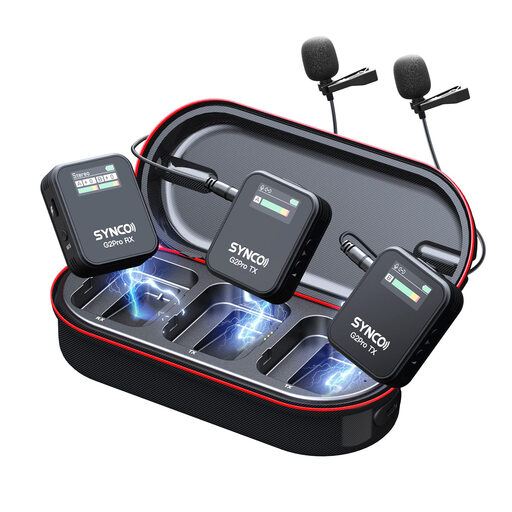
SYNCO G2(A2) Pro lavalier microphone
An alternative to a desk microphone if you’d rather wear a wireless lavalier microphone while recording your voice.
The product name identifies this model as a wireless lavalier microphone.
View at Joybuy
 No image available
SYNCO S8 lavalier microphone
A lavalier microphone may suit you if you’d rather place the mic close to the storyteller than on the desk.
The product name lists smartphones, PCs, laptops and cameras as compatible devices. Before buying, check that the connection suits your recording device.
View at Joybuy
 No image available
Moman MA6 lavalier microphone, 6 m, 3.5 mm
A wired clip-on option if you’re looking for a lavalier microphone with a 3.5 mm connection for a smartphone.
The product name lists a 6 m cable and automatic pairing. Check that your recording device supports the specified connection.
View at Joybuy
Frequently asked questions
Do I need two pickup patterns for bilingual reading?
No, not just because you’re reading in two languages. If the same person is speaking from the same spot, start by finding the right position for a solo voice. Switchable pickup patterns, like those on the Logitech G Yeti or HyperX QuadCast, are more useful if you want to change the arrangement of sound sources. It’s still worth making a test recording in both languages.
How should I set up the microphone and levels before recording a whole story?
Select the connected microphone in your recording software, read a short passage in both languages and listen to the saved file. Check the loudest emphases for clipping and adjust the input level or distance. The Audacity Manual suggests aiming for peaks of around −6 dB; this isn’t a recommended setting for every microphone.
What extra connections or accessories might I need?
An XLR microphone needs a suitable XLR-to-USB audio interface to record to a computer. According to the product information, the XLR cable isn’t included with the FIFINE models mentioned here. For USB models, check your device’s input too: RØDE says the NT-USB Mini connects using a USB-C-to-USB-A cable; other inputs may require a suitable cable or adapter.
Can I keep a recording of a story for private use or publish it?
Under § 53 of the German Copyright Act (UrhG), individual copies of a protected work by someone else may be made for private use only under the conditions set out there; public communication is a separate right of the author under § 15 UrhG. These provisions are published by the Federal Ministry of Justice and Consumer Protection and the Federal Office of Justice. A private recording therefore doesn’t automatically give you permission to publish it; check the rights for the specific text and any translation you use.
What if someone else speaks while I’m recording?
§ 201 of the German Criminal Code (StGB) covers the unauthorised recording of another person’s non-public spoken words. If other people will be audible, discuss the recording with them beforehand; this rule doesn’t apply to your own voice recorded alone. The provision is published by the Federal Ministry of Justice and Consumer Protection and the Federal Office of Justice.


