For mostly continuous text, a compact e-reader with adjustable lighting is a sensible starting point. If you want colour photos, fixed page layouts or a choice of reading apps, a tablet is probably the better option. What matters is where you get your biographies and the copy protection they use, as well as lighting and audio settings that work in a shared bedroom. Warm, adjustable light is a comfort feature, but there is no proven promise that it will help you sleep better.
Who is this guide for?
Reading in the evening while someone else is asleep
You want to read longer passages with little ambient light, and adjust the lighting and, if necessary, audio to suit a shared sleeping space. The available settings do not prove any particular effect on sleep.
Using specific books or library titles
Before buying, you want to make sure that biographies from a particular source, with their specific copy protection, can be opened on the device.
Reading biographies with pictures
You regularly look at colour photos or fixed page layouts and need more than a compact black-and-white display.
What should you look for when buying?
| Buying consideration |
What to check before buying |
Who is it most relevant to? |
| Lighting and audio in a shared bedroom |
Check the light colour and brightness on the specific model; for audio, check the connection or Bluetooth. |
When I read in the evening beside someone who is asleep, I want to see the text clearly while disturbing them as little as possible. Around 36% of consumers put considerate reading in low ambient light first. |
| Access to the biographies you want |
Check the source, file format, copy protection and, where relevant, device software against the specific title. |
Before buying, I want to know whether the exact biography I’ve bought or borrowed can be opened on the device. For around 29% of consumers, access to specific titles comes first. |
| Photos, page layouts and reading apps |
Check a typical text and photo page on the display size you have in mind, and make sure the apps you need are compatible. |
If my biography includes lots of photos or fixed page layouts, I want to be able to view them comfortably. Around 21% of consumers put images, layouts or app use first. |
| Comfort during long reading sessions |
Compare the weight of the specific version and try reading a longer passage at your preferred font size. |
When I read in bed for a long time, I want to hold the device comfortably and see enough text on each page. For around 14% of consumers, ease of use comes first. |
Common buying mistakes
-
Choosing a Kindle e-reader just for its lighting to read Onleihe books
Onleihe’s help pages point out that protected Onleihe e-books cannot be opened on Kindle e-readers.
Before buying a device, decide where you’ll get the biography you want and check compatibility for that specific title.
-
Assuming warm reading light means better sleep
A study published in the Proceedings of the National Academy of Sciences compared a light-emitting reading device with a printed book. It does not prove the effects of today’s lighting modes or any effect on the other person in the room.
Choose the brightness and light colour based on whether you can read the text clearly and whether the setting works for the other person. Don’t expect it to have any particular effect on your health.
-
Choosing a device for illustrated biographies based on the words ‘colour display’ alone
PocketBook lists 300 dpi in greyscale and 150 dpi in colour for the Verse Pro Color. So a colour display alone doesn’t tell you whether small images or captions will be easy to make out on a particular page.
Check a typical photo or PDF page on the display size you plan to use.
Key brands at a glance
tolino
The shine 5 is a compact black-and-white e-reader for mostly continuous text.
- According to tolino, the shine 5 has a 6-inch display, weighs 173 g and offers smartLight.
- For direct Onleihe access, Onleihe’s help pages state that the shine 5 5th Generation needs at least software version 5.15.253009. Also check compatibility for the specific title.
Samsung
The Galaxy Tab A11 is a compact tablet option if apps or images matter as well as text.
- Samsung lists an 8.7-inch display and a 3.5-mm headphone socket for the Galaxy Tab A11.
- These specifications do not prove that it will cause little light disturbance in a bedroom or that every reading app will work. Check the app you want and its requirements.
Kindle
A Kindle e-reader is worth considering if the biographies you want are compatible with the Kindle system.
- Before buying, check whether the specific books you want are available for this system.
- According to Onleihe’s help pages, protected Onleihe e-books cannot be opened on Kindle e-readers.
PocketBook
The Verse Pro Color is a compact colour E Ink option for compatible files and titles, once you’ve checked they’ll work.
- PocketBook lists SMARTlight and support for a range of formats for this model.
- PocketBook specifies 300 dpi in greyscale and 150 dpi in colour for the Verse Pro Color. For direct Onleihe access, Onleihe’s help pages list a minimum software version of 6.3 for supported devices.
Apple
The iPad mini with A20 Pro is a compact tablet alternative for images and apps.
- Apple lists an 8.5-inch OLED display for this model.
- Apple gives 6 November 2026 as the date it will generally become available. These details apply to this model and cannot be assumed to apply to earlier iPad mini generations.
Joybuy tablets for reading biographies
This selection focuses on Joybuy tablets for biographies with pictures, fixed page layouts or a compatible reading app. If you mainly read continuous text, an e-reader remains an alternative.
 No image available
Samsung Galaxy Tab A11+ X230, 11-inch, 6 GB RAM, 128 GB
The 11-inch format could suit biographies with pictures or fixed page layouts; check a typical page on the display.
Wi-Fi, 6 GB RAM, 128 GB storage; colour: grey.
View at Joybuy
 No image available
UXD Android 16 tablet, 13.4-inch, 256 GB, with keyboard, mouse and stylus
The large display could suit biographies with fixed page layouts; check whether it’s comfortable to use in a shared bedroom.
13.4-inch FHD IPS display, Android 16 and 20 GB RAM (8 GB + 12 GB virtual); the listing also includes a keyboard, mouse and stylus.
View at Joybuy
 No image available
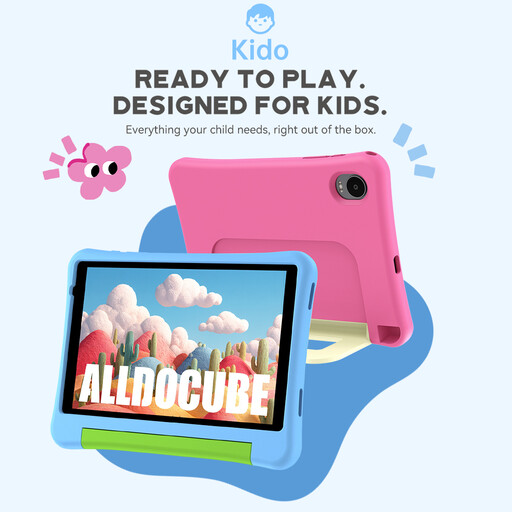
Alldocube Kido children's tablet, 8-inch, Android 15, with pink protective case
The 8-inch format is a compact tablet option; for biographies with lots of images, check that photos and captions are easy to make out on the pages you want to read.
Android 15, 3 GB RAM and 32 GB storage; the product title also mentions a 3.5-mm socket.
View at Joybuy
 No image available
TECLAST P50TCase, 11-inch, Android 16 tablet kit
The 11-inch format could work well for images and fixed page layouts; compare the display with a typical biography page.
90 Hz IPS display, 16 GB RAM (3 GB + 13 GB virtual), 128 GB storage and a 3.5-mm socket.
View at Joybuy
 No image available
ALLDOCUBE iPlay 70 mini Ultra, 8.8-inch, 12 GB + 256 GB, Android 14
The 8.8-inch format could suit you if you’re looking for a smaller tablet for biographies with images or page layouts; check how the specific page appears on screen.
Android 14 and 12 GB RAM with 256 GB storage; according to the product title, no adapter is included.
View at Joybuy
Frequently asked questions
Can I open Onleihe biographies on any e-reader?
No. According to Onleihe’s help pages, protected Onleihe e-books cannot be opened on Kindle e-readers. For direct access, they list, among other devices, the tolino shine 5 5th Generation with software version 5.15.253009 or later, and supported PocketBook devices with version 6.3 or later. Also check the model and copy protection for the specific title.
What software version do I need for the Onleihe app on a tablet?
According to Onleihe’s help pages, the Onleihe 3 app needs at least Android 10 or iOS 15.1. You’ll also need a valid library card and the corresponding login details to access it.
How can I read in the evening when the other person is already asleep?
Adjust the brightness and light colour so you can still read the text clearly, and use suitable headphones for audio rather than the speakers. Check that the specific device supports the headphone connection or Bluetooth you need; this does not prove any particular effect on sleep.


